地形与植被
地形是游戏里面积最大的“一张材质”:它要铺几平方公里而不露出重复,要在陡崖上不拉伸,要让草、砂、岩、雪自然地互相咬合;地面上还要长出成千上万株会被踩弯的草。本章用一张程序化高度场,把这些技术一项项拆开实现。
20.1 地形着色要解决的四个问题
普通物体的材质由美术在 DCC 软件里展好 UV、画好贴图,Shader 只负责“照着贴”。地形不一样:它通常由一张高度图(Heightmap)直接生成网格,UV 是均匀铺在水平面上的;它的尺寸动辄几百米到几公里,任何一张贴图拉满全图都会糊成一片;它的表面又同时包含草地、土路、岩壁、积雪等完全不同的材质。于是地形 Shader 要回答四个问题:
- 贴图怎么铺——用网格 UV、世界坐标,还是三个方向分别投影?陡坡上会不会被拉成竖条?
- 多层材质怎么分布——靠美术手刷一张权重图(Splatmap),还是按高度、坡度等规则自动计算?
- 层与层之间怎么过渡——简单线性插值会得到“两张图半透明叠在一起”的泥浆感,真实的过渡应该是石头缝先被土填满、雪先积在凹处。
- 地面上的东西怎么画——一片草地有几万株草,逐个 GameObject 渲染会把 CPU 拖垮,需要 GPU Instancing。
Unity 自带的 Terrain 组件把这些问题打包解决了一部分:它负责高度图 LOD、Splatmap 绘制工具、细节物体(Detail)与树的批量渲染,URP 为它提供了 TerrainLit 系列 Shader。但 Terrain 的很多行为藏在引擎里,不利于看清 Shader 本身。本章的配图全部用一张程序化高度场网格代替 Terrain:给一个高度函数 h(x, z),生成规则网格,用中心差分求法线。这样得到的就是一块普通 Mesh,所有着色都由我们自己的 Shader 完成;学会之后,再看 TerrainLit 的源码会非常轻松(20.6 节会对照着读)。
/// <param name="size">边长(米),网格中心在原点</param>
/// <param name="n">每边段数,顶点数 (n+1)²</param>
/// <param name="height">高度函数,输入世界 x/z,输出 y</param>
public static Mesh Build(float size, int n, Func<float, float, float> height)
{
    int vc = (n + 1) * (n + 1);
    var v = new Vector3[vc];
    var nr = new Vector3[vc];
    var uv = new Vector2[vc];
    float step = size / n;
    for (int z = 0; z <= n; z++)
        for (int x = 0; x <= n; x++)
        {
            float wx = -size * 0.5f + x * step, wz = -size * 0.5f + z * step;
            int k = z * (n + 1) + x;
            v[k] = new Vector3(wx, height(wx, wz), wz);
            uv[k] = new Vector2((float)x / n, (float)z / n);
            // 中心差分求法线:N = normalize(-dh/dx, 1, -dh/dz)
            float e = step * 0.5f;
            float dx = (height(wx + e, wz) - height(wx - e, wz)) / (2 * e);
            float dz = (height(wx, wz + e) - height(wx, wz - e)) / (2 * e);
            nr[k] = new Vector3(-dx, 1f, -dz).normalized;
        }
    var idx = new int[n * n * 6];
    int p = 0;
    for (int z = 0; z < n; z++)
        for (int x = 0; x < n; x++)
        {
            int a = z * (n + 1) + x, b = a + n + 1;
            idx[p++] = a; idx[p++] = b; idx[p++] = a + 1;
            idx[p++] = a + 1; idx[p++] = b; idx[p++] = b + 1;
        }
    var m = new Mesh { name = "Heightfield", indexFormat = IndexFormat.UInt32 };
    m.vertices = v; m.normals = nr; m.uv = uv; m.triangles = idx;
    m.RecalculateTangents();
    m.RecalculateBounds();
    return m;
}
法线这一步值得多说一句。高度场 可以看成隐式曲面 ,它的梯度方向就是法线方向,取反并让 y 分量为正,得到
偏导数用中心差分 近似即可。它比 Mesh.RecalculateNormals() 更好:后者按三角形面积加权平均面法线,在网格边界处会因为缺少相邻三角形而偏斜,而解析求导在边界上一样准确。Unity Terrain 在 GPU 上也是用同样的差分思路从高度图生成法线图的。
案例 20.1世界空间 UV 与陡坡拉伸入门单独打开 ↗
目标:理解为什么地形不能直接用网格 UV,世界空间 XZ 投影又在哪里失效。
高度场网格的 UV 是在水平面上均匀分布的:第 i 列顶点的 u 就是 i/n。贴图因此是“从正上方投影”下来的,平地上完全没问题;但在一面 60° 的陡坡上,水平方向走 1 米,表面实际走了 2 米——同样的纹素被摊到了两倍的面积上,纹理被拉成竖条。更一般地,坡面与水平面夹角为 θ 时,沿坡方向的拉伸倍数是
其中 是单位法线的 y 分量。θ 接近 90° 时它趋于无穷,垂直的崖壁上只剩下一条条竖线。
世界空间 UV(World-Space UV)就是直接用 positionWS.xz × 平铺系数 当 UV。它与网格 UV 在平地上等价,但有两个好处:一是与网格分辨率、分块方式无关,多块地形拼接时纹理天然连续;二是平铺密度用“每米几次”来描述,美术更好控制。它解决不了陡坡拉伸——那需要下一个案例的三平面映射。下面这个对照 Shader 用一个 KeywordEnum 在三种贴法之间切换:
half4 frag(Varyings i) : SV_Target
{
    float3 n = normalize(i.normalWS);
    half3 albedo;
#if defined(_UVMODE_MESHUV)
    albedo = SAMPLE_TEXTURE2D(_BaseMap, sampler_BaseMap, i.uv).rgb;
#elif defined(_UVMODE_WORLDXZ)
    // 世界空间 UV:从正上方往下“投影”,平地完美,陡坡被拉成竖条
    albedo = SAMPLE_TEXTURE2D(_BaseMap, sampler_BaseMap, i.positionWS.xz * _Tiling).rgb;
#else
    float3 w = TriplanarWeights(n, _Sharpness);
    #if defined(_UVMODE_WEIGHTS)
        albedo = w;     // 调试:R=X 投影 G=Y 投影 B=Z 投影
    #else
        TriplanarUV uv = GetTriplanarUV(i.positionWS, n, _Tiling);
        albedo = SampleTriplanar(TEXTURE2D_ARGS(_BaseMap, sampler_BaseMap), uv, w).rgb;
    #endif
#endif
    return Ch20ShadePBR(i.positionWS, n, i.positionCS, albedo, 0, 0.15, 1, i.fogFactor);
}
vec4 frag()
{
    vec3 n = normalize(normalWS);
    vec3 albedo;
#if defined(_UVMODE_MESHUV)
    albedo = texture(_BaseMap, uv).rgb;
#elif defined(_UVMODE_WORLDXZ)
    // 世界空间 UV:从正上方往下“投影”,平地完美,陡坡被拉成竖条
    albedo = texture(_BaseMap, positionWS.xz * _Tiling).rgb;
#else
    vec3 w = TriplanarWeights(n, _Sharpness);
    #if defined(_UVMODE_WEIGHTS)
        albedo = w;     // 调试:R=X 投影 G=Y 投影 B=Z 投影
    #else
        TriplanarUV tuv = GetTriplanarUV(positionWS, n, _Tiling);
        albedo = SampleTriplanar(_BaseMap, tuv, w).rgb;
    #endif
#endif
    return Ch20ShadePBR(positionWS, n, gl_FragCoord, albedo, 0.0, 0.15, 1.0, fogFactor);
}
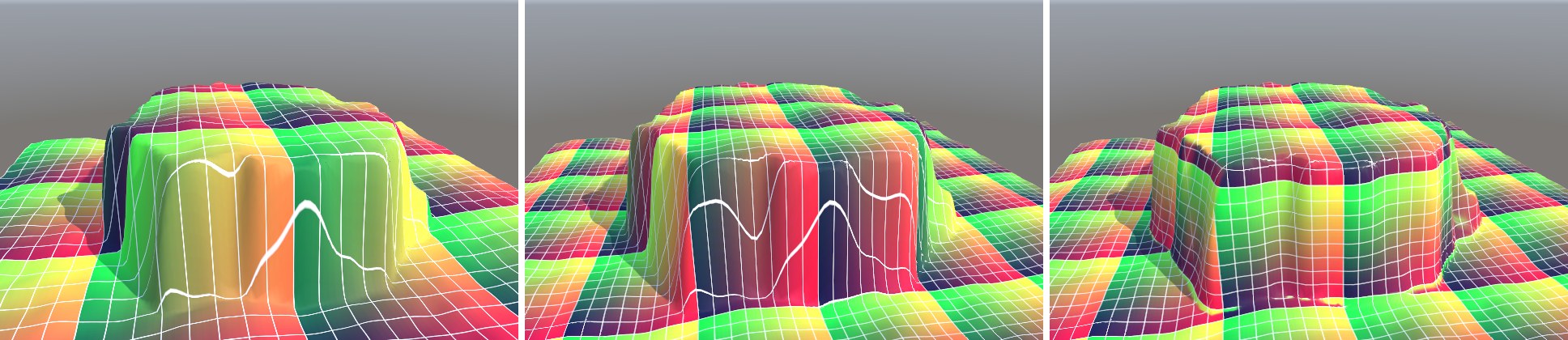
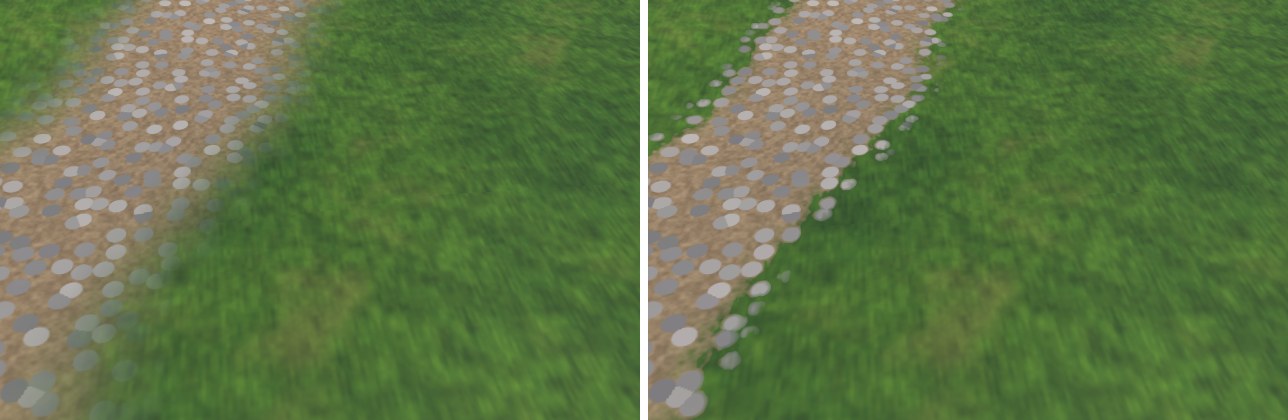
左图和中图几乎一样,这正说明高度场网格的 UV 本质上就是一次 XZ 投影。注意中图格子的大小与左图不同:世界 UV 的平铺是按米算的(_Tiling = 0.5,即每 2 米一格),与网格尺寸无关。
[KeywordEnum(MeshUV, WorldXZ, Triplanar, Weights)] 声明的属性,材质创建时会按默认值自动打开第一个关键字 _UVMODE_MESHUV。如果在 C# 里只 EnableKeyword("_UVMODE_TRIPLANAR"),两个关键字同时开着,Unity 会选中 #pragma 列表里靠前的那个,看上去“切换没有生效”。正确做法是先关掉同组的全部关键字再打开一个,并同步 float 属性值:// KeywordEnum 在材质创建时会按属性默认值打开第一个关键字(_UVMODE_MESHUV)。 // 代码里切换时要“关掉全部、再打开一个”,并同步 float 属性,否则 Inspector 与实际变体不一致。 static readonly string[] s_UVModes = { "_UVMODE_MESHUV", "_UVMODE_WORLDXZ", "_UVMODE_TRIPLANAR", "_UVMODE_WEIGHTS" }; static void SetUVMode(Material m, int mode) { foreach (var k in s_UVModes) m.DisableKeyword(k); m.EnableKeyword(s_UVModes[mode]); m.SetFloat("_UVMode", mode); }
案例 20.2三平面映射 Triplanar入门单独打开 ↗
目标:让贴图在任意朝向的表面上都不拉伸,并理解它的混合权重和代价。
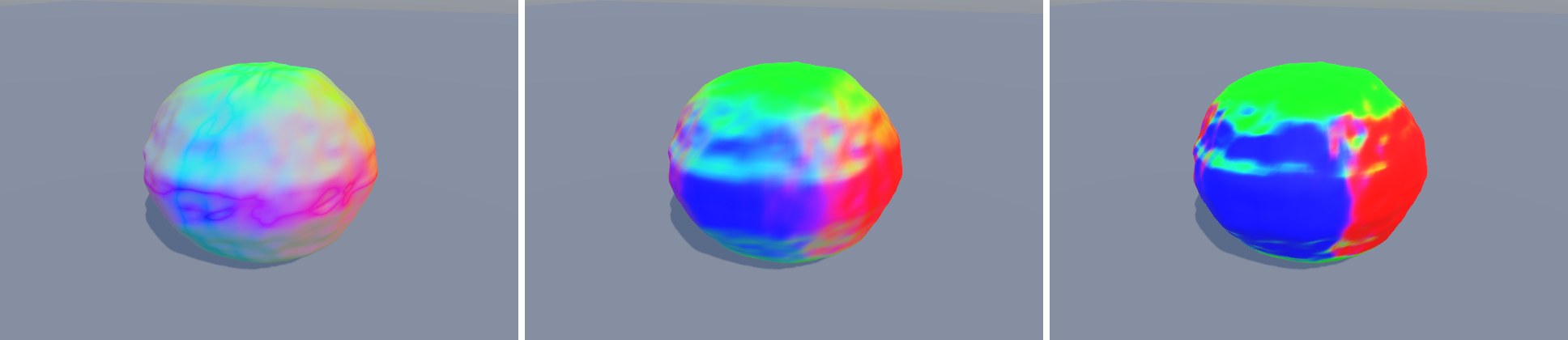
三平面映射(Triplanar Mapping)的思路很朴素:既然单方向投影只在“正对投影方向”的表面上好看,那就沿世界的 X、Y、Z 三个轴各投影一次,再按表面法线决定每个像素主要用哪一张。X 方向的投影用 (z, y) 当 UV,Y 方向用 (x, z),Z 方向用 (x, y)。法线越接近某个轴,那个轴的投影就越“正”,权重也就越大:
归一化保证三个权重之和为 1,亮度不会在过渡区忽明忽暗;指数 k(代码里的 _Sharpness)控制过渡带的宽窄。k = 1 时,45° 斜面上两张投影各占一半,两套图案叠在一起很容易看出“重影”;k 越大,过渡越窄,大部分区域只用一张投影,代价是过渡处更硬。URP 的 core 库里也有一个 ComputeTriplanarWeights(CommonMaterial.hlsl),它先减去 0.2 再取三次方,效果相当于一个固定的较硬设置。
// 三个投影方向的混合权重:|N| 的 sharpness 次方再归一化。
// sharpness 越大,过渡带越窄;1 时过渡最宽,45° 斜面上能看到两张图叠在一起。
float3 TriplanarWeights(float3 normalWS, float sharpness)
{
    float3 w = pow(abs(normalWS), sharpness);
    return w / max(dot(w, 1.0), 1e-5);
}

struct TriplanarUV
{
    float2 x;   // 沿 X 轴投影:用 (z, y)
    float2 y;   // 沿 Y 轴投影:用 (x, z)
    float2 z;   // 沿 Z 轴投影:用 (x, y)
};

TriplanarUV GetTriplanarUV(float3 positionWS, float3 normalWS, float scale)
{
    TriplanarUV t;
    float3 p = positionWS * scale;
    t.x = p.zy;
    t.y = p.xz;
    t.z = p.xy;
    // 背面方向的投影会左右镜像(文字、箭头会反),按法线符号把 U 翻回来
    float3 s = normalWS < 0 ? -1.0 : 1.0;
    t.x.x *= s.x;
    t.y.x *= s.y;
    t.z.x *= -s.z;
    return t;
}

half4 SampleTriplanar(TEXTURE2D_PARAM(tex, samp), TriplanarUV uv, float3 w)
{
    half4 cx = SAMPLE_TEXTURE2D(tex, samp, uv.x);
    half4 cy = SAMPLE_TEXTURE2D(tex, samp, uv.y);
    half4 cz = SAMPLE_TEXTURE2D(tex, samp, uv.z);
    return cx * w.x + cy * w.y + cz * w.z;
}
// 三个投影方向的混合权重:|N| 的 sharpness 次方再归一化。
// sharpness 越大,过渡带越窄;1 时过渡最宽,45° 斜面上能看到两张图叠在一起。
vec3 TriplanarWeights(vec3 normalWS, float sharpness)
{
    vec3 w = pow(abs(normalWS), vec3(sharpness));
    return w / max(dot(w, vec3(1.0)), 1e-5);
}

struct TriplanarUV
{
    vec2 x;   // 沿 X 轴投影:用 (z, y)
    vec2 y;   // 沿 Y 轴投影:用 (x, z)
    vec2 z;   // 沿 Z 轴投影:用 (x, y)
};

// HLSL 的 normalWS < 0 ? -1.0 : 1.0(逐分量)
vec3 Ch20AxisSign(vec3 n) { return mix(vec3(1.0), vec3(-1.0), vec3(lessThan(n, vec3(0.0)))); }

TriplanarUV GetTriplanarUV(vec3 positionWS, vec3 normalWS, float scale)
{
    TriplanarUV t;
    vec3 p = positionWS * scale;
    t.x = p.zy;
    t.y = p.xz;
    t.z = p.xy;
    // 背面方向的投影会左右镜像(文字、箭头会反),按法线符号把 U 翻回来
    vec3 s = Ch20AxisSign(normalWS);
    t.x.x *= s.x;
    t.y.x *= s.y;
    t.z.x *= -s.z;
    return t;
}

// GLSL 的采样器可以直接当函数参数(对应 HLSL 的 TEXTURE2D_PARAM(tex, samp))
vec4 SampleTriplanar(sampler2D tex, TriplanarUV uv, vec3 w)
{
    vec4 cx = texture(tex, uv.x);
    vec4 cy = texture(tex, uv.y);
    vec4 cz = texture(tex, uv.z);
    return cx * w.x + cy * w.y + cz * w.z;
}
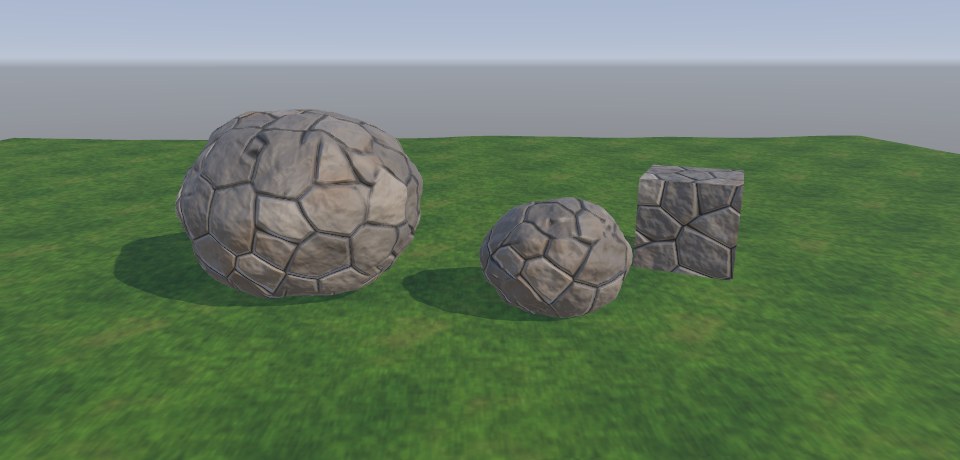
代码里有一处容易忽略的细节:背面投影的镜像。沿 +X 看过去和沿 −X 看过去,同一组 (z, y) 坐标在屏幕上的左右方向是相反的;草、石头这类无方向纹理看不出来,但文字、箭头、砖缝的错位就会暴露。GetTriplanarUV 按法线符号把对应投影的 U 翻转回来,Z 方向则是在正面翻转(因为相机从 −Z 看向 +Z 面时,世界 +X 在画面左侧)。
代价与取舍
- 采样数 ×3。每张贴图要采三次,带法线就是 6 次。地形上常见的优化是:权重小于某个阈值的投影直接跳过(动态分支),或者只对“岩石”这类出现在陡坡上的层做 Triplanar,草地、雪用一次顶视采样——20.4 节就是这样做的。
- 世界空间 vs 物体空间。用世界坐标投影的物体一旦移动,纹理会在表面上“游泳”。地形、建筑这类静态物体用世界空间;会动的道具应改用物体空间坐标和物体空间法线做投影。
- Mipmap 与各向异性。三次投影的 UV 导数各不相同,硬件按各自的导数选 mip,这是正确的;但过渡区两张图的模糊程度不同,远处偶尔能看到一道“清晰度接缝”,适当提高 k 就能缓解。
案例 20.3法线贴图的 Triplanar:UDN、Whiteout 与 RNM进阶单独打开 ↗
目标:给三平面映射加上法线贴图,并且光照正确。
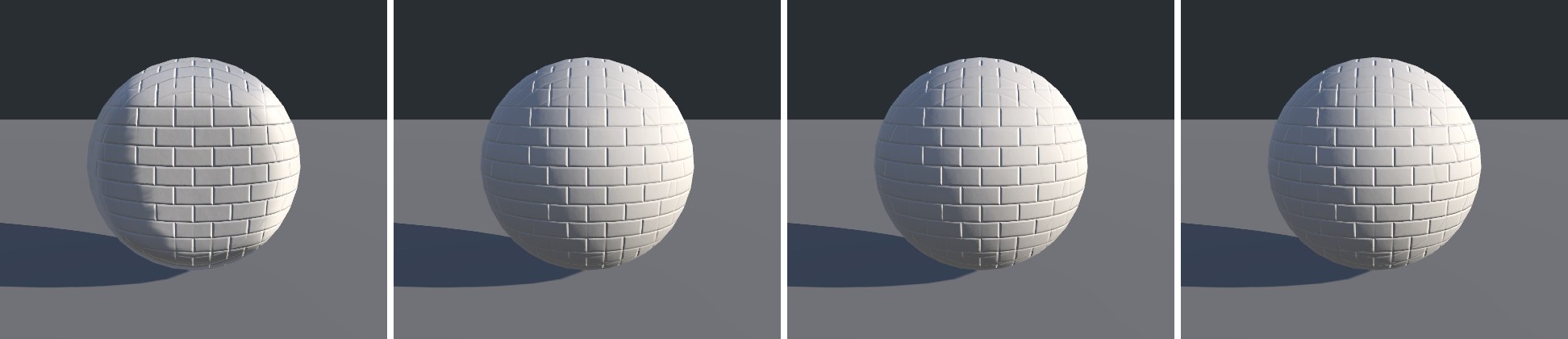
颜色可以随便按权重混合,法线不行。普通法线贴图存的是切线空间的方向,需要 TBN 矩阵转到世界空间;可 Triplanar 根本没有网格切线——三张投影各有各的“切线空间”:X 投影的 (u, v, n) 轴对应世界的 (z, y, x),Y 投影对应 (x, z, y),Z 投影对应 (x, y, z)。问题在于这三个“切线空间”的 n 轴都是世界轴,而真实表面的法线是倾斜的。直接把切线法线 swizzle 到世界轴上(Swizzle 法),等于假装表面就是轴对齐的平面——一个球会被照成一个方块。
正确的做法是把采样得到的细节法线“叠加”到几何法线上,这正是第 7 章细节法线混合要解决的同一个问题,只是这次“底层法线”是几何法线在该投影平面内的表示:对 X 投影,几何法线在其切线空间里的坐标就是 (N.z, N.y, N.x)。于是可以套用三种经典的法线混合公式:
| 方法 | 投影平面内的公式(n = 细节法线,g = 几何法线在该平面的表示) | 特点 |
|---|---|---|
| UDN | (n.xy + g.xy, g.z) | 最便宜;细节在斜面上会被“压扁”,凹凸感偏弱 |
| Whiteout | (n.xy + g.xy, n.z × g.z) | 多一次乘法,细节保留得更好,最常用的性价比方案 |
| RNM | 把 n 从 (0,0,1) “旋转”到 g 的方向 | 数学上最正确(Reoriented Normal Mapping),开销略高 |
RNM 在 core 库里有现成实现 BlendNormalRNM(n1, n2)(CommonMaterial.hlsl),它假设 n1 的 z 为正;所以先用 |N| 构造基底,混合后再把 z 的符号乘回去。
// 法线的 Triplanar:三张切线空间法线各自“转”到世界空间再按权重混合。
// mode 0 = 直接 swizzle(忽略几何法线,球会被照成方块)
// mode 1 = UDN(xy 相加,z 用几何法线)
// mode 2 = Whiteout(xy 相加,z 相乘)
// mode 3 = RNM(Reoriented Normal Mapping,把细节法线“旋转”到几何法线上)
half3 TriplanarNormalWS(TEXTURE2D_PARAM(bump, samp), TriplanarUV uv, float3 w, half3 normalWS, half scale, int mode)
{
    half3 tx = UnpackNormalScale(SAMPLE_TEXTURE2D(bump, samp, uv.x), scale);
    half3 ty = UnpackNormalScale(SAMPLE_TEXTURE2D(bump, samp, uv.y), scale);
    half3 tz = UnpackNormalScale(SAMPLE_TEXTURE2D(bump, samp, uv.z), scale);

    half3 axisSign = normalWS < 0 ? -1.0 : 1.0;
    // 与 GetTriplanarUV 中翻转 U 对应:切线 x 分量也要跟着翻
    tx.x *= axisSign.x;
    ty.x *= axisSign.y;
    tz.x *= -axisSign.z;

    half3 n = normalWS;
    half3 an = abs(normalWS);
    if (mode == 0)          // Swizzle:假设表面就是轴对齐的平面
    {
        tx.z *= axisSign.x; ty.z *= axisSign.y; tz.z *= axisSign.z;
    }
    else if (mode == 1)     // UDN
    {
        tx = half3(tx.xy + n.zy, n.x);
        ty = half3(ty.xy + n.xz, n.y);
        tz = half3(tz.xy + n.xy, n.z);
    }
    else if (mode == 2)     // Whiteout
    {
        tx = half3(tx.xy + n.zy, abs(tx.z) * n.x);
        ty = half3(ty.xy + n.xz, abs(ty.z) * n.y);
        tz = half3(tz.xy + n.xy, abs(tz.z) * n.z);
    }
    else                    // RNM:基底法线取 (各平面内的几何法线, |N|),用 core 库的 BlendNormalRNM
    {
        tx = BlendNormalRNM(half3(n.zy, an.x), tx);
        ty = BlendNormalRNM(half3(n.xz, an.y), ty);
        tz = BlendNormalRNM(half3(n.xy, an.z), tz);
        tx.z *= axisSign.x; ty.z *= axisSign.y; tz.z *= axisSign.z;
    }
    // swizzle 回世界轴:X 平面的 (u,v,n) = (z,y,x),Y 平面 = (x,z,y),Z 平面 = (x,y,z)
    return normalize(tx.zyx * w.x + ty.xzy * w.y + tz.xyz * w.z);
}
// 法线的 Triplanar:三张切线空间法线各自“转”到世界空间再按权重混合。
// mode 0 = 直接 swizzle(忽略几何法线,球会被照成方块)
// mode 1 = UDN(xy 相加,z 用几何法线)
// mode 2 = Whiteout(xy 相加,z 相乘)
// mode 3 = RNM(Reoriented Normal Mapping,把细节法线“旋转”到几何法线上)
vec3 TriplanarNormalWS(sampler2D bump, TriplanarUV uv, vec3 w, vec3 normalWS, float scale, int mode)
{
    vec3 tx = UnpackNormalmapRGorAG(texture(bump, uv.x), scale);
    vec3 ty = UnpackNormalmapRGorAG(texture(bump, uv.y), scale);
    vec3 tz = UnpackNormalmapRGorAG(texture(bump, uv.z), scale);

    vec3 axisSign = Ch20AxisSign(normalWS);
    // 与 GetTriplanarUV 中翻转 U 对应:切线 x 分量也要跟着翻
    tx.x *= axisSign.x;
    ty.x *= axisSign.y;
    tz.x *= -axisSign.z;

    vec3 n = normalWS;
    vec3 an = abs(normalWS);
    if (mode == 0)          // Swizzle:假设表面就是轴对齐的平面
    {
        tx.z *= axisSign.x; ty.z *= axisSign.y; tz.z *= axisSign.z;
    }
    else if (mode == 1)     // UDN
    {
        tx = vec3(tx.xy + n.zy, n.x);
        ty = vec3(ty.xy + n.xz, n.y);
        tz = vec3(tz.xy + n.xy, n.z);
    }
    else if (mode == 2)     // Whiteout
    {
        tx = vec3(tx.xy + n.zy, abs(tx.z) * n.x);
        ty = vec3(ty.xy + n.xz, abs(ty.z) * n.y);
        tz = vec3(tz.xy + n.xy, abs(tz.z) * n.z);
    }
    else                    // RNM:基底法线取 (各平面内的几何法线, |N|),用 core 库的 BlendNormalRNM
    {
        tx = BlendNormalRNM(vec3(n.zy, an.x), tx);
        ty = BlendNormalRNM(vec3(n.xz, an.y), ty);
        tz = BlendNormalRNM(vec3(n.xy, an.z), tz);
        tx.z *= axisSign.x; ty.z *= axisSign.y; tz.z *= axisSign.z;
    }
    // swizzle 回世界轴:X 平面的 (u,v,n) = (z,y,x),Y 平面 = (x,z,y),Z 平面 = (x,y,z)
    return normalize(tx.zyx * w.x + ty.xzy * w.y + tz.xyz * w.z);
}
注意前面翻转 U 时,切线空间的 x 轴也随之反向,所以采样出来的 tx.x 等也要乘上同样的符号,否则背面的凹凸方向是反的。最后一行把三个平面的结果 swizzle 回世界轴、按权重相加再归一化。
|N.y| 把它淡出到几何法线。20.2 按规则铺材质:高度与坡度
手刷权重图(下一节的 Splatmap)精确但费人力,大地图上更常见的是“规则驱动”:海拔低处是砂石,平缓处长草,坡度超过某个角度露出岩石,雪线以上积雪。这些规则只需要两个量——世界高度 positionWS.y 和坡度 1 − N.y(平地为 0,垂直崖壁为 1)。用 smoothstep 把它们映射成 0..1 的遮罩,再按顺序把各层叠上去。
直接这样做的结果会很“假”:高度遮罩是一条条等高线,坡度遮罩沿着网格的折线走,整个地形像一张地形图。解决办法有两个:一是给判断量加噪声,打破等高线;二是层与层之间不用线性插值,而用下一节的高度混合,让过渡带呈现出“石头缝先被填满”的细节。
案例 20.4高度/坡度自动材质:草 → 砂石 → 岩石 → 雪进阶单独打开 ↗
目标:一个 Shader 自动给整块地形分配四种地表,并且层间过渡自然。
四张地表贴图都是拍摄时用 C# 程序生成的可平铺噪声(见 Ch20/Editor/TerrainTextures.cs),RGB 是颜色,A 通道存“高度”:草叶尖高、根部低;岩石的板块高、裂缝低;卵石中心高、砂粒低。高度信息就是后面高度混合的依据。
half4 frag(Varyings i) : SV_Target
{
    half3 n = normalize(i.normalWS);
    float3 pos = i.positionWS;

    // 低频噪声:打破“等高线”一样整齐的分界
    half noise = SAMPLE_TEXTURE2D(_NoiseTex, sampler_NoiseTex, pos.xz * 0.04).r - 0.5;
    half h = pos.y + noise * _NoiseAmp;
    half slope = 1.0 - n.y;                          // 0 = 平地,1 = 垂直崖壁

    // 平缓的层用顶视投影即可;岩石主要出现在陡坡,必须 Triplanar
    float2 uvTop = pos.xz * _Tiling;
    half4 grass = SAMPLE_TEXTURE2D(_GrassTex, sampler_GrassTex, uvTop);
    half4 sand  = SAMPLE_TEXTURE2D(_SandTex,  sampler_GrassTex, uvTop * 1.3);
    half4 snow  = SAMPLE_TEXTURE2D(_SnowTex,  sampler_GrassTex, uvTop * 0.5);
    float3 tw = TriplanarWeights(n, 8);
    TriplanarUV tuv = GetTriplanarUV(pos, n, _RockTiling);
    half4 rock = SampleTriplanar(TEXTURE2D_ARGS(_RockTex, sampler_GrassTex), tuv, tw);
    half3 rockN = TriplanarNormalWS(TEXTURE2D_ARGS(_RockNormal, sampler_GrassTex), tuv, tw, n, 1, 3);

    // 规则 → 遮罩(0..1)
    half sandMask = 1.0 - smoothstep(_SandHeight - _HeightBand, _SandHeight + _HeightBand, h);
    half rockMask = smoothstep(_RockSlope - _SlopeBand, _RockSlope + _SlopeBand, slope + noise * 0.25);
vec4 frag()
{
    vec3 n = normalize(normalWS);
    vec3 pos = positionWS;

    // 低频噪声:打破“等高线”一样整齐的分界
    float noise = texture(_NoiseTex, pos.xz * 0.04).r - 0.5;
    float h = pos.y + noise * _NoiseAmp;
    float slope = 1.0 - n.y;                          // 0 = 平地,1 = 垂直崖壁

    // 平缓的层用顶视投影即可;岩石主要出现在陡坡,必须 Triplanar
    vec2 uvTop = pos.xz * _Tiling;
    vec4 grass = texture(_GrassTex, uvTop);
    vec4 sand  = texture(_SandTex,  uvTop * 1.3);
    vec4 snow  = texture(_SnowTex,  uvTop * 0.5);
    vec3 tw = TriplanarWeights(n, 8.0);
    TriplanarUV tuv = GetTriplanarUV(pos, n, _RockTiling);
    vec4 rock = SampleTriplanar(_RockTex, tuv, tw);
    vec3 rockN = TriplanarNormalWS(_RockNormal, tuv, tw, n, 1.0, 3);

    // 规则 → 遮罩(0..1)
    float sandMask = 1.0 - smoothstep(_SandHeight - _HeightBand, _SandHeight + _HeightBand, h);
    float rockMask = smoothstep(_RockSlope - _SlopeBand, _RockSlope + _SlopeBand, slope + noise * 0.25);
这里有几个细节:
- 噪声同时扰动高度和坡度。同一份低频噪声
noise加到高度判断上(乘_NoiseAmp米),也加到坡度判断上(乘 0.25),雪线和岩石边界就都不再是光滑曲线。 - 只有岩石做 Triplanar。草、砂、雪只出现在平缓处,用顶视投影一次采样足够;岩石专门出现在陡坡,必须三平面。这样整个 Shader 的采样数从“每层 3 次”降到“1+1+3+3(法线)+1+1(噪声)”。
- 共用采样器。五张图都用
sampler_GrassTex采样。在部分移动平台和图形 API 上,一个 Shader 能用的采样器(Sampler State)数量有限(常见上限是 16),地形 Shader 层数一多很容易超,URP 的 TerrainLit 也是所有层共用sampler_Splat0。
遮罩算好之后,按“从下往上铺”的顺序逐层叠加:
// 按“从下往上铺”的顺序逐层叠:每层都和“已经铺好的结果”做一次高度混合
half4 c = grass;
half3 nrm = n;
half4 layerW = half4(1, 0, 0, 0);               // 记录各层最终占比:草/砂/岩/雪(调试用)

half t = HeightBlendWeight(c.a, sand.a, sandMask, _BlendDepth);
c = lerp(c, sand, t);               layerW = half4(layerW.xyz * (1 - t), 0); layerW.y += t;

t = HeightBlendWeight(c.a, rock.a, rockMask, _BlendDepth);
c = lerp(c, rock, t);               nrm = normalize(lerp(nrm, rockN, t));
layerW.xyz *= (1 - t);              layerW.z += t;

// 雪:高于雪线,并且“细节法线”朝上的地方才积得住——岩石的凹坑与台面先白
half snowSlope = 1.0 - nrm.y;
half snowMask = smoothstep(_SnowHeight - _HeightBand, _SnowHeight + _HeightBand, h)
              * (1.0 - smoothstep(0.35, 0.65, snowSlope));
t = HeightBlendWeight(c.a, snow.a, snowMask, _BlendDepth);
c = lerp(c, snow, t);               nrm = normalize(lerp(nrm, n, t * 0.6));
layerW *= (1 - t);                  layerW.w += t;
// 按“从下往上铺”的顺序逐层叠:每层都和“已经铺好的结果”做一次高度混合
vec4 c = grass;
vec3 nrm = n;
vec4 layerW = vec4(1, 0, 0, 0);               // 记录各层最终占比:草/砂/岩/雪(调试用)

float t = HeightBlendWeight(c.a, sand.a, sandMask, _BlendDepth);
c = mix(c, sand, t);                layerW = vec4(layerW.xyz * (1.0 - t), 0.0); layerW.y += t;

t = HeightBlendWeight(c.a, rock.a, rockMask, _BlendDepth);
c = mix(c, rock, t);                nrm = normalize(mix(nrm, rockN, t));
layerW.xyz *= (1.0 - t);            layerW.z += t;

// 雪:高于雪线,并且“细节法线”朝上的地方才积得住——岩石的凹坑与台面先白
float snowSlope = 1.0 - nrm.y;
float snowMask = smoothstep(_SnowHeight - _HeightBand, _SnowHeight + _HeightBand, h)
               * (1.0 - smoothstep(0.35, 0.65, snowSlope));
t = HeightBlendWeight(c.a, snow.a, snowMask, _BlendDepth);
c = mix(c, snow, t);                nrm = normalize(mix(nrm, n, t * 0.6));
layerW *= (1.0 - t);                layerW.w += t;
每叠一层,都拿“已经铺好的结果”(包括它的高度 c.a)和新层做一次高度混合;同时把各层最终占比记录在 layerW 里,既用来混合光滑度,也用于调试显示。雪的规则特意用了叠加岩石法线之后的坡度:岩石凹坑和台面朝上的细节先积雪,竖直的岩面保持裸露,这比用几何法线判断要自然得多。
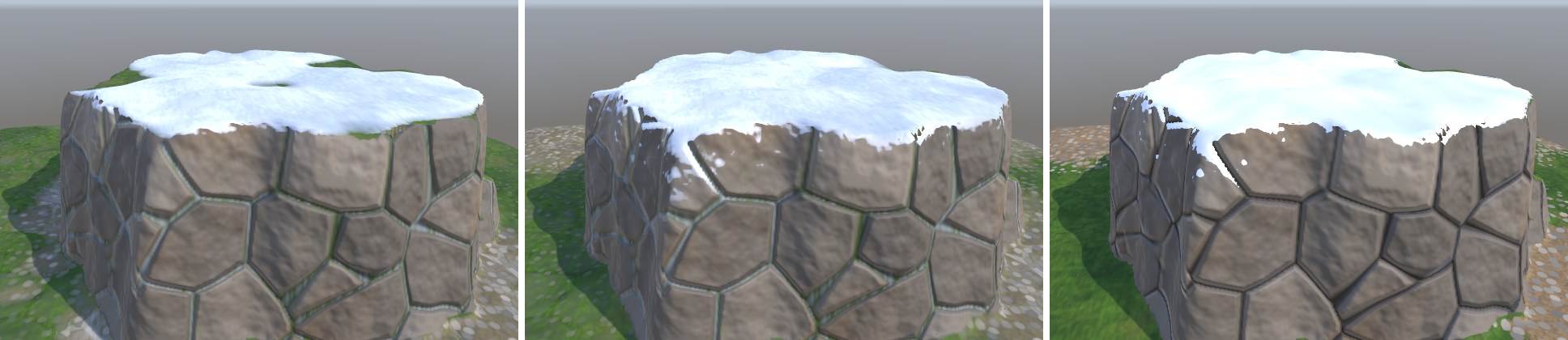
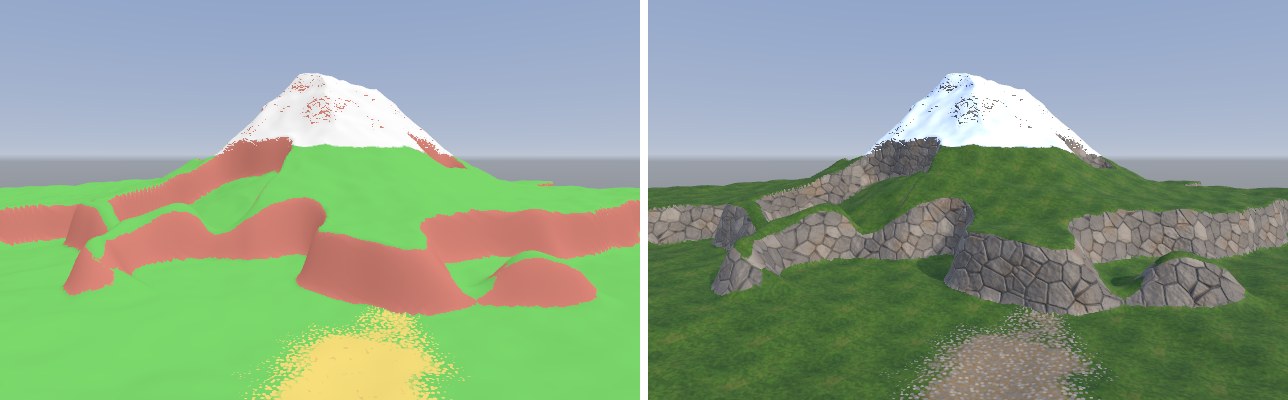
_RockSlope 决定多陡算崖壁、_SnowHeight 决定雪线、_NoiseAmp 决定边界的破碎程度;分布满意后再切回正常视图调 _BlendDepth。分布和过渡是两件事,混在一起调很容易顾此失彼。案例 20.5高度混合 Height Blend进阶单独打开 ↗
目标:让两层材质的过渡由各自的高度决定,而不是简单的半透明叠加。
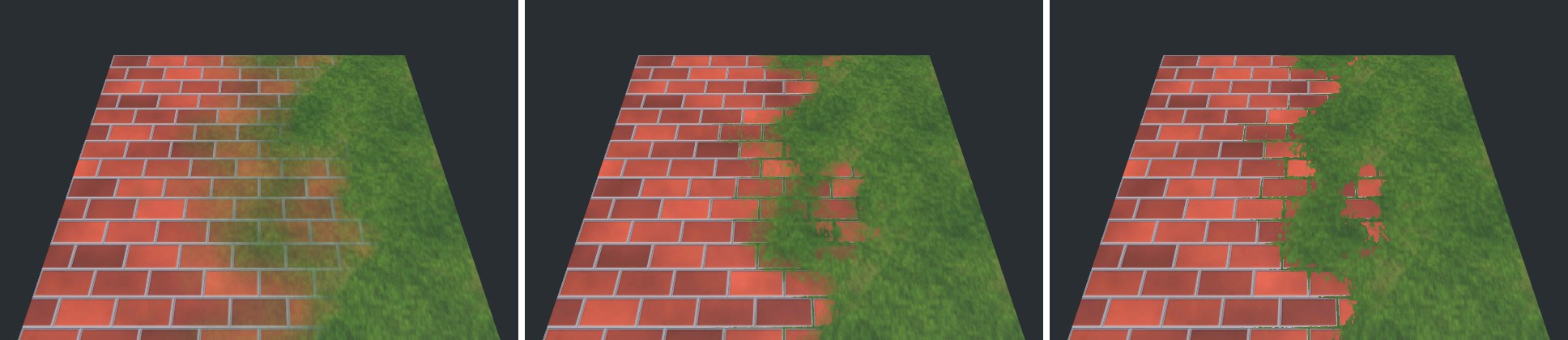
设想砖地上铺了一层土:土首先会填满砖缝,砖面最后才被盖住。线性插值 lerp(A, B, t) 做不到这一点——它在每个像素上都是“A 的 (1−t) 加 B 的 t”,结果是砖和土同时半透明。高度混合的想法是:把遮罩 t 理解成“B 层的厚度”,加到 B 的高度上;同样把 1−t 加到 A 的高度上;哪一层“更高”就显示哪一层:
只有比“最高者”低不超过 d(混合深度,_BlendDepth)的层才有权重。d 很小时几乎是“谁高谁赢”的硬切换;d 很大时所有层都有权重,退化成接近线性的混合。
// 高度混合:t 是“第二层的遮罩权重”,h1/h2 是两层的高度(存在贴图 A 通道)。
// 谁“又高、权重又大”谁就露出来;depth 控制过渡软硬(0.01 很硬,0.3 接近线性)。
half HeightBlendWeight(half h1, half h2, half t, half depth)
{
    half a1 = h1 + (1.0 - t);
    half a2 = h2 + t;
    half top = max(a1, a2) - depth;
    half b1 = max(a1 - top, 0.0);
    half b2 = max(a2 - top, 0.0);
    return b2 / max(b1 + b2, 1e-4);
}
// 高度混合:t 是“第二层的遮罩权重”,h1/h2 是两层的高度(存在贴图 A 通道)。
// 谁“又高、权重又大”谁就露出来;depth 控制过渡软硬(0.01 很硬,0.3 接近线性)。
float HeightBlendWeight(float h1, float h2, float t, float depth)
{
    float a1 = h1 + (1.0 - t);
    float a2 = h2 + t;
    float top = max(a1, a2) - depth;
    float b1 = max(a1 - top, 0.0);
    float b2 = max(a2 - top, 0.0);
    return b2 / max(b1 + b2, 1e-4);
}
演示 Shader 把两层的数据组织方式也做成了对照:A 层(砖)用三张独立的图——颜色、高度(R 通道)、法线;B 层(草)把高度打包进颜色贴图的 A 通道。后者省一次采样,是地形层贴图的常见约定(URP TerrainLit 则把高度放在 Mask Map 的 B 通道,见下一节)。
half4 frag(Varyings i) : SV_Target
{
    float2 uvA = TRANSFORM_TEX(i.uv, _MapA);
    float2 uvB = i.uv * _TilingB;
    half3 albedoA = SAMPLE_TEXTURE2D(_MapA, sampler_MapA, uvA).rgb;
    half  heightA = SAMPLE_TEXTURE2D(_HeightA, sampler_MapA, uvA).r;
    half3 normalA = UnpackNormal(SAMPLE_TEXTURE2D(_NormalA, sampler_MapA, uvA));
    half4 layerB  = SAMPLE_TEXTURE2D(_MapB, sampler_MapA, uvB);

    // 遮罩:从左到右的渐变 + 噪声,模拟“刷”出来的过渡区
    half noise = SAMPLE_TEXTURE2D(_NoiseTex, sampler_NoiseTex, i.uv * 1.5).r - 0.5;
    half mask = saturate((i.uv.x - 0.5 + _MaskOffset + noise * 0.35) * _MaskContrast + 0.5);

    // 线性混合 vs 高度混合
    half tLinear = mask;
    half tHeight = HeightBlendWeight(heightA, layerB.a, mask, _BlendDepth);
    half t = lerp(tLinear, tHeight, _UseHeight);

    half3 albedo = lerp(albedoA, layerB.rgb, t);
    half3 normalTS = normalize(lerp(normalA, half3(0, 0, 1), t));
    float sgn = i.tangentWS.w;
    float3 bitangent = sgn * cross(i.normalWS, i.tangentWS.xyz);
    half3 normalWS = TransformTangentToWorld(normalTS, half3x3(i.tangentWS.xyz, bitangent, i.normalWS));
    half occlusion = lerp(lerp(0.6, 1.0, heightA), 1.0, t);   // 砖缝顺手压暗一点
    return Ch20ShadePBR(i.positionWS, normalWS, i.positionCS, albedo, 0, lerp(0.3, 0.12, t), occlusion, i.fogFactor);
}
vec4 frag()
{
    vec2 uvA = TransformTex(uv, _MapA_ST);
    vec2 uvB = uv * _TilingB;
    vec3 albedoA = texture(_MapA, uvA).rgb;
    float heightA = texture(_HeightA, uvA).r;
    vec3 normalA = UnpackNormalmapRGorAG(texture(_NormalA, uvA), 1.0);   // = URP 桌面平台的 UnpackNormal
    vec4 layerB  = texture(_MapB, uvB);

    // 遮罩:从左到右的渐变 + 噪声,模拟“刷”出来的过渡区
    float noise = texture(_NoiseTex, uv * 1.5).r - 0.5;
    float mask = saturate((uv.x - 0.5 + _MaskOffset + noise * 0.35) * _MaskContrast + 0.5);

    // 线性混合 vs 高度混合
    float tLinear = mask;
    float tHeight = HeightBlendWeight(heightA, layerB.a, mask, _BlendDepth);
    float t = mix(tLinear, tHeight, _UseHeight);

    vec3 albedo = mix(albedoA, layerB.rgb, t);
    vec3 normalTS = normalize(mix(normalA, vec3(0, 0, 1), t));
    float sgn = tangentWS.w;
    vec3 bitangent = sgn * cross(normalWS, tangentWS.xyz);
    // HLSL 的 half3x3(T, B, N) 按行构造;GLSL 的 mat3(T, B, N) 列就是 T/B/N,TransformTangentToWorld 已按此处理
    vec3 nWS = TransformTangentToWorld(normalTS, mat3(tangentWS.xyz, bitangent, normalWS));
    float occlusion = mix(mix(0.6, 1.0, heightA), 1.0, t);   // 砖缝顺手压暗一点
    return Ch20ShadePBR(positionWS, nWS, gl_FragCoord, albedo, 0.0, mix(0.3, 0.12, t), occlusion, fogFactor);
}
案例 20.6Splatmap 四层混合:读懂 TerrainLit 的数据布局进阶单独打开 ↗
目标:实现手绘权重图驱动的四层混合,并对照 URP TerrainLit 理解 Unity Terrain 是怎么做的。
Splatmap(也叫 Control Map)是一张覆盖整块地形的 RGBA 贴图,四个通道分别是四个层的权重。美术用 Terrain 的绘制工具刷的就是它。超过四层时,Unity 会再生成第二张、第三张 Control 图,每四层一组。URP 的 TerrainLit 由几部分组成:
| Shader / 文件 | 作用 |
|---|---|
| TerrainLit.shader | 第一个 Pass 画前 4 层(_Control + _Splat0..3,可选 _Normal0..3、_Mask0..3) |
| TerrainLitAdd.shader | 每多 4 层就叠一个 Add Pass(宏 TERRAIN_SPLAT_ADDPASS),用加法混合累加 |
| TerrainLitBase / BasemapGen | 超过 Base Map Distance 的远处地形不再逐层采样,改用预先烘焙的一张合成图 |
| TerrainLitPasses.hlsl | SplatmapMix、HeightBasedSplatModify 等核心函数 |
摘自 URP 14 Shaders/Terrain/TerrainLitPasses.hlsl,高度混合部分只有十几行:
#ifdef _TERRAIN_BLEND_HEIGHT
void HeightBasedSplatModify(inout half4 splatControl, in half4 masks[4])
{
    // heights are in mask blue channel, we multiply by the splat Control weights to get combined height
    half4 splatHeight = half4(masks[0].b, masks[1].b, masks[2].b, masks[3].b) * splatControl.rgba;
    half maxHeight = max(splatHeight.r, max(splatHeight.g, max(splatHeight.b, splatHeight.a)));
    half transition = max(_HeightTransition, 1e-5);
    half4 weightedHeights = splatHeight + transition - maxHeight.xxxx;
    weightedHeights = max(0, weightedHeights);
    weightedHeights = (weightedHeights + 1e-6) * splatControl;
    half sumHeight = max(dot(weightedHeights, half4(1, 1, 1, 1)), 1e-6);
    splatControl = weightedHeights / sumHeight.xxxx;
}
#endif
与 20.5 的两层公式相比,它用“高度 × 权重”作为每层的有效高度,同样只保留与最高者相差不到 _HeightTransition 的层,再乘回原权重并归一化。几个值得记住的约定:层高度存在 Mask Map 的 B 通道(Mask Map 布局为 R 金属度、G AO、B 高度、A 光滑度);源码注释写明层数超过 4 时会关闭高度混合,因为多 Pass 累加破坏了归一化;不开高度混合时,若颜色贴图带 Alpha 且开启了“Opacity as Density”,SplatmapMix 会用颜色 Alpha 做另一种密度混合。
我们的 Splatmap.shader 沿用同样的数据布局,只做了一处扩展:第 2 层(岩石)使用 Triplanar——TerrainLit 本身对所有层都用 Splat UV,因此 Unity 地形的崖壁仍会拉伸,这是很多项目自己改写地形 Shader 的主要原因之一。
// 与 TerrainLit 的 HeightBasedSplatModify 同一思路:
// 高度 × 权重,取最高者,比它低 transition 以上的层直接归零,剩下的重新归一化
half4 HeightBasedSplat(half4 control, half4 heights, half transition)
{
    half4 h = heights * control;
    half maxH = max(max(h.r, h.g), max(h.b, h.a));
    half4 w = max(h + max(transition, 1e-5) - maxH, 0);
    w = (w + 1e-6) * control;                  // 权重为 0 的层永远不出现
    return w / max(dot(w, 1.0), 1e-6);
}
// 与 TerrainLit 的 HeightBasedSplatModify 同一思路:
// 高度 × 权重,取最高者,比它低 transition 以上的层直接归零,剩下的重新归一化
vec4 HeightBasedSplat(vec4 control, vec4 heights, float transition)
{
    vec4 h = heights * control;
    float maxH = max(max(h.r, h.g), max(h.b, h.a));
    vec4 w = max(h + max(transition, 1e-5) - maxH, 0.0);
    w = (w + 1e-6) * control;                  // 权重为 0 的层永远不出现
    return w / max(dot(w, vec4(1.0)), 1e-6);
}
half4 frag(Varyings i) : SV_Target
{
    half3 n = normalize(i.normalWS);
    half4 control = SAMPLE_TEXTURE2D(_Control, sampler_Control, i.uv);
    control /= max(dot(control, 1.0), 1e-4);   // 画笔刷出来的权重不一定和为 1

#if defined(_DEBUG_CONTROL)
    half3 dbg = control.r * half3(0.2, 0.7, 0.15) + control.g * half3(0.85, 0.6, 0.25)
              + control.b * half3(0.6, 0.6, 0.65) + control.a * half3(1, 1, 1);
    return half4(dbg * (0.55 + 0.45 * saturate(dot(n, half3(0.3, 0.9, -0.3)))), 1);
#endif

    float2 xz = i.positionWS.xz;
    half4 s0 = SAMPLE_TEXTURE2D(_Splat0, sampler_Splat0, xz * _SplatTiling.x);
    half4 s1 = SAMPLE_TEXTURE2D(_Splat1, sampler_Splat0, xz * _SplatTiling.y);
    half4 s3 = SAMPLE_TEXTURE2D(_Splat3, sampler_Splat0, xz * _SplatTiling.w);
    // 第 2 层是岩石,崖壁上用 Triplanar(TerrainLit 本身没有这一步)
    float3 tw = TriplanarWeights(n, 8);
    TriplanarUV tuv = GetTriplanarUV(i.positionWS, n, _SplatTiling.z);
    half4 s2 = SampleTriplanar(TEXTURE2D_ARGS(_Splat2, sampler_Splat0), tuv, tw);
    half3 rockN = TriplanarNormalWS(TEXTURE2D_ARGS(_Normal2, sampler_Splat0), tuv, tw, n, 1, 3);

    if (_HeightBased > 0.5)
        control = HeightBasedSplat(control, half4(s0.a, s1.a, s2.a, s3.a), _HeightTransition);

    half3 albedo = s0.rgb * control.r + s1.rgb * control.g + s2.rgb * control.b + s3.rgb * control.a;
    half3 normalWS = normalize(lerp(n, rockN, control.b));
    half smoothness = dot(control, half4(0.1, 0.15, 0.25, 0.5));
    return Ch20ShadePBR(i.positionWS, normalWS, i.positionCS, albedo, 0, smoothness, 1, i.fogFactor);
}
vec4 frag()
{
    vec3 n = normalize(normalWS);
    vec4 control = texture(_Control, uv);
    control /= max(dot(control, vec4(1.0)), 1e-4);   // 画笔刷出来的权重不一定和为 1

#if defined(_DEBUG_CONTROL)
    vec3 dbg = control.r * vec3(0.2, 0.7, 0.15) + control.g * vec3(0.85, 0.6, 0.25)
             + control.b * vec3(0.6, 0.6, 0.65) + control.a * vec3(1, 1, 1);
    return vec4(dbg * (0.55 + 0.45 * saturate(dot(n, vec3(0.3, 0.9, -0.3)))), 1.0);
#endif

    vec2 xz = positionWS.xz;
    vec4 s0 = texture(_Splat0, xz * _SplatTiling.x);
    vec4 s1 = texture(_Splat1, xz * _SplatTiling.y);
    vec4 s3 = texture(_Splat3, xz * _SplatTiling.w);
    // 第 2 层是岩石,崖壁上用 Triplanar(TerrainLit 本身没有这一步)
    vec3 tw = TriplanarWeights(n, 8.0);
    TriplanarUV tuv = GetTriplanarUV(positionWS, n, _SplatTiling.z);
    vec4 s2 = SampleTriplanar(_Splat2, tuv, tw);
    vec3 rockN = TriplanarNormalWS(_Normal2, tuv, tw, n, 1.0, 3);

    if (_HeightBased > 0.5)
        control = HeightBasedSplat(control, vec4(s0.a, s1.a, s2.a, s3.a), _HeightTransition);

    vec3 albedo = s0.rgb * control.r + s1.rgb * control.g + s2.rgb * control.b + s3.rgb * control.a;
    vec3 nWS = normalize(mix(n, rockN, control.b));
    float smoothness = dot(control, vec4(0.1, 0.15, 0.25, 0.5));
    return Ch20ShadePBR(positionWS, nWS, gl_FragCoord, albedo, 0.0, smoothness, 1.0, fogFactor);
}
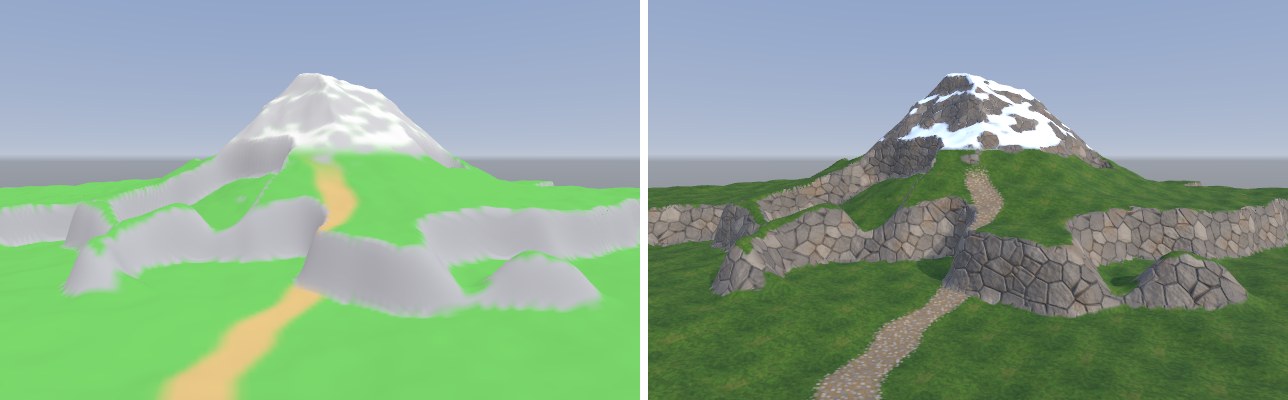
拍摄用的 Control 图同样是程序“刷”出来的:坡度大的地方写 B 通道(岩石),高处写 A 通道(雪),再沿一条正弦曲线画一条土路写进 G 通道——这条路就是规则驱动做不出来、必须手绘的内容。
/// 程序化“画”一张 Control 图:R 草、G 土路、B 岩石(按坡度)、A 雪(按高度)
static Texture2D BuildControl(float size, System.Func<float, float, float> h, int res = 256)
{
    var t = new Texture2D(res, res, TextureFormat.RGBA32, false, true)
    { wrapMode = TextureWrapMode.Clamp, filterMode = FilterMode.Bilinear, hideFlags = HideFlags.DontSave };
    var px = new Color[res * res];
    for (int y = 0; y < res; y++)
        for (int x = 0; x < res; x++)
        {
            float wx = (x / (res - 1f) - 0.5f) * size, wz = (y / (res - 1f) - 0.5f) * size;
            float e = 0.3f;
            float dx = (h(wx + e, wz) - h(wx - e, wz)) / (2 * e), dz = (h(wx, wz + e) - h(wx, wz - e)) / (2 * e);
            float ny = 1f / Mathf.Sqrt(1 + dx * dx + dz * dz);
            float rock = Smooth(0.82f, 0.74f, ny);
            float snow = Smooth(6.5f, 8f, h(wx, wz)) * (1 - rock * 0.7f);
            // 一条蜿蜒的小路:到正弦曲线的距离
            float pathX = Mathf.Sin(wz * 0.18f) * 4f - 2f + Heightfield.Fbm(wz * 0.2f, 3f, 2) * 2f;
            float path = Smooth(1.4f, 0.6f, Mathf.Abs(wx - pathX)) * Smooth(14f, 8f, wz);
            float grass = 1;
            var c = new Color(grass, 0, 0, 0);
            c = Color.Lerp(c, new Color(0, 1, 0, 0), path);
            c = Color.Lerp(c, new Color(0, 0, 1, 0), rock);
            c = Color.Lerp(c, new Color(0, 0, 0, 1), snow);
            px[y * res + x] = c;
        }
    t.SetPixels(px); t.Apply();
    return t;
}
20.3 植被:为什么需要 GPU Instancing
一片 30 m × 30 m、间距 25 cm 的草地有一万多丛草。如果每丛是一个 GameObject,CPU 每帧要为一万个渲染器做剔除、排序、设置常量缓冲并提交 Draw Call;即便有 SRP Batcher 减少状态切换,物体数量本身的开销也足以占满主线程。GPU 实例化(GPU Instancing)把“同一个网格、同一个材质、画很多次”合并成一次调用:CPU 只上传一个矩阵数组,GPU 用 SV_InstanceID 区分每个实例,在顶点着色器里读出各自的矩阵。
Unity 提供了几种入口:
| API | 实例数据来自 | 说明 |
|---|---|---|
| MeshRenderer + 材质勾选 Enable GPU Instancing | 引擎自动收集 | 在 URP 中,Shader 兼容 SRP Batcher 时优先走 SRP Batcher,不会实例化 |
| Graphics.RenderMeshInstanced | C# 传入矩阵数组 | 2021.2 起的新接口,参数打包在 RenderParams 里;本章使用它 |
| Graphics.DrawMeshInstanced | C# 传入矩阵数组 | 旧接口,同样可用 |
| RenderMeshIndirect / DrawMeshInstancedIndirect | GPU 缓冲区(ComputeBuffer) | 实例数据完全在 GPU 上,可配合 Compute Shader 做剔除;Shader 需自行读取缓冲区 |
在 Shader 一侧,实例化需要三样东西:#pragma multi_compile_instancing 生成带 INSTANCING_ON 的变体;顶点输入里的 UNITY_VERTEX_INPUT_INSTANCE_ID 和顶点函数开头的 UNITY_SETUP_INSTANCE_ID(v)——后者会把 unity_ObjectToWorld 等矩阵重定向到当前实例的那一个,所以 TransformObjectToWorld 等函数完全不用改;如果还需要每个实例不同的材质参数,用 UNITY_INSTANCING_BUFFER_START/END 声明,UNITY_ACCESS_INSTANCED_PROP 读取。
案例 20.7RenderMeshInstanced 画一片草地进阶单独打开 ↗
目标:不创建任何 GameObject,用 GPU Instancing 画出上万丛草,每丛颜色略有不同。
草丛网格
实例化的单位是“一丛”而不是“一片叶子”:一个网格里放 9 片草叶,随机分布在 22 cm 半径的圆盘里,每片有随机的朝向、高度、宽度和前倾量。这样一万个实例就是九万片叶子,而实例数(也就是 CPU 要准备的矩阵数)只有一万。每片草叶由 4 段梯形加一个尖顶组成,uv.y 记录沿叶片的高度(0 根部、1 叶尖),Shader 用它做弯曲权重;顶点色 R 存每片叶子的随机值。
/// 一丛草:blades 片草叶随机分布在半径 radius 的圆盘里。
/// uv.y = 沿草叶的高度(0 根部,1 叶尖),Shader 用它当弯曲权重;color.r = 每片叶子的随机值
public static Mesh BuildClump(int blades = 9, float radius = 0.22f, int seed = 1)
{
    const int seg = 4;
    var rnd = new System.Random(seed);
    float R() => (float)rnd.NextDouble();
    var v = new List<Vector3>(); var n = new List<Vector3>(); var uv = new List<Vector2>();
    var col = new List<Color>(); var idx = new List<int>();
    for (int b = 0; b < blades; b++)
    {
        float a = R() * Mathf.PI * 2, r = Mathf.Sqrt(R()) * radius;
        var root = new Vector3(Mathf.Cos(a) * r, 0, Mathf.Sin(a) * r);
        float yaw = R() * Mathf.PI * 2;
        var side = new Vector3(Mathf.Cos(yaw), 0, Mathf.Sin(yaw));        // 叶片宽度方向
        var face = Vector3.Cross(side, Vector3.up);                         // 叶片朝向
        float h = Mathf.Lerp(0.35f, 0.7f, R()), w = Mathf.Lerp(0.03f, 0.05f, R());
        float lean = Mathf.Lerp(0.05f, 0.3f, R());                          // 叶尖前倾量
        float rand = R();
        int baseIdx = v.Count;
        for (int s = 0; s <= seg; s++)
        {
            float t = (float)s / seg;
            var center = root + Vector3.up * (h * t) + face * (lean * t * t);
            float ww = w * (1 - t * 0.85f);
            var bend = (Vector3.up - face * (2 * lean * t / h)).normalized;  // 沿叶片的切向
            var nrm = Vector3.Cross(bend, side).normalized;
            if (s < seg)
            {
                v.Add(center - side * ww); v.Add(center + side * ww);
                n.Add(nrm); n.Add(nrm);
                uv.Add(new Vector2(0, t)); uv.Add(new Vector2(1, t));
                col.Add(new Color(rand, 0, 0, 1)); col.Add(new Color(rand, 0, 0, 1));
            }
            else
            {
                v.Add(center); n.Add(nrm); uv.Add(new Vector2(0.5f, 1)); col.Add(new Color(rand, 0, 0, 1));
            }
        }
        for (int s = 0; s < seg - 1; s++)
        {
            int i0 = baseIdx + s * 2;
            idx.Add(i0); idx.Add(i0 + 2); idx.Add(i0 + 1);
            idx.Add(i0 + 1); idx.Add(i0 + 2); idx.Add(i0 + 3);
        }
        int last = baseIdx + (seg - 1) * 2;
        idx.Add(last); idx.Add(last + 2); idx.Add(last + 1);
    }
    var m = new Mesh { name = "GrassClump" };
    m.SetVertices(v); m.SetNormals(n); m.SetUVs(0, uv); m.SetColors(col); m.SetTriangles(idx, 0);
    m.RecalculateBounds();
    return m;
}
// 案例 20.7–20.9:批量绘制草丛 + 上传交互体(网页版,对应 Ch20/GrassRenderer.cs)。
// C# 用 Graphics.RenderMeshInstanced 每 1023 个实例一批提交;WebGL2 没有这个 API,
// 这里往场景里加一个“自定义绘制物体”:同一个草丛网格 + instanceCount,引擎用 drawElementsInstanced 一次画完,
// 每实例矩阵和 _Variation 打包进一张 RGBA32F 贴图(Grass.glsl 里按 gl_InstanceID 读取),
// 主画面、阴影 Pass 都走引擎的普通流程(和 RenderParams 里的 shadowCastingMode / receiveShadows 一样)。
//
// 实例数据在 C# 里由拍摄脚本 Ch20Shots.Grass() 调 SetInstances() 填入,不会被序列化导出,
// 所以网页版按同样的参数(区域、间距、随机种子、筛选规则)重新生成:
//   - System.Random 按 .NET 源码逐位复刻,位置、旋转、缩放、颜色随机值与 Unity 一致;
//   - 地面高度直接从场景里的地形网格插值(等价于 C# 里的高度函数 h(x, z));
//   - 缩放用到的 Mathf.PerlinNoise 是近似实现(只影响 ±20% 的大小起伏)。
import { mat4 } from '../engine/math.js';

const DATA_WIDTH = 1024;   // 与 Grass.glsl 的 GRASS_DATA_WIDTH 一致
const MAX_INTERACTORS = 8;

// 各配图调用 Ch20Shots.Grass(s, h, area, spacing, accept, seed) 的参数
const SHOTS = {
  'ch20-grass-field': { area: [-14, -8, 28, 34], spacing: 0.24 },
  'ch20-grass-interact': { area: [-6, -4, 12, 12], spacing: 0.16 },
  'ch20-grass-fade': { area: [-16, -6, 32, 40], spacing: 0.3 },
  // 只在平缓、低于雪线的地方长草
  'ch20-final': {
    area: [-16, -14, 30, 30], spacing: 0.26,
    accept: (x, z, h) => {
      const e = 0.3, y = h(x, z);
      const dx = (h(x + e, z) - h(x - e, z)) / (2 * e), dz = (h(x, z + e) - h(x, z - e)) / (2 * e);
      return dx * dx + dz * dz < 0.12 && y < 4 && y > -0.3;
    },
  },
};

export default class GrassRenderer {
  constructor(engine, json, obj, scene) {
    this.engine = engine; this.obj = obj; this.scene = scene;
    const d = json.data || {};
    this.d = d;
    this.castShadows = d.castShadows !== false;
    this.interactorRadius = d.interactorRadius ?? 1;
    // 导出数据里引用的 Transform 以 {component: 物体序号} 表示
    this.interactors = (d.interactors || []).map((t) => (t && t.component !== undefined && t.component !== null ? scene.objects[t.component] : null));
  }

  async init() {
    const E = this.engine, S = this.scene, d = this.d;
    const material = d.material && S.materialById(d.material.material);
    if (!material || !d.mesh || !d.mesh.mesh) return;
    const mesh = await E.assets.mesh(d.mesh.mesh);
    const { matrices, variation } = this.buildInstances();
    this.setInstances(matrices, variation, mesh, material);
  }

  /// 设置所有实例:矩阵(每个 12 个数 = 前三行)+ 每实例一个 0..1 的随机值(Shader 里用来做颜色变化)
  setInstances(matrices, variation, mesh, material) {
    const n = variation.length;
    if (!n) return;
    const texels = n * 4, rows = Math.ceil(texels / DATA_WIDTH);
    const data = new Float32Array(DATA_WIDTH * rows * 4);
    const min = [Infinity, Infinity, Infinity], max = [-Infinity, -Infinity, -Infinity];
    for (let i = 0; i < n; i++) {
      data.set(matrices.subarray(i * 12, i * 12 + 12), i * 16);
      data[i * 16 + 12] = variation[i];
      const p = [matrices[i * 12 + 3], matrices[i * 12 + 7], matrices[i * 12 + 11]];
      for (let k = 0; k < 3; k++) { min[k] = Math.min(min[k], p[k]); max[k] = Math.max(max[k], p[k]); }
    }
    const tex = this.engine.glc.texture2D(DATA_WIDTH, rows, 'RGBA32F', data, { mips: false, filter: 'Point', wrap: 'Clamp' });
    // 外扩 1 米,留给草高和弯曲
    const center = [0, 1, 2].map((k) => (min[k] + max[k]) * 0.5);
    const extents = [0, 1, 2].map((k) => (max[k] - min[k]) * 0.5 + 1);
    const o = this.obj;
    this.drawObj = {
      index: -1, name: o.name + ' (instanced)', active: true, layer: o.layer, json: o.json,
      matrix: mat4.identity(), invMatrix: mat4.identity(), flip: false,
      mesh, instanceCount: n,
      renderer: {
        enabled: true, materials: [material], castShadows: this.castShadows, shadowsOnly: false,
        receiveShadows: true, bounds: [center, extents], sortingOrder: 0,
      },
      uniforms: { _GrassInstanceData: tex },
    };
    this.scene.renderers.push(this.drawObj);
    this.count = n;
  }

  // 每帧(C# 是每个相机开始渲染时)上传交互体:全局数组,所有用到它的材质都能读到
  update() {
    if (this.drawObj) this.drawObj.active = this.obj.active !== false;
    const arr = new Float32Array(MAX_INTERACTORS * 4);
    let n = 0;
    for (const t of this.interactors) {
      if (!t || n >= MAX_INTERACTORS) continue;
      const m = t.matrix, s = (t.json.lossyScale || [1])[0];
      arr.set([m[12], m[13], m[14], this.interactorRadius * s], n * 4);
      n++;
    }
    this.engine.setGlobal('_Ch20Interactors', arr);
    this.engine.setGlobal('_Ch20InteractorCount', n);
  }

  // ---------------- 复刻 Ch20Shots.Grass() 的实例生成 ----------------
  buildInstances() {
    const cfg = SHOTS[this.scene.doc.id] || null;
    const h = this.terrainHeight();
    let area, spacing, accept = null;
    if (cfg) { area = cfg.area; spacing = cfg.spacing; accept = cfg.accept || null; }
    else {
      // 不认识的场景:铺满地形
      const b = this.terrain ? this.terrain.renderer.bounds : [[0, 0, 0], [5, 0, 5]];
      area = [b[0][0] - b[1][0], b[0][2] - b[1][2], b[1][0] * 2, b[1][2] * 2]; spacing = 0.3;
    }
    const f = Math.fround;
    const rnd = new DotNetRandom(5);
    const R = () => f(rnd.nextDouble());
    const mats = [], vars = [];
    const [ax, ay, aw, ah] = area.map(f);
    const sp = f(spacing);
    // C# 用 float 累加循环变量,次数要与之一致,所以全程用 Math.fround 模拟单精度
    for (let z = ay; z < f(ay + ah); z = f(z + sp)) {
      for (let x = ax; x < f(ax + aw); x = f(x + sp)) {
        const px = f(x + f(f(R() - 0.5) * sp));
        const pz = f(z + f(f(R() - 0.5) * sp));
        if (accept && !accept(px, pz, h)) continue;
        const py = h(px, pz);
        const sc = lerp(0.75, 1.35, R()) * lerp(0.8, 1.2, fbm(px * 0.3, pz * 0.3, 2));
        const yaw = (R() * 360 * Math.PI) / 180;
        // Matrix4x4.TRS(p, Euler(0, yaw, 0), sc) 的前三行(Unity 左手系绕 Y 旋转)
        const c = Math.cos(yaw) * sc, s = Math.sin(yaw) * sc;
        mats.push(c, 0, s, px, 0, sc, 0, py, -s, 0, c, pz);
        vars.push(R());
      }
    }
    return { matrices: new Float32Array(mats), variation: new Float32Array(vars) };
  }

  // 地形高度:在场景里名为 Terrain 的规则网格(Heightfield.Build 生成)上按三角形插值
  terrainHeight() {
    const t = this.scene.objects.find((o) => o.name === 'Terrain' && o.mesh && o.mesh.cpu && o.mesh.cpu.position);
    this.terrain = t;
    if (!t) return () => 0;
    const pos = t.mesh.cpu.position, vc = t.mesh.header.vertexCount;
    const N = Math.round(Math.sqrt(vc)) - 1;   // 每边段数
    const x0 = pos[0], z0 = pos[2], step = (pos[(N) * 3] - x0) / N;
    const m = t.matrix;   // 地形物体在原点,这里仍按平移处理
    const Y = (ix, iz) => pos[(iz * (N + 1) + ix) * 3 + 1];
    return (wx, wz) => {
      const gx = Math.min(Math.max((wx - m[12] - x0) / step, 0), N - 1e-4), gz = Math.min(Math.max((wz - m[14] - z0) / step, 0), N - 1e-4);
      const ix = Math.floor(gx), iz = Math.floor(gz), fx = gx - ix, fz = gz - iz;
      const h00 = Y(ix, iz), h10 = Y(ix + 1, iz), h01 = Y(ix, iz + 1), h11 = Y(ix + 1, iz + 1);
      // 与 Heightfield.Build 的三角形划分一致:(a, b, a+1) 与 (a+1, b, b+1)
      const y = fx + fz <= 1 ? h00 + fx * (h10 - h00) + fz * (h01 - h00) : h11 + (1 - fx) * (h01 - h11) + (1 - fz) * (h10 - h11);
      return y + m[13];
    };
  }
}

function lerp(a, b, t) { t = Math.min(Math.max(t, 0), 1); return a + (b - a) * t; }

// .NET(Mono)System.Random(seed) 的 Knuth 减法生成器,按参考源码逐行移植
class DotNetRandom {
  constructor(seed) {
    const MBIG = 2147483647, MSEED = 161803398;
    const a = new Int32Array(56);
    const sub = seed === -2147483648 ? 2147483647 : Math.abs(seed);
    let mj = MSEED - sub;
    a[55] = mj;
    let mk = 1;
    for (let i = 1; i < 55; i++) {
      const ii = (21 * i) % 55;
      a[ii] = mk;
      mk = mj - mk;
      if (mk < 0) mk += MBIG;
      mj = a[ii];
    }
    for (let k = 1; k < 5; k++)
      for (let i = 1; i < 56; i++) {
        a[i] -= a[1 + ((i + 30) % 55)];
        if (a[i] < 0) a[i] += MBIG;
      }
    this.a = a; this.inext = 0; this.inextp = 21; this.MBIG = MBIG;
  }
  sample() {
    let n = this.inext, np = this.inextp;
    if (++n >= 56) n = 1;
    if (++np >= 56) np = 1;
    let r = this.a[n] - this.a[np];
    if (r === this.MBIG) r--;
    if (r < 0) r += this.MBIG;
    this.a[n] = r;
    this.inext = n; this.inextp = np;
    return r;
  }
  nextDouble() { return this.sample() * (1 / this.MBIG); }
}

// Mathf.PerlinNoise 的近似(经典改进 Perlin 噪声,输出约 0..1)与 Heightfield.Fbm
const PERM = [151, 160, 137, 91, 90, 15, 131, 13, 201, 95, 96, 53, 194, 233, 7, 225, 140, 36, 103, 30, 69, 142, 8, 99, 37, 240, 21, 10, 23, 190, 6, 148, 247, 120, 234, 75, 0, 26, 197, 62, 94, 252, 219, 203, 117, 35, 11, 32, 57, 177, 33, 88, 237, 149, 56, 87, 174, 20, 125, 136, 171, 168, 68, 175, 74, 165, 71, 134, 139, 48, 27, 166, 77, 146, 158, 231, 83, 111, 229, 122, 60, 211, 133, 230, 220, 105, 92, 41, 55, 46, 245, 40, 244, 102, 143, 54, 65, 25, 63, 161, 1, 216, 80, 73, 209, 76, 132, 187, 208, 89, 18, 169, 200, 196, 135, 130, 116, 188, 159, 86, 164, 100, 109, 198, 173, 186, 3, 64, 52, 217, 226, 250, 124, 123, 5, 202, 38, 147, 118, 126, 255, 82, 85, 212, 207, 206, 59, 227, 47, 16, 58, 17, 182, 189, 28, 42, 223, 183, 170, 213, 119, 248, 152, 2, 44, 154, 163, 70, 221, 153, 101, 155, 167, 43, 172, 9, 129, 22, 39, 253, 19, 98, 108, 110, 79, 113, 224, 232, 178, 185, 112, 104, 218, 246, 97, 228, 251, 34, 242, 193, 238, 210, 144, 12, 191, 179, 162, 241, 81, 51, 145, 235, 249, 14, 239, 107, 49, 192, 214, 31, 181, 199, 106, 157, 184, 84, 204, 176, 115, 121, 50, 45, 127, 4, 150, 254, 138, 236, 205, 93, 222, 114, 67, 29, 24, 72, 243, 141, 128, 195, 78, 66, 215, 61, 156, 180];
const P = new Int32Array(512);
for (let i = 0; i < 512; i++) P[i] = PERM[i & 255];
function grad(h, x, y) { h &= 15; const u = h < 8 ? x : y, v = h < 4 ? y : h === 12 || h === 14 ? x : 0; return ((h & 1) === 0 ? u : -u) + ((h & 2) === 0 ? v : -v); }
function perlin(x, y) {
  const X = Math.floor(x) & 255, Y = Math.floor(y) & 255;
  x -= Math.floor(x); y -= Math.floor(y);
  const fade = (t) => t * t * t * (t * (t * 6 - 15) + 10);
  const u = fade(x), v = fade(y);
  const A = P[X] + Y, B = P[X + 1] + Y;
  const l = (t, a, b) => a + t * (b - a);
  const n = l(v, l(u, grad(P[P[A]], x, y), grad(P[P[B]], x - 1, y)), l(u, grad(P[P[A + 1]], x, y - 1), grad(P[P[B + 1]], x - 1, y - 1)));
  return Math.min(Math.max((n + 1) * 0.5, 0), 1);
}
function fbm(x, z, octaves = 5) {
  let sum = 0, amp = 0.5, freq = 1, norm = 0;
  for (let i = 0; i < octaves; i++) {
    sum += perlin(x * freq + i * 17.13, z * freq - i * 9.71) * amp;
    norm += amp; amp *= 0.5; freq *= 2.03;
  }
  return sum / norm;
}
提交实例
/// 设置所有实例:矩阵 + 每实例一个 0..1 的随机值(Shader 里用来做颜色变化)
public void SetInstances(IList<Matrix4x4> matrices, IList<float> variation)
{
    m_Batches.Clear();
    m_Props.Clear();
    var min = Vector3.one * float.MaxValue;
    var max = Vector3.one * float.MinValue;
    for (int start = 0; start < matrices.Count; start += BatchSize)
    {
        int count = Mathf.Min(BatchSize, matrices.Count - start);
        var mats = new Matrix4x4[count];
        var vars = new float[count];
        for (int i = 0; i < count; i++)
        {
            mats[i] = matrices[start + i];
            vars[i] = variation[start + i];
            Vector3 p = mats[i].GetColumn(3);
            min = Vector3.Min(min, p); max = Vector3.Max(max, p);
        }
        // 每批一个 MaterialPropertyBlock,数组属性会按实例分发到 UNITY_INSTANCING_BUFFER
        var mpb = new MaterialPropertyBlock();
        mpb.SetFloatArray(s_Variation, vars);
        m_Batches.Add(mats);
        m_Props.Add(mpb);
    }
    m_Bounds = new Bounds((min + max) * 0.5f, max - min + Vector3.one * 2f);  // 外扩 1 米,留给草高和弯曲
}
/// 设置所有实例:矩阵(每个 12 个数 = 前三行)+ 每实例一个 0..1 的随机值(Shader 里用来做颜色变化)
setInstances(matrices, variation, mesh, material) {
  const n = variation.length;
  if (!n) return;
  const texels = n * 4, rows = Math.ceil(texels / DATA_WIDTH);
  const data = new Float32Array(DATA_WIDTH * rows * 4);
  const min = [Infinity, Infinity, Infinity], max = [-Infinity, -Infinity, -Infinity];
  for (let i = 0; i < n; i++) {
    data.set(matrices.subarray(i * 12, i * 12 + 12), i * 16);
    data[i * 16 + 12] = variation[i];
    const p = [matrices[i * 12 + 3], matrices[i * 12 + 7], matrices[i * 12 + 11]];
    for (let k = 0; k < 3; k++) { min[k] = Math.min(min[k], p[k]); max[k] = Math.max(max[k], p[k]); }
  }
  const tex = this.engine.glc.texture2D(DATA_WIDTH, rows, 'RGBA32F', data, { mips: false, filter: 'Point', wrap: 'Clamp' });
  // 外扩 1 米,留给草高和弯曲
  const center = [0, 1, 2].map((k) => (min[k] + max[k]) * 0.5);
  const extents = [0, 1, 2].map((k) => (max[k] - min[k]) * 0.5 + 1);
  const o = this.obj;
  this.drawObj = {
    index: -1, name: o.name + ' (instanced)', active: true, layer: o.layer, json: o.json,
    matrix: mat4.identity(), invMatrix: mat4.identity(), flip: false,
    mesh, instanceCount: n,
    renderer: {
      enabled: true, materials: [material], castShadows: this.castShadows, shadowsOnly: false,
      receiveShadows: true, bounds: [center, extents], sortingOrder: 0,
    },
    uniforms: { _GrassInstanceData: tex },
  };
  this.scene.renderers.push(this.drawObj);
  this.count = n;
}
实例按每批 1023 个切分:传统的实例化路径把矩阵数组放在常量缓冲区里,大小受限,DrawMeshInstanced 的上限就是 1023;RenderMeshInstanced 的文档对单次数量的描述各版本略有出入,按 1023 分批在所有版本上都安全。每批配一个 MaterialPropertyBlock,用 SetFloatArray 传入数组——数组下标与实例下标一一对应,Unity 会把它分发到 Shader 的 UNITY_INSTANCING_BUFFER 里。worldBounds 是整片草地的包围盒,用于视锥剔除:整批要么全画、要么全不画,所以大片草地应按区块(例如 16 m × 16 m)分组,各自给包围盒,否则看不见的草也会全部提交。
void OnEnable() { RenderPipelineManager.beginCameraRendering += OnBeginCamera; }
void OnDisable() { RenderPipelineManager.beginCameraRendering -= OnBeginCamera; }

// 在每个相机开始渲染时提交:编辑模式、Scene 视图、手动 Camera.Render() 都能画出来。
// 只在 Play 模式下用的话,放进 Update() 里调用、不指定 camera 也可以。
void OnBeginCamera(ScriptableRenderContext context, Camera cam)
{
    if (mesh == null || material == null || m_Batches.Count == 0) return;
    UploadInteractors();
    var rp = new RenderParams(material)
    {
        camera = cam,                          // 只画进当前这个相机
        worldBounds = m_Bounds,                // 整片草地的包围盒,用于视锥剔除
        shadowCastingMode = castShadows ? ShadowCastingMode.On : ShadowCastingMode.Off,
        receiveShadows = true,
        layer = gameObject.layer,
    };
    for (int i = 0; i < m_Batches.Count; i++)
    {
        rp.matProps = m_Props[i];
        Graphics.RenderMeshInstanced(rp, mesh, 0, m_Batches[i]);
    }
}
// 案例 20.7–20.9:批量绘制草丛 + 上传交互体(网页版,对应 Ch20/GrassRenderer.cs)。
// C# 用 Graphics.RenderMeshInstanced 每 1023 个实例一批提交;WebGL2 没有这个 API,
// 这里往场景里加一个“自定义绘制物体”:同一个草丛网格 + instanceCount,引擎用 drawElementsInstanced 一次画完,
// 每实例矩阵和 _Variation 打包进一张 RGBA32F 贴图(Grass.glsl 里按 gl_InstanceID 读取),
// 主画面、阴影 Pass 都走引擎的普通流程(和 RenderParams 里的 shadowCastingMode / receiveShadows 一样)。
//
// 实例数据在 C# 里由拍摄脚本 Ch20Shots.Grass() 调 SetInstances() 填入,不会被序列化导出,
// 所以网页版按同样的参数(区域、间距、随机种子、筛选规则)重新生成:
//   - System.Random 按 .NET 源码逐位复刻,位置、旋转、缩放、颜色随机值与 Unity 一致;
//   - 地面高度直接从场景里的地形网格插值(等价于 C# 里的高度函数 h(x, z));
//   - 缩放用到的 Mathf.PerlinNoise 是近似实现(只影响 ±20% 的大小起伏)。
import { mat4 } from '../engine/math.js';

const DATA_WIDTH = 1024;   // 与 Grass.glsl 的 GRASS_DATA_WIDTH 一致
const MAX_INTERACTORS = 8;

// 各配图调用 Ch20Shots.Grass(s, h, area, spacing, accept, seed) 的参数
const SHOTS = {
  'ch20-grass-field': { area: [-14, -8, 28, 34], spacing: 0.24 },
  'ch20-grass-interact': { area: [-6, -4, 12, 12], spacing: 0.16 },
  'ch20-grass-fade': { area: [-16, -6, 32, 40], spacing: 0.3 },
  // 只在平缓、低于雪线的地方长草
  'ch20-final': {
    area: [-16, -14, 30, 30], spacing: 0.26,
    accept: (x, z, h) => {
      const e = 0.3, y = h(x, z);
      const dx = (h(x + e, z) - h(x - e, z)) / (2 * e), dz = (h(x, z + e) - h(x, z - e)) / (2 * e);
      return dx * dx + dz * dz < 0.12 && y < 4 && y > -0.3;
    },
  },
};

export default class GrassRenderer {
  constructor(engine, json, obj, scene) {
    this.engine = engine; this.obj = obj; this.scene = scene;
    const d = json.data || {};
    this.d = d;
    this.castShadows = d.castShadows !== false;
    this.interactorRadius = d.interactorRadius ?? 1;
    // 导出数据里引用的 Transform 以 {component: 物体序号} 表示
    this.interactors = (d.interactors || []).map((t) => (t && t.component !== undefined && t.component !== null ? scene.objects[t.component] : null));
  }

  async init() {
    const E = this.engine, S = this.scene, d = this.d;
    const material = d.material && S.materialById(d.material.material);
    if (!material || !d.mesh || !d.mesh.mesh) return;
    const mesh = await E.assets.mesh(d.mesh.mesh);
    const { matrices, variation } = this.buildInstances();
    this.setInstances(matrices, variation, mesh, material);
  }

  /// 设置所有实例:矩阵(每个 12 个数 = 前三行)+ 每实例一个 0..1 的随机值(Shader 里用来做颜色变化)
  setInstances(matrices, variation, mesh, material) {
    const n = variation.length;
    if (!n) return;
    const texels = n * 4, rows = Math.ceil(texels / DATA_WIDTH);
    const data = new Float32Array(DATA_WIDTH * rows * 4);
    const min = [Infinity, Infinity, Infinity], max = [-Infinity, -Infinity, -Infinity];
    for (let i = 0; i < n; i++) {
      data.set(matrices.subarray(i * 12, i * 12 + 12), i * 16);
      data[i * 16 + 12] = variation[i];
      const p = [matrices[i * 12 + 3], matrices[i * 12 + 7], matrices[i * 12 + 11]];
      for (let k = 0; k < 3; k++) { min[k] = Math.min(min[k], p[k]); max[k] = Math.max(max[k], p[k]); }
    }
    const tex = this.engine.glc.texture2D(DATA_WIDTH, rows, 'RGBA32F', data, { mips: false, filter: 'Point', wrap: 'Clamp' });
    // 外扩 1 米,留给草高和弯曲
    const center = [0, 1, 2].map((k) => (min[k] + max[k]) * 0.5);
    const extents = [0, 1, 2].map((k) => (max[k] - min[k]) * 0.5 + 1);
    const o = this.obj;
    this.drawObj = {
      index: -1, name: o.name + ' (instanced)', active: true, layer: o.layer, json: o.json,
      matrix: mat4.identity(), invMatrix: mat4.identity(), flip: false,
      mesh, instanceCount: n,
      renderer: {
        enabled: true, materials: [material], castShadows: this.castShadows, shadowsOnly: false,
        receiveShadows: true, bounds: [center, extents], sortingOrder: 0,
      },
      uniforms: { _GrassInstanceData: tex },
    };
    this.scene.renderers.push(this.drawObj);
    this.count = n;
  }

  // 每帧(C# 是每个相机开始渲染时)上传交互体:全局数组,所有用到它的材质都能读到
  update() {
    if (this.drawObj) this.drawObj.active = this.obj.active !== false;
    const arr = new Float32Array(MAX_INTERACTORS * 4);
    let n = 0;
    for (const t of this.interactors) {
      if (!t || n >= MAX_INTERACTORS) continue;
      const m = t.matrix, s = (t.json.lossyScale || [1])[0];
      arr.set([m[12], m[13], m[14], this.interactorRadius * s], n * 4);
      n++;
    }
    this.engine.setGlobal('_Ch20Interactors', arr);
    this.engine.setGlobal('_Ch20InteractorCount', n);
  }

  // ---------------- 复刻 Ch20Shots.Grass() 的实例生成 ----------------
  buildInstances() {
    const cfg = SHOTS[this.scene.doc.id] || null;
    const h = this.terrainHeight();
    let area, spacing, accept = null;
    if (cfg) { area = cfg.area; spacing = cfg.spacing; accept = cfg.accept || null; }
    else {
      // 不认识的场景:铺满地形
      const b = this.terrain ? this.terrain.renderer.bounds : [[0, 0, 0], [5, 0, 5]];
      area = [b[0][0] - b[1][0], b[0][2] - b[1][2], b[1][0] * 2, b[1][2] * 2]; spacing = 0.3;
    }
    const f = Math.fround;
    const rnd = new DotNetRandom(5);
    const R = () => f(rnd.nextDouble());
    const mats = [], vars = [];
    const [ax, ay, aw, ah] = area.map(f);
    const sp = f(spacing);
    // C# 用 float 累加循环变量,次数要与之一致,所以全程用 Math.fround 模拟单精度
    for (let z = ay; z < f(ay + ah); z = f(z + sp)) {
      for (let x = ax; x < f(ax + aw); x = f(x + sp)) {
        const px = f(x + f(f(R() - 0.5) * sp));
        const pz = f(z + f(f(R() - 0.5) * sp));
        if (accept && !accept(px, pz, h)) continue;
        const py = h(px, pz);
        const sc = lerp(0.75, 1.35, R()) * lerp(0.8, 1.2, fbm(px * 0.3, pz * 0.3, 2));
        const yaw = (R() * 360 * Math.PI) / 180;
        // Matrix4x4.TRS(p, Euler(0, yaw, 0), sc) 的前三行(Unity 左手系绕 Y 旋转)
        const c = Math.cos(yaw) * sc, s = Math.sin(yaw) * sc;
        mats.push(c, 0, s, px, 0, sc, 0, py, -s, 0, c, pz);
        vars.push(R());
      }
    }
    return { matrices: new Float32Array(mats), variation: new Float32Array(vars) };
  }

  // 地形高度:在场景里名为 Terrain 的规则网格(Heightfield.Build 生成)上按三角形插值
  terrainHeight() {
    const t = this.scene.objects.find((o) => o.name === 'Terrain' && o.mesh && o.mesh.cpu && o.mesh.cpu.position);
    this.terrain = t;
    if (!t) return () => 0;
    const pos = t.mesh.cpu.position, vc = t.mesh.header.vertexCount;
    const N = Math.round(Math.sqrt(vc)) - 1;   // 每边段数
    const x0 = pos[0], z0 = pos[2], step = (pos[(N) * 3] - x0) / N;
    const m = t.matrix;   // 地形物体在原点,这里仍按平移处理
    const Y = (ix, iz) => pos[(iz * (N + 1) + ix) * 3 + 1];
    return (wx, wz) => {
      const gx = Math.min(Math.max((wx - m[12] - x0) / step, 0), N - 1e-4), gz = Math.min(Math.max((wz - m[14] - z0) / step, 0), N - 1e-4);
      const ix = Math.floor(gx), iz = Math.floor(gz), fx = gx - ix, fz = gz - iz;
      const h00 = Y(ix, iz), h10 = Y(ix + 1, iz), h01 = Y(ix, iz + 1), h11 = Y(ix + 1, iz + 1);
      // 与 Heightfield.Build 的三角形划分一致:(a, b, a+1) 与 (a+1, b, b+1)
      const y = fx + fz <= 1 ? h00 + fx * (h10 - h00) + fz * (h01 - h00) : h11 + (1 - fx) * (h01 - h11) + (1 - fz) * (h10 - h11);
      return y + m[13];
    };
  }
}

function lerp(a, b, t) { t = Math.min(Math.max(t, 0), 1); return a + (b - a) * t; }

// .NET(Mono)System.Random(seed) 的 Knuth 减法生成器,按参考源码逐行移植
class DotNetRandom {
  constructor(seed) {
    const MBIG = 2147483647, MSEED = 161803398;
    const a = new Int32Array(56);
    const sub = seed === -2147483648 ? 2147483647 : Math.abs(seed);
    let mj = MSEED - sub;
    a[55] = mj;
    let mk = 1;
    for (let i = 1; i < 55; i++) {
      const ii = (21 * i) % 55;
      a[ii] = mk;
      mk = mj - mk;
      if (mk < 0) mk += MBIG;
      mj = a[ii];
    }
    for (let k = 1; k < 5; k++)
      for (let i = 1; i < 56; i++) {
        a[i] -= a[1 + ((i + 30) % 55)];
        if (a[i] < 0) a[i] += MBIG;
      }
    this.a = a; this.inext = 0; this.inextp = 21; this.MBIG = MBIG;
  }
  sample() {
    let n = this.inext, np = this.inextp;
    if (++n >= 56) n = 1;
    if (++np >= 56) np = 1;
    let r = this.a[n] - this.a[np];
    if (r === this.MBIG) r--;
    if (r < 0) r += this.MBIG;
    this.a[n] = r;
    this.inext = n; this.inextp = np;
    return r;
  }
  nextDouble() { return this.sample() * (1 / this.MBIG); }
}

// Mathf.PerlinNoise 的近似(经典改进 Perlin 噪声,输出约 0..1)与 Heightfield.Fbm
const PERM = [151, 160, 137, 91, 90, 15, 131, 13, 201, 95, 96, 53, 194, 233, 7, 225, 140, 36, 103, 30, 69, 142, 8, 99, 37, 240, 21, 10, 23, 190, 6, 148, 247, 120, 234, 75, 0, 26, 197, 62, 94, 252, 219, 203, 117, 35, 11, 32, 57, 177, 33, 88, 237, 149, 56, 87, 174, 20, 125, 136, 171, 168, 68, 175, 74, 165, 71, 134, 139, 48, 27, 166, 77, 146, 158, 231, 83, 111, 229, 122, 60, 211, 133, 230, 220, 105, 92, 41, 55, 46, 245, 40, 244, 102, 143, 54, 65, 25, 63, 161, 1, 216, 80, 73, 209, 76, 132, 187, 208, 89, 18, 169, 200, 196, 135, 130, 116, 188, 159, 86, 164, 100, 109, 198, 173, 186, 3, 64, 52, 217, 226, 250, 124, 123, 5, 202, 38, 147, 118, 126, 255, 82, 85, 212, 207, 206, 59, 227, 47, 16, 58, 17, 182, 189, 28, 42, 223, 183, 170, 213, 119, 248, 152, 2, 44, 154, 163, 70, 221, 153, 101, 155, 167, 43, 172, 9, 129, 22, 39, 253, 19, 98, 108, 110, 79, 113, 224, 232, 178, 185, 112, 104, 218, 246, 97, 228, 251, 34, 242, 193, 238, 210, 144, 12, 191, 179, 162, 241, 81, 51, 145, 235, 249, 14, 239, 107, 49, 192, 214, 31, 181, 199, 106, 157, 184, 84, 204, 176, 115, 121, 50, 45, 127, 4, 150, 254, 138, 236, 205, 93, 222, 114, 67, 29, 24, 72, 243, 141, 128, 195, 78, 66, 215, 61, 156, 180];
const P = new Int32Array(512);
for (let i = 0; i < 512; i++) P[i] = PERM[i & 255];
function grad(h, x, y) { h &= 15; const u = h < 8 ? x : y, v = h < 4 ? y : h === 12 || h === 14 ? x : 0; return ((h & 1) === 0 ? u : -u) + ((h & 2) === 0 ? v : -v); }
function perlin(x, y) {
  const X = Math.floor(x) & 255, Y = Math.floor(y) & 255;
  x -= Math.floor(x); y -= Math.floor(y);
  const fade = (t) => t * t * t * (t * (t * 6 - 15) + 10);
  const u = fade(x), v = fade(y);
  const A = P[X] + Y, B = P[X + 1] + Y;
  const l = (t, a, b) => a + t * (b - a);
  const n = l(v, l(u, grad(P[P[A]], x, y), grad(P[P[B]], x - 1, y)), l(u, grad(P[P[A + 1]], x, y - 1), grad(P[P[B + 1]], x - 1, y - 1)));
  return Math.min(Math.max((n + 1) * 0.5, 0), 1);
}
function fbm(x, z, octaves = 5) {
  let sum = 0, amp = 0.5, freq = 1, norm = 0;
  for (let i = 0; i < octaves; i++) {
    sum += perlin(x * freq + i * 17.13, z * freq - i * 9.71) * amp;
    norm += amp; amp *= 0.5; freq *= 2.03;
  }
  return sum / norm;
}
提交时机值得专门说明。最常见的写法是在 Update() 里调用 Graphics.RenderMeshInstanced,它会把这批绘制加入“本帧”的渲染列表,Play 模式下完全没问题。但在编辑模式、或者像本书配图这样在批处理模式里手动调用 Camera.Render() 时,Update 不会按每次渲染被调用,加入的绘制只对紧随其后的一次渲染有效。我们实测的结论是:挂一个 [ExecuteAlways] 组件,在 RenderPipelineManager.beginCameraRendering 回调里、并且通过 RenderParams.camera 指定当前相机提交,编辑器 Scene 视图、Game 视图和手动 Camera.Render() 都能稳定画出来(URP 在这个回调之后才做剔除,所以阴影 Pass 也能看到这些实例)。
Shader:每实例属性
// 每实例属性:C# 用 MaterialPropertyBlock.SetFloatArray("_Variation", ...) 按批传入
UNITY_INSTANCING_BUFFER_START(GrassProps)
    UNITY_DEFINE_INSTANCED_PROP(float, _Variation)
UNITY_INSTANCING_BUFFER_END(GrassProps)
没有开启实例化的变体里,这个宏会退化成一个普通的 float _Variation;开启后变成按 unity_InstanceID 索引的数组。读取时一律写 UNITY_ACCESS_INSTANCED_PROP(GrassProps, _Variation),两种变体都能编译。片元着色器如果也要读实例属性,Varyings 里必须带上 UNITY_VERTEX_INPUT_INSTANCE_ID,并在顶点里 UNITY_TRANSFER_INSTANCE_ID、片元里 UNITY_SETUP_INSTANCE_ID。
half4 frag(Varyings i, FRONT_FACE_TYPE face : FRONT_FACE_SEMANTIC) : SV_Target
{
    UNITY_SETUP_INSTANCE_ID(i);
    // 距离淡出的后半段:抖动裁剪,避免草在某个距离“啪”地整片消失
    clip(i.data.z - Bayer4x4(i.positionCS.xy));

    float h = i.data.x;
    half3 albedo = lerp(_RootColor.rgb, _TipColor.rgb, h);
    albedo = lerp(albedo, _DryColor.rgb * lerp(0.6, 1.0, h), smoothstep(1.0 - _DryAmount, 1.0, i.data.y));
    albedo *= lerp(0.85, 1.15, frac(i.data.y * 7.31));

    // 双面:背面翻转法线;再往“上”方向拉,让整片草地的明暗更柔和统一
    half3 n = normalize(i.normalWS) * (IS_FRONT_VFACE(face, 1, -1));
    n = normalize(lerp(n, half3(0, 1, 0), _NormalUp));
    half occlusion = lerp(0.35, 1.0, h);    // 根部互相遮挡,压暗
    half4 color = Ch20ShadePBR(i.positionWS, n, i.positionCS, albedo, 0, 0.2, occlusion, i.data.w);

    // 逆光透射:视线与光线方向接近相反时,叶尖透出亮绿色
    Light mainLight = GetMainLight(TransformWorldToShadowCoord(i.positionWS));
    half3 V = GetWorldSpaceNormalizeViewDir(i.positionWS);
    half back = pow(saturate(dot(V, -mainLight.direction)), 4.0);
    color.rgb += albedo * mainLight.color * (mainLight.shadowAttenuation * back * _Translucency * h);
    return color;
}
vec4 frag()
{
    // 距离淡出的后半段:抖动裁剪,避免草在某个距离“啪”地整片消失
    if (data.z - Bayer4x4(gl_FragCoord.xy) < 0.0) discard;

    float h = data.x;
    vec3 albedo = mix(_RootColor.rgb, _TipColor.rgb, h);
    albedo = mix(albedo, _DryColor.rgb * mix(0.6, 1.0, h), smoothstep(1.0 - _DryAmount, 1.0, data.y));
    albedo *= mix(0.85, 1.15, fract(data.y * 7.31));

    // 双面:背面翻转法线;再往“上”方向拉,让整片草地的明暗更柔和统一
    vec3 n = normalize(normalWS) * (gl_FrontFacing ? 1.0 : -1.0);
    n = normalize(mix(n, vec3(0, 1, 0), _NormalUp));
    float occlusion = mix(0.35, 1.0, h);    // 根部互相遮挡,压暗
    vec4 color = Ch20ShadePBR(positionWS, n, gl_FragCoord, albedo, 0.0, 0.2, occlusion, data.w);

    // 逆光透射:视线与光线方向接近相反时,叶尖透出亮绿色
    Light mainLight = GetMainLight(TransformWorldToShadowCoord(positionWS));
    vec3 V = GetWorldSpaceNormalizeViewDir(positionWS);
    float back = pow(saturate(dot(V, -mainLight.direction)), 4.0);
    color.rgb += albedo * mainLight.color * (mainLight.shadowAttenuation * back * _Translucency * h);
    return color;
}
草的着色做了三处“作弊”:法线向世界上方偏一半(_NormalUp),让成片的草明暗统一,不至于一片片叶子各自闪烁;根部按高度压暗,模拟草丛内部互相遮挡;再加一个逆光透射项——视线与光线方向接近相反时,叶片透出亮绿色,这是草地在夕阳下最有特征的样子。
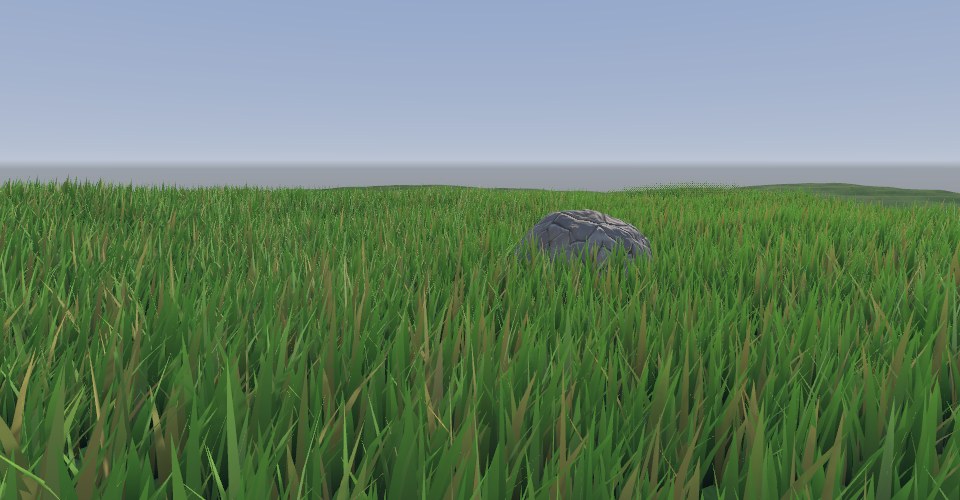
enableInstancing:RenderMeshInstanced 会直接报错,代码里要 mat.enableInstancing = true。② Shader 漏了 #pragma multi_compile_instancing:没有实例化变体,所有实例画在同一个位置。③ ShadowCaster、DepthOnly 等 Pass 也要加这条 pragma 并调用 UNITY_SETUP_INSTANCE_ID,否则阴影全叠在原点。④ 阴影的代价:草地投射阴影会让阴影 Pass 再画一遍所有实例,远处的草通常应关闭投影(分两批,近处 ShadowCastingMode.On、远处 Off)。案例 20.8草的交互压弯进阶单独打开 ↗
目标:角色或物体经过时,周围的草被推开、压低。
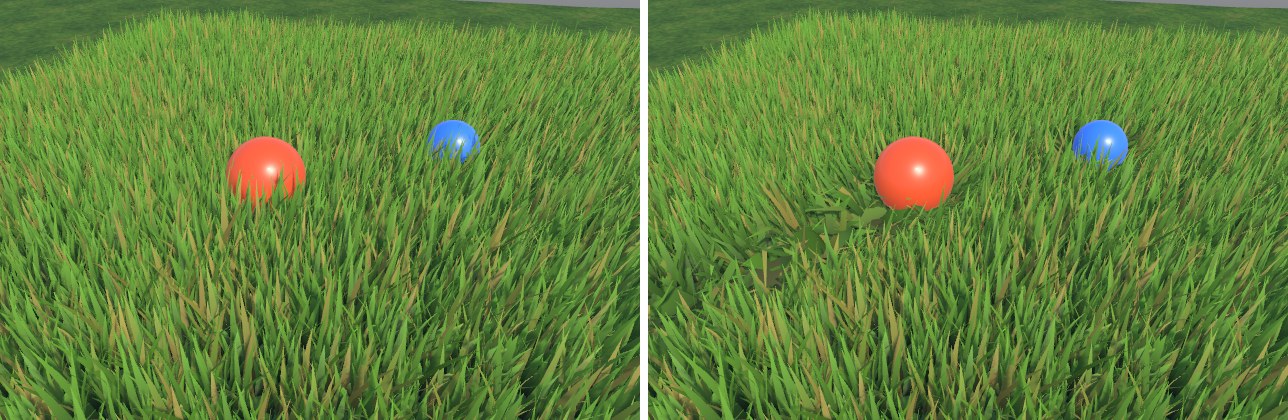
最简单而有效的做法是把“交互体”的位置和半径作为全局数组传给 Shader,每个草叶顶点计算自己到每个交互体的水平距离,在半径以内的就沿远离方向推开。全局变量不放进 UnityPerMaterial,由 Shader.SetGlobalVectorArray 设置,所有用到它的材质(草、花、灌木)都能读到。
// 交互体:全局数组,xyz = 世界坐标,w = 影响半径。不放进 UnityPerMaterial,由 Shader.SetGlobal* 设置
float4 _Ch20Interactors[8];
float  _Ch20InteractorCount;
void UploadInteractors()
{
    int n = 0;
    if (interactors != null)
        foreach (var t in interactors)
        {
            if (t == null || n >= MaxInteractors) continue;
            var p = t.position;
            m_InteractorData[n++] = new Vector4(p.x, p.y, p.z, interactorRadius * t.lossyScale.x);
        }
    // 全局数组:所有用到它的材质都能读到(草、灌木、花……)
    Shader.SetGlobalVectorArray(s_Interactors, m_InteractorData);
    Shader.SetGlobalFloat(s_InteractorCount, n);
}
// 案例 20.7–20.9:批量绘制草丛 + 上传交互体(网页版,对应 Ch20/GrassRenderer.cs)。
// C# 用 Graphics.RenderMeshInstanced 每 1023 个实例一批提交;WebGL2 没有这个 API,
// 这里往场景里加一个“自定义绘制物体”:同一个草丛网格 + instanceCount,引擎用 drawElementsInstanced 一次画完,
// 每实例矩阵和 _Variation 打包进一张 RGBA32F 贴图(Grass.glsl 里按 gl_InstanceID 读取),
// 主画面、阴影 Pass 都走引擎的普通流程(和 RenderParams 里的 shadowCastingMode / receiveShadows 一样)。
//
// 实例数据在 C# 里由拍摄脚本 Ch20Shots.Grass() 调 SetInstances() 填入,不会被序列化导出,
// 所以网页版按同样的参数(区域、间距、随机种子、筛选规则)重新生成:
//   - System.Random 按 .NET 源码逐位复刻,位置、旋转、缩放、颜色随机值与 Unity 一致;
//   - 地面高度直接从场景里的地形网格插值(等价于 C# 里的高度函数 h(x, z));
//   - 缩放用到的 Mathf.PerlinNoise 是近似实现(只影响 ±20% 的大小起伏)。
import { mat4 } from '../engine/math.js';

const DATA_WIDTH = 1024;   // 与 Grass.glsl 的 GRASS_DATA_WIDTH 一致
const MAX_INTERACTORS = 8;

// 各配图调用 Ch20Shots.Grass(s, h, area, spacing, accept, seed) 的参数
const SHOTS = {
  'ch20-grass-field': { area: [-14, -8, 28, 34], spacing: 0.24 },
  'ch20-grass-interact': { area: [-6, -4, 12, 12], spacing: 0.16 },
  'ch20-grass-fade': { area: [-16, -6, 32, 40], spacing: 0.3 },
  // 只在平缓、低于雪线的地方长草
  'ch20-final': {
    area: [-16, -14, 30, 30], spacing: 0.26,
    accept: (x, z, h) => {
      const e = 0.3, y = h(x, z);
      const dx = (h(x + e, z) - h(x - e, z)) / (2 * e), dz = (h(x, z + e) - h(x, z - e)) / (2 * e);
      return dx * dx + dz * dz < 0.12 && y < 4 && y > -0.3;
    },
  },
};

export default class GrassRenderer {
  constructor(engine, json, obj, scene) {
    this.engine = engine; this.obj = obj; this.scene = scene;
    const d = json.data || {};
    this.d = d;
    this.castShadows = d.castShadows !== false;
    this.interactorRadius = d.interactorRadius ?? 1;
    // 导出数据里引用的 Transform 以 {component: 物体序号} 表示
    this.interactors = (d.interactors || []).map((t) => (t && t.component !== undefined && t.component !== null ? scene.objects[t.component] : null));
  }

  async init() {
    const E = this.engine, S = this.scene, d = this.d;
    const material = d.material && S.materialById(d.material.material);
    if (!material || !d.mesh || !d.mesh.mesh) return;
    const mesh = await E.assets.mesh(d.mesh.mesh);
    const { matrices, variation } = this.buildInstances();
    this.setInstances(matrices, variation, mesh, material);
  }

  /// 设置所有实例:矩阵(每个 12 个数 = 前三行)+ 每实例一个 0..1 的随机值(Shader 里用来做颜色变化)
  setInstances(matrices, variation, mesh, material) {
    const n = variation.length;
    if (!n) return;
    const texels = n * 4, rows = Math.ceil(texels / DATA_WIDTH);
    const data = new Float32Array(DATA_WIDTH * rows * 4);
    const min = [Infinity, Infinity, Infinity], max = [-Infinity, -Infinity, -Infinity];
    for (let i = 0; i < n; i++) {
      data.set(matrices.subarray(i * 12, i * 12 + 12), i * 16);
      data[i * 16 + 12] = variation[i];
      const p = [matrices[i * 12 + 3], matrices[i * 12 + 7], matrices[i * 12 + 11]];
      for (let k = 0; k < 3; k++) { min[k] = Math.min(min[k], p[k]); max[k] = Math.max(max[k], p[k]); }
    }
    const tex = this.engine.glc.texture2D(DATA_WIDTH, rows, 'RGBA32F', data, { mips: false, filter: 'Point', wrap: 'Clamp' });
    // 外扩 1 米,留给草高和弯曲
    const center = [0, 1, 2].map((k) => (min[k] + max[k]) * 0.5);
    const extents = [0, 1, 2].map((k) => (max[k] - min[k]) * 0.5 + 1);
    const o = this.obj;
    this.drawObj = {
      index: -1, name: o.name + ' (instanced)', active: true, layer: o.layer, json: o.json,
      matrix: mat4.identity(), invMatrix: mat4.identity(), flip: false,
      mesh, instanceCount: n,
      renderer: {
        enabled: true, materials: [material], castShadows: this.castShadows, shadowsOnly: false,
        receiveShadows: true, bounds: [center, extents], sortingOrder: 0,
      },
      uniforms: { _GrassInstanceData: tex },
    };
    this.scene.renderers.push(this.drawObj);
    this.count = n;
  }

  // 每帧(C# 是每个相机开始渲染时)上传交互体:全局数组,所有用到它的材质都能读到
  update() {
    if (this.drawObj) this.drawObj.active = this.obj.active !== false;
    const arr = new Float32Array(MAX_INTERACTORS * 4);
    let n = 0;
    for (const t of this.interactors) {
      if (!t || n >= MAX_INTERACTORS) continue;
      const m = t.matrix, s = (t.json.lossyScale || [1])[0];
      arr.set([m[12], m[13], m[14], this.interactorRadius * s], n * 4);
      n++;
    }
    this.engine.setGlobal('_Ch20Interactors', arr);
    this.engine.setGlobal('_Ch20InteractorCount', n);
  }

  // ---------------- 复刻 Ch20Shots.Grass() 的实例生成 ----------------
  buildInstances() {
    const cfg = SHOTS[this.scene.doc.id] || null;
    const h = this.terrainHeight();
    let area, spacing, accept = null;
    if (cfg) { area = cfg.area; spacing = cfg.spacing; accept = cfg.accept || null; }
    else {
      // 不认识的场景:铺满地形
      const b = this.terrain ? this.terrain.renderer.bounds : [[0, 0, 0], [5, 0, 5]];
      area = [b[0][0] - b[1][0], b[0][2] - b[1][2], b[1][0] * 2, b[1][2] * 2]; spacing = 0.3;
    }
    const f = Math.fround;
    const rnd = new DotNetRandom(5);
    const R = () => f(rnd.nextDouble());
    const mats = [], vars = [];
    const [ax, ay, aw, ah] = area.map(f);
    const sp = f(spacing);
    // C# 用 float 累加循环变量,次数要与之一致,所以全程用 Math.fround 模拟单精度
    for (let z = ay; z < f(ay + ah); z = f(z + sp)) {
      for (let x = ax; x < f(ax + aw); x = f(x + sp)) {
        const px = f(x + f(f(R() - 0.5) * sp));
        const pz = f(z + f(f(R() - 0.5) * sp));
        if (accept && !accept(px, pz, h)) continue;
        const py = h(px, pz);
        const sc = lerp(0.75, 1.35, R()) * lerp(0.8, 1.2, fbm(px * 0.3, pz * 0.3, 2));
        const yaw = (R() * 360 * Math.PI) / 180;
        // Matrix4x4.TRS(p, Euler(0, yaw, 0), sc) 的前三行(Unity 左手系绕 Y 旋转)
        const c = Math.cos(yaw) * sc, s = Math.sin(yaw) * sc;
        mats.push(c, 0, s, px, 0, sc, 0, py, -s, 0, c, pz);
        vars.push(R());
      }
    }
    return { matrices: new Float32Array(mats), variation: new Float32Array(vars) };
  }

  // 地形高度:在场景里名为 Terrain 的规则网格(Heightfield.Build 生成)上按三角形插值
  terrainHeight() {
    const t = this.scene.objects.find((o) => o.name === 'Terrain' && o.mesh && o.mesh.cpu && o.mesh.cpu.position);
    this.terrain = t;
    if (!t) return () => 0;
    const pos = t.mesh.cpu.position, vc = t.mesh.header.vertexCount;
    const N = Math.round(Math.sqrt(vc)) - 1;   // 每边段数
    const x0 = pos[0], z0 = pos[2], step = (pos[(N) * 3] - x0) / N;
    const m = t.matrix;   // 地形物体在原点,这里仍按平移处理
    const Y = (ix, iz) => pos[(iz * (N + 1) + ix) * 3 + 1];
    return (wx, wz) => {
      const gx = Math.min(Math.max((wx - m[12] - x0) / step, 0), N - 1e-4), gz = Math.min(Math.max((wz - m[14] - z0) / step, 0), N - 1e-4);
      const ix = Math.floor(gx), iz = Math.floor(gz), fx = gx - ix, fz = gz - iz;
      const h00 = Y(ix, iz), h10 = Y(ix + 1, iz), h01 = Y(ix, iz + 1), h11 = Y(ix + 1, iz + 1);
      // 与 Heightfield.Build 的三角形划分一致:(a, b, a+1) 与 (a+1, b, b+1)
      const y = fx + fz <= 1 ? h00 + fx * (h10 - h00) + fz * (h01 - h00) : h11 + (1 - fx) * (h01 - h11) + (1 - fz) * (h10 - h11);
      return y + m[13];
    };
  }
}

function lerp(a, b, t) { t = Math.min(Math.max(t, 0), 1); return a + (b - a) * t; }

// .NET(Mono)System.Random(seed) 的 Knuth 减法生成器,按参考源码逐行移植
class DotNetRandom {
  constructor(seed) {
    const MBIG = 2147483647, MSEED = 161803398;
    const a = new Int32Array(56);
    const sub = seed === -2147483648 ? 2147483647 : Math.abs(seed);
    let mj = MSEED - sub;
    a[55] = mj;
    let mk = 1;
    for (let i = 1; i < 55; i++) {
      const ii = (21 * i) % 55;
      a[ii] = mk;
      mk = mj - mk;
      if (mk < 0) mk += MBIG;
      mj = a[ii];
    }
    for (let k = 1; k < 5; k++)
      for (let i = 1; i < 56; i++) {
        a[i] -= a[1 + ((i + 30) % 55)];
        if (a[i] < 0) a[i] += MBIG;
      }
    this.a = a; this.inext = 0; this.inextp = 21; this.MBIG = MBIG;
  }
  sample() {
    let n = this.inext, np = this.inextp;
    if (++n >= 56) n = 1;
    if (++np >= 56) np = 1;
    let r = this.a[n] - this.a[np];
    if (r === this.MBIG) r--;
    if (r < 0) r += this.MBIG;
    this.a[n] = r;
    this.inext = n; this.inextp = np;
    return r;
  }
  nextDouble() { return this.sample() * (1 / this.MBIG); }
}

// Mathf.PerlinNoise 的近似(经典改进 Perlin 噪声,输出约 0..1)与 Heightfield.Fbm
const PERM = [151, 160, 137, 91, 90, 15, 131, 13, 201, 95, 96, 53, 194, 233, 7, 225, 140, 36, 103, 30, 69, 142, 8, 99, 37, 240, 21, 10, 23, 190, 6, 148, 247, 120, 234, 75, 0, 26, 197, 62, 94, 252, 219, 203, 117, 35, 11, 32, 57, 177, 33, 88, 237, 149, 56, 87, 174, 20, 125, 136, 171, 168, 68, 175, 74, 165, 71, 134, 139, 48, 27, 166, 77, 146, 158, 231, 83, 111, 229, 122, 60, 211, 133, 230, 220, 105, 92, 41, 55, 46, 245, 40, 244, 102, 143, 54, 65, 25, 63, 161, 1, 216, 80, 73, 209, 76, 132, 187, 208, 89, 18, 169, 200, 196, 135, 130, 116, 188, 159, 86, 164, 100, 109, 198, 173, 186, 3, 64, 52, 217, 226, 250, 124, 123, 5, 202, 38, 147, 118, 126, 255, 82, 85, 212, 207, 206, 59, 227, 47, 16, 58, 17, 182, 189, 28, 42, 223, 183, 170, 213, 119, 248, 152, 2, 44, 154, 163, 70, 221, 153, 101, 155, 167, 43, 172, 9, 129, 22, 39, 253, 19, 98, 108, 110, 79, 113, 224, 232, 178, 185, 112, 104, 218, 246, 97, 228, 251, 34, 242, 193, 238, 210, 144, 12, 191, 179, 162, 241, 81, 51, 145, 235, 249, 14, 239, 107, 49, 192, 214, 31, 181, 199, 106, 157, 184, 84, 204, 176, 115, 121, 50, 45, 127, 4, 150, 254, 138, 236, 205, 93, 222, 114, 67, 29, 24, 72, 243, 141, 128, 195, 78, 66, 215, 61, 156, 180];
const P = new Int32Array(512);
for (let i = 0; i < 512; i++) P[i] = PERM[i & 255];
function grad(h, x, y) { h &= 15; const u = h < 8 ? x : y, v = h < 4 ? y : h === 12 || h === 14 ? x : 0; return ((h & 1) === 0 ? u : -u) + ((h & 2) === 0 ? v : -v); }
function perlin(x, y) {
  const X = Math.floor(x) & 255, Y = Math.floor(y) & 255;
  x -= Math.floor(x); y -= Math.floor(y);
  const fade = (t) => t * t * t * (t * (t * 6 - 15) + 10);
  const u = fade(x), v = fade(y);
  const A = P[X] + Y, B = P[X + 1] + Y;
  const l = (t, a, b) => a + t * (b - a);
  const n = l(v, l(u, grad(P[P[A]], x, y), grad(P[P[B]], x - 1, y)), l(u, grad(P[P[A + 1]], x, y - 1), grad(P[P[B + 1]], x - 1, y - 1)));
  return Math.min(Math.max((n + 1) * 0.5, 0), 1);
}
function fbm(x, z, octaves = 5) {
  let sum = 0, amp = 0.5, freq = 1, norm = 0;
  for (let i = 0; i < octaves; i++) {
    sum += perlin(x * freq + i * 17.13, z * freq - i * 9.71) * amp;
    norm += amp; amp *= 0.5; freq *= 2.03;
  }
  return sum / norm;
}
顶点变形把距离淡出、风、交互三件事放在一个函数里,前向 Pass、阴影 Pass、深度 Pass 共用——所有 Pass 必须做相同的变形,否则影子和深度不跟着草动。
// 返回变形后的世界坐标;fade 为距离淡出系数(1 = 完全可见)
float3 GrassDeform(GrassAttributes v, out float fade)
{
    float3 pivotWS = TransformObjectToWorld(float3(0, 0, 0));     // 这一丛草的根部中心
    // 1) 距离淡出:先把整丛草“压矮”,再配合片元里的抖动裁剪
    float camDist = distance(pivotWS, GetCameraPositionWS());
    fade = saturate((_FadeEnd - camDist) / max(_FadeEnd - _FadeStart, 1e-3));
    float3 posOS = v.positionOS.xyz;
    posOS.y *= lerp(0.3, 1.0, fade);
    float3 posWS = TransformObjectToWorld(posOS);

    float h = v.uv.y;            // 0 根部 → 1 叶尖
    float bendW = h * h;         // 根部钉死、越往上越软(平方让弯曲更像弧线)

    // 2) 风:简化的行波(完整的风场做法见第 17 章)。_WindPhase 供静帧拍摄用
    float phase = _WindPhase + _Time.y * _WindSpeed;
    float wave = sin(dot(pivotWS.xz, float2(0.35, 0.22)) + phase) * 0.5 + 0.5;
    wave += sin(dot(pivotWS.xz, float2(-1.3, 0.9)) + phase * 2.3) * 0.15;
    posWS.xz += normalize(_WindDir.xz) * (wave * _WindStrength * bendW);

    // 3) 交互:每个交互体把附近的草沿水平方向推开,并往下压
    float2 push = 0;
    float press = 0;
    int count = (int)_Ch20InteractorCount;
    for (int k = 0; k < count; k++)
    {
        float4 it = _Ch20Interactors[k];
        float2 d = posWS.xz - it.xz;
        float dist = length(d);
        float f = saturate(1.0 - dist / it.w);
        f = f * f * (3.0 - 2.0 * f);                         // smoothstep 形状,边缘不突变
        f *= saturate(1.0 - (pivotWS.y - it.y) / it.w);      // 交互体离地太高就不影响
        push += d / max(dist, 1e-3) * f;
        press = max(press, f);
    }
    // 水平推开量不超过顶点离地高度;再按“到根部的距离不变”把顶点压低:y' = √(h² − |o|²)
    float hy = max(posWS.y - pivotWS.y, 0.0);
    float2 o = push * (_BendStrength * bendW);
    float ol = length(o);
    float maxO = hy * 0.95;
    o *= min(1.0, maxO / max(ol, 1e-4));
    ol = min(ol, maxO);
    posWS.xz += o;
    posWS.y = pivotWS.y + sqrt(max(hy * hy - ol * ol, 0.0)) * (1.0 - press * _PressDown);
    return posWS;
}
// 返回变形后的世界坐标;fade 为距离淡出系数(1 = 完全可见)
// 顶点输入(GrassAttributes):positionOS、normalOS、color、texcoord0
vec3 GrassDeform(out float fade)
{
    vec3 pivotWS = GrassObjectToWorld(vec3(0, 0, 0));     // 这一丛草的根部中心
    // 1) 距离淡出:先把整丛草“压矮”,再配合片元里的抖动裁剪
    float camDist = distance(pivotWS, GetCameraPositionWS());
    fade = saturate((_FadeEnd - camDist) / max(_FadeEnd - _FadeStart, 1e-3));
    vec3 posOS = positionOS.xyz;
    posOS.y *= mix(0.3, 1.0, fade);
    vec3 posWS = GrassObjectToWorld(posOS);

    float h = texcoord0.y;       // 0 根部 → 1 叶尖
    float bendW = h * h;         // 根部钉死、越往上越软(平方让弯曲更像弧线)

    // 2) 风:简化的行波(完整的风场做法见第 17 章)。_WindPhase 供静帧拍摄用
    float phase = _WindPhase + _Time.y * _WindSpeed;
    float wave = sin(dot(pivotWS.xz, vec2(0.35, 0.22)) + phase) * 0.5 + 0.5;
    wave += sin(dot(pivotWS.xz, vec2(-1.3, 0.9)) + phase * 2.3) * 0.15;
    posWS.xz += normalize(_WindDir.xz) * (wave * _WindStrength * bendW);

    // 3) 交互:每个交互体把附近的草沿水平方向推开,并往下压
    vec2 push = vec2(0.0);
    float press = 0.0;
    int count = int(_Ch20InteractorCount);
    for (int k = 0; k < count; k++)
    {
        vec4 it = _Ch20Interactors[k];
        vec2 d = posWS.xz - it.xz;
        float dist = length(d);
        float f = saturate(1.0 - dist / it.w);
        f = f * f * (3.0 - 2.0 * f);                         // smoothstep 形状,边缘不突变
        f *= saturate(1.0 - (pivotWS.y - it.y) / it.w);      // 交互体离地太高就不影响
        push += d / max(dist, 1e-3) * f;
        press = max(press, f);
    }
    // 水平推开量不超过顶点离地高度;再按“到根部的距离不变”把顶点压低:y' = √(h² − |o|²)
    float hy = max(posWS.y - pivotWS.y, 0.0);
    vec2 o = push * (_BendStrength * bendW);
    float ol = length(o);
    float maxO = hy * 0.95;
    o *= min(1.0, maxO / max(ol, 1e-4));
    ol = min(ol, maxO);
    posWS.xz += o;
    posWS.y = pivotWS.y + sqrt(max(hy * hy - ol * ol, 0.0)) * (1.0 - press * _PressDown);
    return posWS;
}
推开量直接加在 xz 上会让草叶变长(水平位移 + 原有高度),被压倒的草看起来像被拉长的面条。修正方法是保持“顶点到根部的距离”不变:顶点原来离地 h,水平推开 |o| 后,新的高度应为 ,并且 |o| 不能超过 h。弯曲权重用 uv.y²,根部几乎不动,越往上越软,叶片呈弧形倒下。
案例 20.9距离淡出:缩短与抖动裁剪进阶单独打开 ↗
目标:草在远处平滑地消失,而不是在某个距离“啪”地断掉。
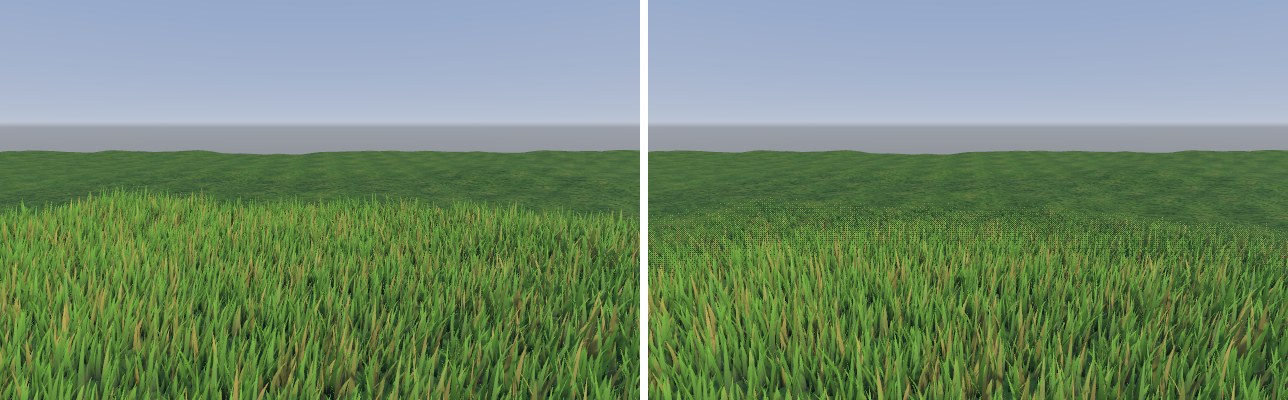
草地必须有一个绘制距离:几十米外的草叶小于一个像素,画了也只是产生闪烁和过度绘制(Overdraw)。直接截断会在地面上留下一条清晰的边界线,相机一动边界线跟着移动,非常显眼。我们组合两种手段:
- 缩短:顶点着色器里按到相机的距离计算
fade,把整丛草的高度乘以lerp(0.3, 1, fade)。远处的草先变矮,自然地“沉”进地面。 - 抖动裁剪(Dither Clip):片元着色器里用 4×4 Bayer 矩阵给每个像素一个阈值,
clip(fade − 阈值)。fade 为 0.5 时恰好一半像素被丢弃。没有时间抗锯齿时能看到细小的网点(如图 20-17 右的远处),开启 TAA 后网点在帧间累积,看起来就像半透明;它仍然是不透明渲染,不需要排序、也能正常写深度。注意 MSAA 帮不上忙:clip 是按片元执行的,同一像素的多个采样一起被保留或丢弃。
// 4×4 Bayer 抖动阈值(0..1):按屏幕像素位置给出不同阈值,用 clip 做“半透明”
float Bayer4x4(float2 pixel)
{
    const float m[16] = { 0, 8, 2, 10, 12, 4, 14, 6, 3, 11, 1, 9, 15, 7, 13, 5 };
    uint2 p = uint2(pixel) % 4;
    return (m[p.y * 4 + p.x] + 0.5) / 16.0;
}
clip(Alpha Test)在 TBDR 架构的移动 GPU 上会破坏隐藏面剔除(HSR/Early-Z)的效率,大面积使用时代价明显。移动端可以只保留“缩短”,或者把淡出带放在非常远、覆盖像素很少的地方;更彻底的做法是按区块做 LOD:远处区块直接用更稀疏的实例数组。地面贴图的颜色也要与草的平均颜色接近,草消失后才不会露出一块不同色的地面——这也是为什么示范地形的草地层贴图偏深绿。案例 20.10综合:一块完整的小地形进阶单独打开 ↗
目标:把本章的技术组合起来。
地面使用案例 20.4 的自动材质(高度/坡度规则 + 岩石 Triplanar + 高度混合);草只种在“坡度小、低于雪线”的地方——种植时在 C# 里对高度函数求坡度,过滤掉陡坡和高处,这与 Shader 里的规则是同一套判断,所以草地边缘正好与地表的草地层对齐。草的距离淡出设在 20–28 米,再开启指数雾让远山退到背景里。
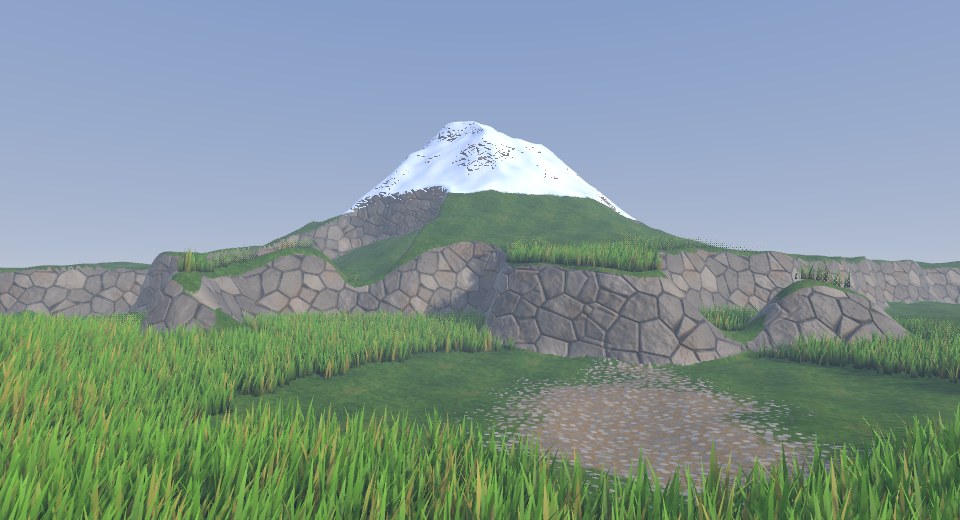
如果要把这一套搬到 Unity Terrain 上,对应关系是:高度场网格 → Terrain 组件;AutoTerrain.shader → 改写 TerrainLit(保留它的 _Control/_Splat 接口和 Instanced 地形的高度图采样)或在 Terrain 的材质槽里放自定义 Shader;草 → Terrain 的 Detail 系统(URP 用 TerrainDetailLit / WavingGrass 系列 Shader)或者像本章这样自己用实例化绘制,后者在交互和淡出上更可控。
20.4 性能、移动端与 Built-in 差异
地形 Shader 是“屏幕覆盖率最高”的 Shader 之一,往往占据画面下半部分的全部像素,片元开销会被放大。几条经验:
- 数清采样数。四层 Splatmap、每层颜色 + 法线 + Mask,就是 1 + 4×3 = 13 次采样;岩石层再改成 Triplanar,又多 6 次。优先砍掉远处用不到的:法线和 Mask 只在近处采样(按距离做动态分支或像 TerrainLit 那样在远处切换到 Basemap),Triplanar 只给陡坡层用。
- 贴图打包。颜色 + 高度放一张 RGBA,金属/AO/高度/光滑度放一张 Mask,法线用两通道压缩格式(BC5 / ASTC 的法线模式)。所有层共用一个采样器。
- 用 Texture2DArray。层数很多(8 层以上)时,把各层贴图放进一个纹理数组,Control 图里存“层索引 + 权重”而不是每层一个通道,可以避免 Add Pass 的多次绘制。这超出了本章范围,但值得知道它是大世界地形的主流方案。
- 植被的瓶颈通常在顶点和 Overdraw,不在 Draw Call。九万片叶子 × 9 个顶点,再加上阴影 Pass 的一遍,顶点数相当可观;草叶互相重叠又带来大量 Overdraw。控制实例密度、远处减少每丛叶片数(准备 2–3 个 LOD 的草丛网格)、关闭远处阴影,效果往往比优化 Shader 指令更明显。
- half 精度。颜色、权重、法线都可以用
half;但世界坐标(用于 Triplanar 和世界 UV)必须是float——在距原点几百米的地方,half 的精度已经不足以表达厘米级的位置,纹理会出现明显的抖动和块状。
与 Built-in 管线相比,地形的原理没有变化,差异主要在写法:Built-in 的 Terrain Shader 通常是 Surface Shader,用 #pragma surface ... vertex:SplatmapVert finalcolor:SplatmapFinalColor 挂接引擎提供的 TerrainSplatmapCommon.cginc;URP 没有 Surface Shader,TerrainLit 是手写的顶点/片元函数,光照通过 UniversalFragmentPBR 计算——与本章的 Ch20ShadePBR 是同一个入口:
// 把“世界空间位置 + 世界法线 + 表面参数”交给 URP 的 PBR 光照。
// 地形类 Shader 的表面是自己混出来的,不走 Lit 的 SurfaceInput,所以直接组装 InputData/SurfaceData。
half4 Ch20ShadePBR(float3 positionWS, half3 normalWS, float4 positionCS,
                   half3 albedo, half metallic, half smoothness, half occlusion, half fogFactor)
{
    InputData inputData = (InputData)0;
    inputData.positionWS = positionWS;
    inputData.normalWS = NormalizeNormalPerPixel(normalWS);
    inputData.viewDirectionWS = GetWorldSpaceNormalizeViewDir(positionWS);
    inputData.shadowCoord = TransformWorldToShadowCoord(positionWS);   // 逐像素算级联,避免顶点插值跨级联
    inputData.fogCoord = fogFactor;
    inputData.bakedGI = SampleSH(inputData.normalWS);
    inputData.normalizedScreenSpaceUV = GetNormalizedScreenSpaceUV(positionCS);  // Forward+ 的分块光源查找要用
    inputData.shadowMask = half4(1, 1, 1, 1);

    SurfaceData surface = (SurfaceData)0;
    surface.albedo = albedo;
    surface.metallic = metallic;
    surface.smoothness = smoothness;
    surface.occlusion = occlusion;
    surface.alpha = 1;
    surface.normalTS = half3(0, 0, 1);

    half4 color = UniversalFragmentPBR(inputData, surface);
    color.rgb = MixFog(color.rgb, fogFactor);
    return color;
}
// 把“世界空间位置 + 世界法线 + 表面参数”交给 URP 的 PBR 光照。
// 地形类 Shader 的表面是自己混出来的,不走 Lit 的 SurfaceInput,所以直接组装 InputData/SurfaceData。
// positionCS 在片元里传 gl_FragCoord(对应 HLSL 的 SV_POSITION)
vec4 Ch20ShadePBR(vec3 positionWS, vec3 normalWS, vec4 positionCS,
                  vec3 albedo, float metallic, float smoothness, float occlusion, float fogFactor)
{
    InputData inputData = InitInputData();
    inputData.positionWS = positionWS;
    inputData.positionCS = positionCS;
    inputData.normalWS = NormalizeNormalPerPixel(normalWS);
    inputData.viewDirectionWS = GetWorldSpaceNormalizeViewDir(positionWS);
    inputData.shadowCoord = TransformWorldToShadowCoord(positionWS);   // 逐像素算级联,避免顶点插值跨级联
    inputData.fogCoord = fogFactor;
    inputData.bakedGI = SampleSH(inputData.normalWS);
    inputData.normalizedScreenSpaceUV = GetNormalizedScreenSpaceUV(positionCS);  // Forward+ 的分块光源查找要用
    inputData.shadowMask = vec4(1, 1, 1, 1);

    SurfaceData surface = InitSurfaceData();
    surface.albedo = albedo;
    surface.metallic = metallic;
    surface.smoothness = smoothness;
    surface.occlusion = occlusion;
    surface.alpha = 1.0;
    surface.normalTS = vec3(0, 0, 1);

    vec4 color = UniversalFragmentPBR(inputData, surface);
    color.rgb = MixFog(color.rgb, fogFactor);
    return color;
}
这个小函数是本章所有“自己混出表面”的 Shader 共用的光照出口:表面参数自己算,InputData 自己组装,然后交给 URP。shadowCoord 在片元里逐像素计算而不是在顶点里插值,是因为开启级联阴影时,同一个大三角形的三个顶点可能落在不同的级联里,插值出来的阴影坐标是错的——地形三角形往往很大,这一点尤其要注意。
本章小结
- 高度场网格的 UV 等价于世界 XZ 投影,陡坡上拉伸 1/N.y 倍;三平面映射沿三个轴各投影一次,用 |N|^k 归一化作为权重。
- Triplanar 的法线不能直接 swizzle,要把细节法线叠加到几何法线上:UDN 最便宜,Whiteout 性价比最高,RNM 最正确;背面翻转 U 时切线 x 分量也要翻。
- 自动地表 = 规则遮罩(高度、坡度 + 噪声)+ 逐层叠加;层间用高度混合,过渡由贴图高度决定,“缝隙先被填满”。
- TerrainLit:
_Control的 RGBA 是四层权重,超过 4 层走 Add Pass;高度存在 Mask Map 的 B 通道,Height Based Blend 只在 ≤4 层时生效;所有层共用一个采样器。 - 大量植被用 GPU Instancing:
Graphics.RenderMeshInstanced+multi_compile_instancing+UNITY_SETUP_INSTANCE_ID,每实例数据用UNITY_INSTANCING_BUFFER+ MaterialPropertyBlock 数组。 - 交互用全局数组,所有 Pass 做相同的顶点变形;距离淡出用“缩短 + Bayer 抖动裁剪”,移动端慎用 clip。
练习
- 给
Triplanar.shader加一个“物体空间”开关:用positionOS和物体空间法线做投影,让一个旋转、移动的石头纹理不再游动。 - 在
TriplanarNormalWS里加入动态分支:权重小于 0.01 的投影跳过采样。用 Frame Debugger 或 GPU 性能工具对比开关前后的耗时。 - 在
AutoTerrain.shader中加一个“朝向”规则:只在背阴的北坡(法线 z 分量为负)上长苔藓。 - 把
GrassRenderer改成按 16 m × 16 m 区块分组,每块各自计算包围盒,并让远处区块关闭阴影投射。 - 实现“交互 RT”:用一张跟随相机的 RenderTexture 记录推开方向,每帧衰减,让草被压过后几秒内慢慢恢复。