URP 渲染实战 / 第 4 章 Shader 里的数学工具箱与程序化图案 / 案例 4.6
案例 4.6Voronoi 细胞进阶
目标:生成 Voronoi(又称 Worley、细胞噪声)图案,分别展示“到最近点的距离”“细胞边界”和“按细胞上色的鹅卵石”。它是石板路、龟裂土地、细胞、鳞片、第 18 章护盾、第 19 章水下焦散的基础。
做法是 4.3 节“编号 + 局部坐标”结构的延伸:每个格子用哈希决定一个特征点的位置,平面上每个点都属于离它最近的那个特征点,形成一个个凸多边形细胞。由于特征点留在自己的格子里,最近的点一定在当前格及其邻居之中,不需要遍历所有点。
Assets/Cookbook/Ch04/ProceduralLib.hlsl(节选:voronoi)
// Worley / Voronoi:每格放一个随机特征点,求到最近(F1)和次近(F2)特征点的距离
// phase 让特征点在格子内绕圈移动,用来做动画
float2 VoronoiPoint(float2 cell, float phase)
{
    float2 h = Hash22(cell);
    return 0.5 + 0.4 * sin(phase + TWO_PI * h);   // 特征点在格内的位置,始终留在 [0.1,0.9]
}

void Voronoi(float2 p, float phase, out float f1, out float f2, out float2 nearestCell)
{
    float2 i = floor(p);
    float2 f = frac(p);
    f1 = 8.0; f2 = 8.0; nearestCell = i;
    // F1 用 3×3 邻域就够;F2(次近点)可能在更远的格子里,所以搜 5×5
    [unroll] for (int y = -2; y <= 2; y++)
    [unroll] for (int x = -2; x <= 2; x++)
    {
        float2 g = float2(x, y);                       // 邻居格子相对偏移
        float d = length(g + VoronoiPoint(i + g, phase) - f);
        if (d < f1)      { f2 = f1; f1 = d; nearestCell = i + g; }
        else if (d < f2) { f2 = d; }
    }
}

// 到细胞边界的“真实”距离:边界是两个特征点连线的中垂线,
// 点到中垂线的距离 = dot(两点中点 - 当前点, 两点连线方向)
float VoronoiBorder(float2 p, float phase)
{
    float2 i = floor(p);
    float2 f = frac(p);
    // 第一遍:找最近点(相对当前点的向量 mr)
    float2 mg = 0, mr = 0; float md = 8.0;
    [unroll] for (int y = -1; y <= 1; y++)
    [unroll] for (int x = -1; x <= 1; x++)
    {
        float2 g = float2(x, y);
        float2 r = g + VoronoiPoint(i + g, phase) - f;
        float d = dot(r, r);
        if (d < md) { md = d; mr = r; mg = g; }
    }
    // 第二遍:以最近点所在格为中心,对其余每个点求到中垂线的距离,取最小
    md = 8.0;
    [unroll] for (int y2 = -2; y2 <= 2; y2++)
    [unroll] for (int x2 = -2; x2 <= 2; x2++)
    {
        float2 g = mg + float2(x2, y2);
        float2 r = g + VoronoiPoint(i + g, phase) - f;
        float2 diff = r - mr;
        if (dot(diff, diff) > 1e-5)
            md = min(md, dot(0.5 * (mr + r), normalize(diff)));
    }
    return md;
}
// Worley / Voronoi:每格放一个随机特征点,求到最近(F1)和次近(F2)特征点的距离
// phase 让特征点在格子内绕圈移动,用来做动画
vec2 VoronoiPoint(vec2 cell, float phase)
{
    vec2 h = Hash22(cell);
    return 0.5 + 0.4 * sin(phase + TWO_PI * h);   // 特征点在格内的位置,始终留在 [0.1,0.9]
}

void Voronoi(vec2 p, float phase, out float f1, out float f2, out vec2 nearestCell)
{
    vec2 i = floor(p);
    vec2 f = fract(p);
    f1 = 8.0; f2 = 8.0; nearestCell = i;
    // F1 用 3×3 邻域就够;F2(次近点)可能在更远的格子里,所以搜 5×5
    for (int y = -2; y <= 2; y++)
    for (int x = -2; x <= 2; x++)
    {
        vec2 g = vec2(x, y);                           // 邻居格子相对偏移
        float d = length(g + VoronoiPoint(i + g, phase) - f);
        if (d < f1)      { f2 = f1; f1 = d; nearestCell = i + g; }
        else if (d < f2) { f2 = d; }
    }
}

// 到细胞边界的“真实”距离:边界是两个特征点连线的中垂线,
// 点到中垂线的距离 = dot(两点中点 - 当前点, 两点连线方向)
float VoronoiBorder(vec2 p, float phase)
{
    vec2 i = floor(p);
    vec2 f = fract(p);
    // 第一遍:找最近点(相对当前点的向量 mr)
    vec2 mg = vec2(0.0), mr = vec2(0.0); float md = 8.0;
    for (int y = -1; y <= 1; y++)
    for (int x = -1; x <= 1; x++)
    {
        vec2 g = vec2(x, y);
        vec2 r = g + VoronoiPoint(i + g, phase) - f;
        float d = dot(r, r);
        if (d < md) { md = d; mr = r; mg = g; }
    }
    // 第二遍:以最近点所在格为中心,对其余每个点求到中垂线的距离,取最小
    md = 8.0;
    for (int y2 = -2; y2 <= 2; y2++)
    for (int x2 = -2; x2 <= 2; x2++)
    {
        vec2 g = mg + vec2(x2, y2);
        vec2 r = g + VoronoiPoint(i + g, phase) - f;
        vec2 diff = r - mr;
        if (dot(diff, diff) > 1e-5)
            md = min(md, dot(0.5 * (mr + r), normalize(diff)));
    }
    return md;
}
函数里有三个值得注意的地方:
- 动画:特征点位置是
0.5 + 0.4·sin(phase + 2π·hash),每个点以自己的随机相位在格内往复,整体看起来像细胞在蠕动。0.4 的幅度保证点始终留在 [0.1, 0.9],搜索范围才可靠。 - 搜索范围:只求 F1(最近点)时 3×3 邻域就够了;但 F2(次近点)在特征点分布不均时可能落在更外一圈的格子里,所以这里保险地搜索 5×5,代价是每像素 25 次哈希。在本例的参数下,3×3 与 5×5 的结果肉眼几乎看不出差别——图 4-12 中间那几处糊边另有原因,见下一条。
- 真实边界距离:
F2 − F1常被当作“到边界的距离”,但它只是近似:两个特征点靠得很近时,F2 − F1 在整个区域都不会超过两点间距,边界会糊成一大片;三个细胞交汇处也会变宽。精确的做法(Inigo Quilez 介绍过的两遍算法)是:先找到最近点,再对周围每个点求当前位置到“两点连线的中垂线”的距离,取最小值。中垂线正是两个细胞的分界线,这个距离才是真正的边界距离。
Assets/Cookbook/Ch04/C04_06_Voronoi.shader(节选:shade)
half3 col;
if (_Mode < 0.5)
{
    // F1:到最近特征点的距离 → 一个个“圆锥”,加等高线更容易看出形状
    col = lerp(_ColorA.rgb, _ColorB.rgb, saturate(f1 * 1.4));
    col *= 0.85 + 0.15 * step(0.5, frac(f1 * 8.0));
    col = lerp(col, _EdgeColor.rgb, 1.0 - smoothstep(0.03, 0.05, f1));   // 特征点
}
else if (_Mode < 1.5)
{
    // F2 - F1:两个最近点距离相等的地方就是细胞边界,那里差值趋于 0
    float e = f2 - f1;
    col = lerp(_EdgeColor.rgb, _ColorB.rgb, smoothstep(0.0, _EdgeWidth * 2.0, e));
}
else
{
    // 用最近格子的编号再哈希一次,每个细胞一个固定颜色
    float h = Hash21(cell + 31.7);
    col = lerp(_ColorA.rgb, _ColorB.rgb, h);
    // 用到边界的真实距离做明暗和描边:中心亮、边缘暗,像鹅卵石
    float border = VoronoiBorder(p, _Phase + _Time.y * _Speed);
    col *= lerp(0.7, 1.1, saturate(border * 2.5));
    float aa = fwidth(border);
    col = lerp(_EdgeColor.rgb, col, smoothstep(_EdgeWidth * 0.5 - aa, _EdgeWidth * 0.5 + aa, border));
}
vec3 col;
if (_Mode < 0.5)
{
    // F1:到最近特征点的距离 → 一个个“圆锥”,加等高线更容易看出形状
    col = mix(_ColorA.rgb, _ColorB.rgb, saturate(f1 * 1.4));
    col *= 0.85 + 0.15 * step(0.5, fract(f1 * 8.0));
    col = mix(col, _EdgeColor.rgb, 1.0 - smoothstep(0.03, 0.05, f1));   // 特征点
}
else if (_Mode < 1.5)
{
    // F2 - F1:两个最近点距离相等的地方就是细胞边界,那里差值趋于 0
    float e = f2 - f1;
    col = mix(_EdgeColor.rgb, _ColorB.rgb, smoothstep(0.0, _EdgeWidth * 2.0, e));
}
else
{
    // 用最近格子的编号再哈希一次,每个细胞一个固定颜色
    float h = Hash21(cell + 31.7);
    col = mix(_ColorA.rgb, _ColorB.rgb, h);
    // 用到边界的真实距离做明暗和描边:中心亮、边缘暗,像鹅卵石
    float border = VoronoiBorder(p, _Phase + _Time.y * _Speed);
    col *= mix(0.7, 1.1, saturate(border * 2.5));
    float aa = fwidth(border);
    col = mix(_EdgeColor.rgb, col, smoothstep(_EdgeWidth * 0.5 - aa, _EdgeWidth * 0.5 + aa, border));
}
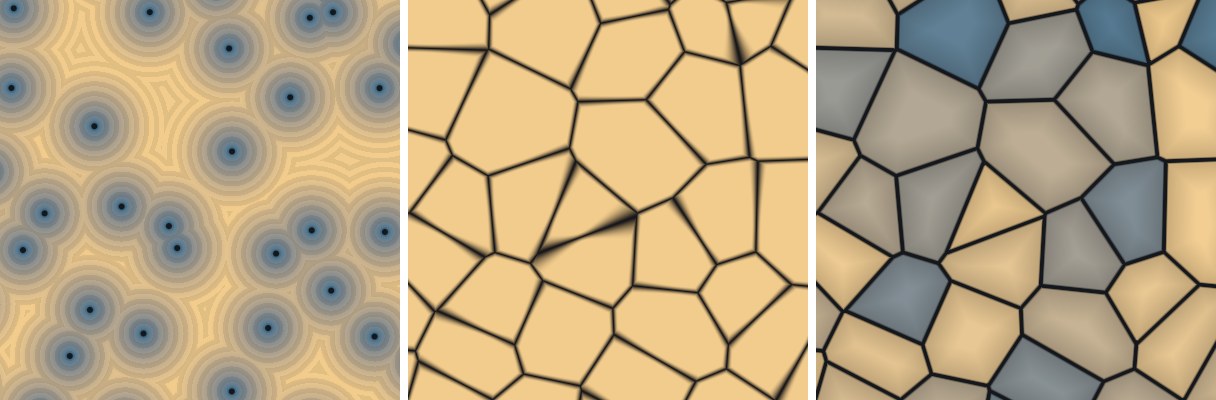
性能图 4-12 右图的着色每像素要调用一次
Voronoi(25 次哈希)和一次 VoronoiBorder(9 + 25 次),合计约 60 次哈希与距离计算,在移动端整屏使用时开销可观。静态的 Voronoi 图案最好烘焙成贴图;需要动画时,考虑降低分辨率渲染到 RenderTexture,或只在必要的区域(比如护盾的命中点附近)计算。