案例 3.7投射阴影与写入深度:ShadowCaster 与 DepthOnly进阶
目标:让物体能投射阴影(包括镂空形状的阴影),并能出现在深度图 _CameraDepthTexture 里。
到上一步为止,我们的 Shader 只有一个画颜色的 Pass。URP 在一帧里还会做别的绘制:渲染阴影图时,会以光源为“相机”把场景画一遍,只找带 ShadowCaster 标签的 Pass;需要深度预渲染(Depth Prepass)时,会再画一遍深度,只找 DepthOnly 标签的 Pass。一个 Shader 没有这些 Pass,物体就既不投影,也不会出现在预渲染的深度图里——不会报错,只是“悄悄缺席”。
ShadowCaster Pass
// ---------------- 2. 阴影投射 Pass:把物体画进光源的 Shadow Map ----------------
Pass
{
    Name "ShadowCaster"
    Tags { "LightMode"="ShadowCaster" }
    ZWrite On
    ZTest LEqual
    ColorMask 0          // 只要深度,不写颜色
    Cull [_Cull]

    HLSLPROGRAM
    #pragma vertex ShadowVert
    #pragma fragment ShadowFrag
    // 点光/聚光的阴影要用 _LightPosition 逐顶点求光方向,方向光用 _LightDirection
    #pragma multi_compile_vertex _ _CASTING_PUNCTUAL_LIGHT_SHADOW
    // Shadows.hlsl 用到了 CommonMaterial.hlsl 里的 LerpWhiteTo,单独引用时要先包含它
    #include "Packages/com.unity.render-pipelines.core/ShaderLibrary/CommonMaterial.hlsl"
    #include "Packages/com.unity.render-pipelines.universal/ShaderLibrary/Shadows.hlsl"

    // 由 URP 在渲染阴影前设置(ShadowUtils.SetupShadowCasterConstantBuffer)
    float3 _LightDirection;
    float3 _LightPosition;

    struct Attributes { float4 positionOS : POSITION; float3 normalOS : NORMAL; float2 uv : TEXCOORD0; };
    struct Varyings   { float4 positionCS : SV_POSITION; float2 uv : TEXCOORD0; };

    Varyings ShadowVert (Attributes input)
    {
        Varyings output;
        float3 positionWS = TransformObjectToWorld(input.positionOS.xyz);
        float3 normalWS   = TransformObjectToWorldNormal(input.normalOS);
    #if defined(_CASTING_PUNCTUAL_LIGHT_SHADOW)
        float3 lightDirectionWS = normalize(_LightPosition - positionWS);
    #else
        float3 lightDirectionWS = _LightDirection;
    #endif
        // 沿光方向和法线方向各推一点,减轻自阴影条纹(Shadow Acne),细节见第 6 章
        positionWS = ApplyShadowBias(positionWS, normalWS, lightDirectionWS);
        output.positionCS = TransformWorldToHClip(positionWS);
        // 把超出近平面的投射体压回近平面,避免被裁掉导致阴影缺块
    #if UNITY_REVERSED_Z
        output.positionCS.z = min(output.positionCS.z, UNITY_NEAR_CLIP_VALUE);
    #else
        output.positionCS.z = max(output.positionCS.z, UNITY_NEAR_CLIP_VALUE);
    #endif
        output.uv = TRANSFORM_TEX(input.uv, _BaseMap);
        return output;
    }

    half4 ShadowFrag (Varyings input) : SV_Target
    {
        ClipByAlpha(input.uv);   // 镂空的地方不投影
        return 0;
    }
    ENDHLSL
}
// ---------------- 2. 阴影投射 Pass:把物体画进光源的 Shadow Map ----------------
Pass
{
    Name "ShadowCaster"
    Tags { "LightMode"="ShadowCaster" }
    ZWrite On
    ZTest LEqual
    ColorMask 0          // 只要深度,不写颜色
    Cull [_Cull]

    GLSLPROGRAM
    // 点光/聚光的阴影要用 _LightPosition 逐顶点求光方向,方向光用 _LightDirection。
    // 网页版里 _CASTING_PUNCTUAL_LIGHT_SHADOW 不是关键字,而是 uniform _CastingPunctualLightShadow;
    // _LightDirection / _LightPosition / ApplyShadowBias 都已由 Lighting.glsl 提供(对应 Shadows.hlsl)

    VARYING vec2 uv;

    #ifdef VERTEX
    void main()
    {
        vec3 positionWS = TransformObjectToWorld(positionOS.xyz);
        vec3 normalWS   = TransformObjectToWorldNormal(normalOS);
        vec3 lightDirectionWS = _CastingPunctualLightShadow > 0.5
            ? normalize(_LightPosition - positionWS)
            : _LightDirection;
        // 沿光方向和法线方向各推一点,减轻自阴影条纹(Shadow Acne),细节见第 6 章
        positionWS = ApplyShadowBias(positionWS, normalWS, lightDirectionWS);
        gl_Position = TransformWorldToHClip(positionWS);
        // 把超出近平面的投射体压回近平面,避免被裁掉导致阴影缺块
    #if UNITY_REVERSED_Z
        gl_Position.z = min(gl_Position.z, UNITY_NEAR_CLIP_VALUE);
    #else
        gl_Position.z = max(gl_Position.z, UNITY_NEAR_CLIP_VALUE);
    #endif
        uv = TransformTex(texcoord0.xy, _BaseMap_ST);
    }
    #endif

    #ifdef FRAGMENT
    void main()
    {
        ClipByAlpha(uv);   // 镂空的地方不投影
        fragColor = vec4(0.0);
    }
    #endif
    ENDGLSL
}
逐段解释:
- 渲染状态:
ZWrite On、ZTest LEqual,ColorMask 0表示不写任何颜色通道——阴影图只关心深度。Cull与颜色 Pass 保持一致,否则双面的镂空物体只有一面会投影。 _LightDirection/_LightPosition:URP 在渲染每张阴影图前,由 C# 端的ShadowUtils.SetupShadowCasterConstantBuffer设置这两个全局变量(URP 自带的ShadowCasterPass.hlsl里有同样的注释)。方向光用方向,点光源和聚光灯的光方向在每个顶点都不同,所以用位置现算。_CASTING_PUNCTUAL_LIGHT_SHADOW关键字由 URP 在画点光/聚光阴影时开启,我们只在顶点阶段需要它,所以用multi_compile_vertex。ApplyShadowBias:阴影图的分辨率有限,表面直接拿自己的深度和阴影图比较,会因为精度误差一半判成“在阴影里”,出现条纹状的自阴影(Shadow Acne)。URP 的做法是在画阴影图时,把顶点沿光方向推远一点(Depth Bias)、沿法线往里缩一点(Normal Bias):
// 摘自 URP 14.0.12 ShaderLibrary/Shadows.hlsl
float3 ApplyShadowBias(float3 positionWS, float3 normalWS, float3 lightDirection)
{
    float invNdotL = 1.0 - saturate(dot(lightDirection, normalWS));
    float scale = invNdotL * _ShadowBias.y;

    // normal bias is negative since we want to apply an inset normal offset
    positionWS = lightDirection * _ShadowBias.xxx + positionWS;
    positionWS = normalWS * scale.xxx + positionWS;
    return positionWS;
}
_ShadowBias 来自 URP Asset 和 Light 组件上的 Depth Bias / Normal Bias 设置。法线偏移乘了 1 - N·L:表面越是斜对光源,越容易出现 Acne,偏移就越大。偏移过大则会让阴影和物体“脱开”(Peter-Panning),这些调参问题留到第 6 章用对比图细讲。
- 近平面钳制:方向光的阴影相机只覆盖一个有限的范围,位于其近平面之外(更靠近光源)的投射体会被裁掉,导致阴影缺一块。把超出的 z 压回近平面上(
UNITY_NEAR_CLIP_VALUE在反向 Z 平台上是 1,否则是 -1),这些物体就被“压扁”在近平面上继续投影。 - 镂空:片元里调用与颜色 Pass 相同的裁剪逻辑,所以栅栏的阴影也有孔。我们把它抽成了 HLSLINCLUDE 里的
ClipByAlpha函数,保证三个 Pass 的形状一模一样;颜色 Pass 也改成只按“贴图 alpha × 颜色 alpha”裁剪,顶点色只影响 rgb。
Shadows.hlsl,结果编译报错:undeclared identifier 'LerpWhiteTo',位置在 Shadows.hlsl(298)。原因是 URP 14 的 Shadows.hlsl 用到了 core 包 CommonMaterial.hlsl 里的 LerpWhiteTo,却没有自己 include 它——URP 自带 Shader 不会遇到这个问题,因为它们的 LitInput.hlsl → SurfaceInput.hlsl 已经先引入了 CommonMaterial.hlsl。解决办法就是在 Shadows.hlsl 之前补一行 include,正如上面代码里那样。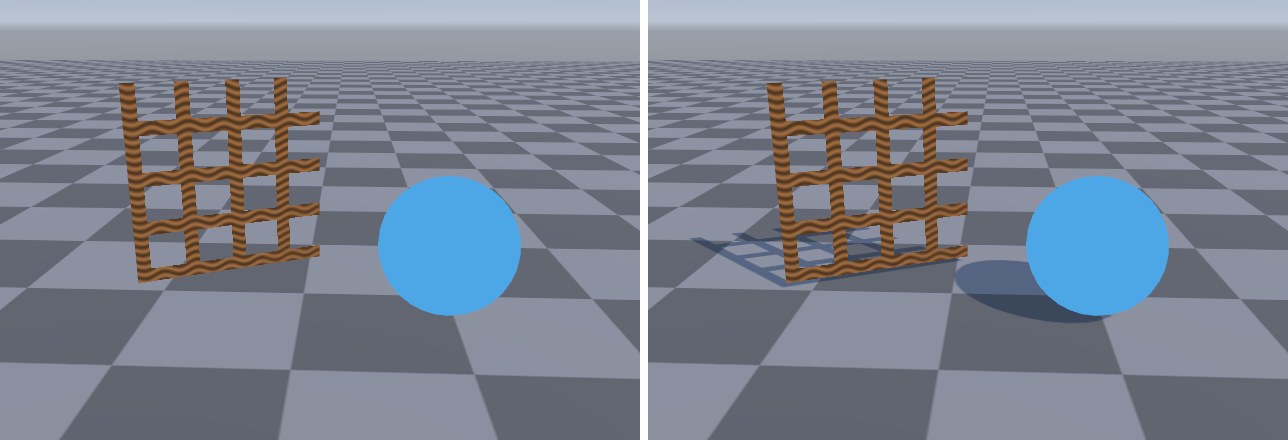
DepthOnly Pass
// ---------------- 3. 深度 Pass:深度预渲染(Depth Prepass)时把物体写进 _CameraDepthTexture ----------------
Pass
{
    Name "DepthOnly"
    Tags { "LightMode"="DepthOnly" }
    ZWrite On
    ColorMask R          // URP 自带 Shader 的写法;深度写进深度缓冲,颜色通道基本用不到
    Cull [_Cull]

    HLSLPROGRAM
    #pragma vertex DepthVert
    #pragma fragment DepthFrag

    struct Attributes { float4 positionOS : POSITION; float2 uv : TEXCOORD0; };
    struct Varyings   { float4 positionCS : SV_POSITION; float2 uv : TEXCOORD0; };

    Varyings DepthVert (Attributes input)
    {
        Varyings output;
        output.positionCS = TransformObjectToHClip(input.positionOS.xyz);
        output.uv = TRANSFORM_TEX(input.uv, _BaseMap);
        return output;
    }

    half DepthFrag (Varyings input) : SV_Target
    {
        ClipByAlpha(input.uv);
        return input.positionCS.z;
    }
    ENDHLSL
}
// ---------------- 3. 深度 Pass:深度预渲染(Depth Prepass)时把物体写进 _CameraDepthTexture ----------------
Pass
{
    Name "DepthOnly"
    Tags { "LightMode"="DepthOnly" }
    ZWrite On
    ColorMask R          // URP 自带 Shader 的写法;深度写进深度缓冲,颜色通道基本用不到
    Cull [_Cull]

    GLSLPROGRAM
    VARYING vec2 uv;

    #ifdef VERTEX
    void main()
    {
        gl_Position = TransformObjectToHClip(positionOS.xyz);
        uv = TransformTex(texcoord0.xy, _BaseMap_ST);
    }
    #endif

    #ifdef FRAGMENT
    void main()
    {
        ClipByAlpha(uv);
        fragColor = vec4(gl_FragCoord.z);
    }
    #endif
    ENDGLSL
}
这个 Pass 只是把物体按相机的视角再画一遍、写进深度缓冲。它什么时候会被用到?URP 获取 _CameraDepthTexture 有两种方式:一是在画完不透明物体后,直接复制相机的深度缓冲(CopyDepth);二是在画不透明物体之前,用所有物体的 DepthOnly Pass 预先画一遍深度(Depth Prepass)。哪种情况走哪条路由 URP 根据平台能力、MSAA、Renderer Feature 的需求等决定。举例来说,屏幕空间环境光遮蔽(SSAO)需要在不透明物体之前就拿到深度,就会触发预渲染。
走复制路线时,没有 DepthOnly Pass 的物体照样在深度图里(因为它的颜色 Pass 写了深度缓冲);走预渲染路线时,它就消失了。为了把这一点拍下来,我们写了一个什么都不画、只“声明需要在不透明物体之前使用深度”的 Renderer Feature 来强制触发预渲染:
// 演示用 Renderer Feature:声明“我在不透明物体之前就要用深度图”,从而让 URP 走深度预渲染(Depth Prepass)。
// 真实项目里 SSAO(Depth 源)、某些自定义效果都会这样触发 Depth Prepass。
// 这时 _CameraDepthTexture 由各物体的 DepthOnly Pass 画出来——没有 DepthOnly Pass 的物体就不在深度图里。
using UnityEngine.Rendering;
using UnityEngine.Rendering.Universal;

namespace Cookbook.Ch03
{
    public class DepthPrepassFeature : ScriptableRendererFeature
    {
        class RequestDepthPass : ScriptableRenderPass
        {
            public RequestDepthPass()
            {
                renderPassEvent = RenderPassEvent.BeforeRenderingOpaques;
                ConfigureInput(ScriptableRenderPassInput.Depth);
            }
            // 什么都不画,只负责“提需求”
            public override void Execute(ScriptableRenderContext context, ref RenderingData renderingData) { }
        }

        RequestDepthPass m_Pass;

        public override void Create() { m_Pass = new RequestDepthPass(); }

        public override void AddRenderPasses(ScriptableRenderer renderer, ref RenderingData renderingData)
        {
            renderer.EnqueuePass(m_Pass);
        }
    }
}
// 演示用 Renderer Feature(JS 版,对应 Ch03/DepthPrepassFeature.cs):
// 声明“我在不透明物体之前就要用深度图”,从而让 URP 走深度预渲染(Depth Prepass)。
// 这时 _CameraDepthTexture 由各物体的 DepthOnly Pass 画出来——没有 DepthOnly Pass 的物体就不在深度图里。
// C# 版的 Pass 本身什么都不画,只用 ConfigureInput(Depth) 提需求;网页引擎没有“按需求自动加 Prepass”的机制,
// 所以这里把 URP 因此插入的 DepthPrepass 一起做了:在 BeforeRenderingPrePasses 时把不透明物体的 DepthOnly Pass 画进一张深度图。
import { RenderPassEvent } from '../engine/features.js';

export default class DepthPrepassFeature {
  constructor(engine) { this.engine = engine; }

  addPasses(frame, enqueue) {
    const E = this.engine, gl = E.gl;
    enqueue(RenderPassEvent.BeforeRenderingPrePasses, (fr) => {
      const rt = E.rt('cookbook:depthPrepass', fr.width, fr.height, { color: null, depth: 'DEPTH24' });
      E.bindTarget(rt);
      gl.depthMask(true); gl.clearDepth(1); gl.clear(gl.DEPTH_BUFFER_BIT);
      fr.drawRenderers({ queue: 'opaque', lightModes: ['DepthOnly'] });
      E.setGlobal('_CameraDepthTexture', rt.depthTexture);
      // 有了 Prepass,URP 就不再在不透明物体之后 CopyDepth
      fr.requireDepth = false;
      fr.bindCamera();
    }, 'DepthPrepass');
  }
}
它利用了 URP 14 UniversalRenderer 里的规则:如果某个 Pass 通过 ConfigureInput(ScriptableRenderPassInput.Depth) 声明需要深度,并且它的事件早于不透明物体的绘制,就必须做深度预渲染。Renderer Feature 的写法第 25 章会系统讲。
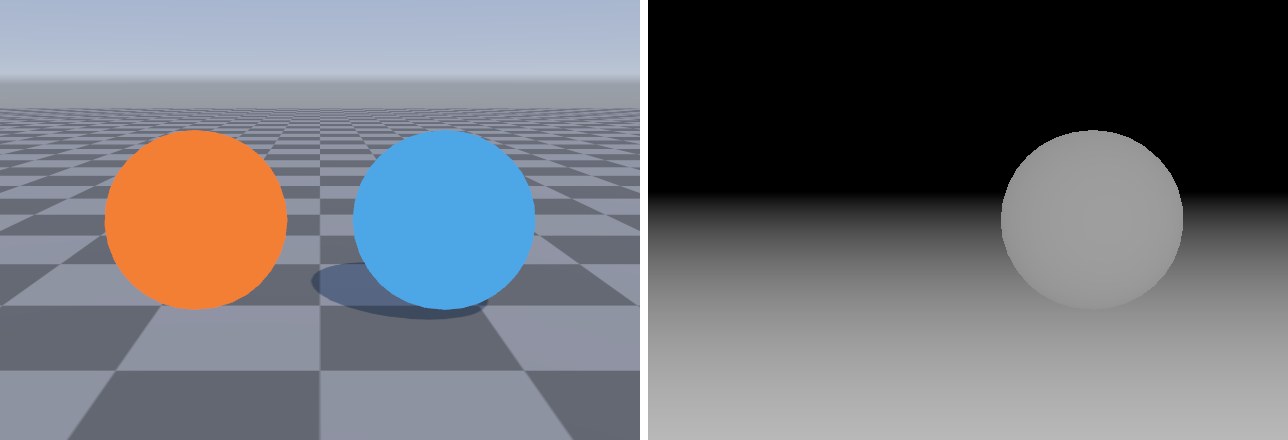
Cookbook/Ch03/Debug/DepthView 把 _CameraDepthTexture 显示为灰度(越近越亮)——橙球在深度图里不存在深度图里缺了物体,后果是所有依赖深度的效果都会对它“视而不见”:SSAO 在它周围不产生遮蔽,软粒子、水面的深度交界泡沫、第 18 章护盾的交接高亮都会穿帮。所以只要是不透明物体,就给它配上 DepthOnly Pass。另一个相关的 Pass 是 DepthNormals,它同时输出法线,供 SSAO 等效果使用(URP 的 SSAO 可选择从深度重建法线,也可以要求 DepthNormals),它需要顶点法线,放到第 6 章与光照一起写。
UsePass "Universal Render Pipeline/Lit/SHADOWCASTER"(Pass 名要大写),二是在自己的 Pass 里 #include ".../Shaders/ShadowCasterPass.hlsl"。两者都能工作,但都依赖 URP 的约定:属性必须叫 _BaseMap、_BaseColor、_Cutoff,镂空必须用 _ALPHATEST_ON 关键字,第二种还要求你按 SurfaceInput.hlsl 的方式声明贴图(它会自己声明 _BaseMap,你再声明一次就会报 redefinition of '_BaseMap')。你的 Shader 一旦加了顶点动画、换了 UV 来源,借来的 Pass 不会跟着变,阴影就和外形对不上了。本书统一手写,代码量也不过二十几行。