URP 渲染实战 / 第 28 章 屏幕空间技术 / 案例 28.5
案例 28.5体积光:步进、抖动、模糊、合成高阶
Assets/Cookbook/Ch28/VolumetricLight.shader(节选:march)
// Henyey-Greenstein 相位函数:g>0 时向前散射为主,迎着光看最亮
float PhaseHG(float cosTheta, float g)
{
    float g2 = g * g;
    return INV_FOUR_PI * (1 - g2) / pow(max(1 + g2 - 2 * g * cosTheta, 1e-4), 1.5);
}

half4 FragMarch(Varyings input) : SV_Target
{
    UNITY_SETUP_STEREO_EYE_INDEX_POST_VERTEX(input);
    float2 uv = input.texcoord;
    float depth = SampleDeviceDepth(uv);
    float3 endWS = IsSkyDepth(depth)
        ? ComputeWorldSpacePosition(uv, UNITY_RAW_FAR_CLIP_VALUE, UNITY_MATRIX_I_VP)
        : ReconstructPositionWS(uv, depth);

    float3 rayWS = endWS - _WorldSpaceCameraPos;
    float rayLength = min(length(rayWS), _MaxDistance);
    float3 dir = rayWS / max(length(rayWS), 1e-4);

    Light mainLight = GetMainLight();
    float phase = PhaseHG(dot(dir, mainLight.direction), _Anisotropy);

    int steps = (int)_Steps;
    float stepLength = rayLength / steps;
    // 抖动起点:把“条带”换成高频噪声,再交给模糊去掉
    float jitter = _Jitter > 0.5 ? InterleavedGradientNoise(input.positionCS.xy, 0) : 0.5;

    float scatter = 0;
    float transmittance = 1;
    float stepT = exp(-_Density * stepLength);    // 每步的透射率(均匀介质)
    for (int i = 0; i < steps; i++)
    {
        float t = (i + jitter) * stepLength;
        float3 p = _WorldSpaceCameraPos + dir * t;
        // 关键两行:世界坐标 → 阴影坐标(自动选级联)→ 比较阴影图
        float4 shadowCoord = TransformWorldToShadowCoord(p);
        float visibility = MainLightRealtimeShadow(shadowCoord);
        // 这一小段介质散射到相机方向的光,再乘上它到相机之间的透射率
        scatter += visibility * transmittance * (1 - stepT);
        transmittance *= stepT;
    }
    scatter *= phase * _Intensity * FOUR_PI;  // ×4π 让 g=0 时的强度约为 1,便于调参
    return half4(scatter, transmittance, 0, 1);
}
// Henyey-Greenstein 相位函数:g>0 时向前散射为主,迎着光看最亮
float PhaseHG(float cosTheta, float g)
{
    float g2 = g * g;
    return INV_FOUR_PI * (1.0 - g2) / pow(max(1.0 + g2 - 2.0 * g * cosTheta, 1e-4), 1.5);
}

vec4 FragMarch()
{
    vec2 uv = texcoord;
    float depth = SampleDeviceDepth(uv);
    vec3 endWS = IsSkyDepth(depth)
        ? ComputeWorldSpacePosition(uv, UNITY_RAW_FAR_CLIP_VALUE, UNITY_MATRIX_I_VP)
        : ReconstructPositionWS(uv, depth);

    vec3 rayWS = endWS - _WorldSpaceCameraPos;
    float rayLength = min(length(rayWS), _MaxDistance);
    vec3 dir = rayWS / max(length(rayWS), 1e-4);

    Light mainLight = GetMainLight();
    float phase = PhaseHG(dot(dir, mainLight.direction), _Anisotropy);

    int steps = int(_Steps);
    float stepLength = rayLength / float(steps);
    // 抖动起点:把“条带”换成高频噪声,再交给模糊去掉
    float jitter = _Jitter > 0.5 ? InterleavedGradientNoise(gl_FragCoord.xy, 0) : 0.5;

    float scatter = 0.0;
    float transmittance = 1.0;
    float stepT = exp(-_Density * stepLength);    // 每步的透射率(均匀介质)
    for (int i = 0; i < steps; i++)
    {
        float t = (float(i) + jitter) * stepLength;
        vec3 p = _WorldSpaceCameraPos + dir * t;
        // 关键两行:世界坐标 → 阴影坐标(自动选级联)→ 比较阴影图
        vec4 shadowCoord = TransformWorldToShadowCoord(p);
        float visibility = MainLightRealtimeShadow(shadowCoord);
        // 这一小段介质散射到相机方向的光,再乘上它到相机之间的透射率
        scatter += visibility * transmittance * (1.0 - stepT);
        transmittance *= stepT;
    }
    scatter *= phase * _Intensity * FOUR_PI;  // ×4π 让 g=0 时的强度约为 1,便于调参
    return vec4(scatter, transmittance, 0.0, 1.0);
}
逐行看几个要点:
- 天空像素用远裁剪面上的点作为终点,再统一用
_MaxDistance截断。截断距离不要超过 URP Asset 的阴影距离,超出部分全部算作“被照亮”,只会得到一片均匀的亮雾。 - 抖动起点(Jitter):所有像素都从 t = 0 开始、每步固定 Δt,相邻像素的采样点落在同一组“深度切片”上,阴影边缘会出现一层层的条带(Banding)。给每个像素一个 [0,1) 的随机起始偏移(这里用 Interleaved Gradient Noise),条带就变成了高频噪声,交给后面的模糊即可。这是所有步进算法通用的技巧:用噪声换走条带,再用滤波(空间模糊或时间累积)去掉噪声。
- 结果乘了 4π,是为了让 g = 0 时相位函数归一到 1,方便美术调强度;这一步不影响物理关系,只是换了个单位。
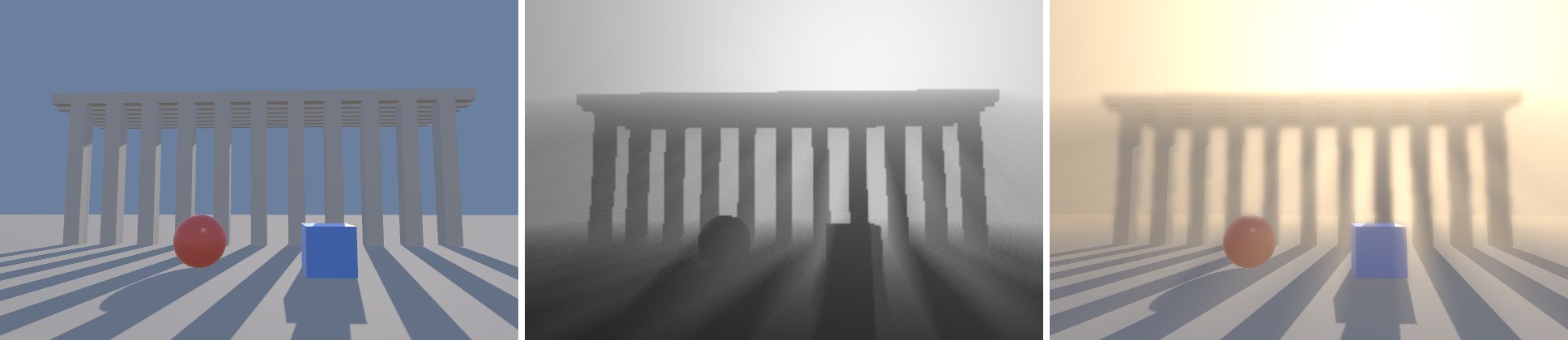
- 输出两个通道:r 是散射光,g 是视线方向的总透射率。合成时场景颜色乘透射率,再加上散射光——体积光同时也是一层雾。
Assets/Cookbook/Ch28/VolumetricLight.shader(节选:composite)
half4 Frag(Varyings input) : SV_Target
{
    half4 color = SAMPLE_TEXTURE2D_X(_BlitTexture, sampler_PointClamp, input.texcoord);
    half2 vol = SAMPLE_TEXTURE2D_X(_VolumetricResult, sampler_LinearClamp, input.texcoord).rg;
    half3 lightColor = GetMainLight().color * _Tint.rgb;
    // 场景被介质衰减(×透射率),再加上介质散射进视线的光
    color.rgb = color.rgb * vol.g + lightColor * vol.r;
    return color;
}
Assets/Cookbook/Ch28/VolumetricLightFeature.cs(节选:execute)
public override void Execute(ScriptableRenderContext context, ref RenderingData renderingData)
{
    var mat = m_Settings.material;
    var cmd = CommandBufferPool.Get();
    using (new ProfilingScope(cmd, profilingSampler))
    {
        int w = m_Vol.rt.width, h = m_Vol.rt.height;
        mat.SetVector(s_TexelSize, new Vector4(1f / w, 1f / h, w, h));

        CoreUtils.SetRenderTarget(cmd, m_Vol);
        Blitter.BlitTexture(cmd, new Vector4(1, 1, 0, 0), mat, 0);       // 光线步进
        if (m_Settings.blur)
        {
            Blitter.BlitCameraTexture(cmd, m_Vol, m_VolTemp, mat, 1);      // 横向模糊
            Blitter.BlitCameraTexture(cmd, m_VolTemp, m_Vol, mat, 2);      // 纵向模糊
        }
        cmd.SetGlobalTexture(s_Result, m_Vol);
        Blitter.BlitCameraTexture(cmd, m_CameraColor, m_Copy);
        Blitter.BlitCameraTexture(cmd, m_Copy, m_CameraColor, mat,
            m_Settings.output == Output.Composite ? 3 : 4);
    }
    context.ExecuteCommandBuffer(cmd);
    CommandBufferPool.Release(cmd);
}
// 案例 28.5:体积光 Renderer Feature(对应 Ch28/VolumetricLightFeature.cs)—— 半分辨率光线步进 → 模糊 → 合成。
import { featureMaterial, RenderPassEvent } from '../engine/features.js';
import { ensureDepth } from './Cookbook.Ch28.ScreenSpaceUtil.js';

const Output = { Composite: 0, ScatterOnly: 1 };

export default class VolumetricLightFeature {
  constructor(engine, data, scene) {
    this.engine = engine;
    this.scene = scene;
    this.settings = { material: null, downsample: 2, blur: true, output: Output.Composite, renderPassEvent: RenderPassEvent.BeforeRenderingTransparents, ...((data && data.settings) || {}) };
  }

  async init() { this.material = featureMaterial(this.scene, this.settings.material); }

  addPasses(frame, enqueue) {
    const s = this.settings, mat = this.material;
    if (!mat) return;
    // 没有主光阴影就没有“光束”,直接跳过
    if (frame.scene.asset.m_MainLightShadowsSupported === false) return;
    enqueue(s.renderPassEvent, (fr) => {
      ensureDepth(fr);   // ConfigureInput(Depth)
      const ds = Math.max(1, s.downsample | 0);
      const w = Math.max(1, Math.floor(fr.width / ds)), h = Math.max(1, Math.floor(fr.height / ds));
      // 散射值可能 >1,用半精度浮点
      const vol = fr.getTemporaryRT('_Volumetric', w, h, { color: 'RGBA16F' });
      const volTemp = fr.getTemporaryRT('_VolumetricTemp', w, h, { color: 'RGBA16F' });
      mat.setVector('_VolTexelSize', [1 / w, 1 / h, w, h]);
      fr.blit(null, vol, mat, 0);                       // 光线步进
      if (s.blur) {
        fr.blit(vol.texture, volTemp, mat, 1);          // 横向模糊
        fr.blit(volTemp.texture, vol, mat, 2);          // 纵向模糊
      }
      fr.setGlobal('_VolumetricResult', vol.texture);
      const copy = fr.getTemporaryRT('_VolumetricColorCopy', fr.width, fr.height, { filter: 'Point' });
      fr.blit(fr.cameraColorTexture(), copy);
      fr.blit(copy.texture, 'camera', mat, s.output === Output.Composite ? 3 : 4);
      fr.bindCamera();
    }, 'VolumetricLight');
  }
}
Feature 在半分辨率(downsample = 2)的 ARGBHalf 纹理上步进,散射值可能超过 1,需要浮点格式。AddRenderPasses 里还检查了 renderingData.shadowData.supportsMainLightShadows:主光不投影或阴影被关掉时,这个效果没有意义,直接不入队。
性能与质量提示:
- 开销 ≈ 像素数 × 步数 × 一次阴影采样。半分辨率 + 16~32 步是常见的起点;1/4 分辨率配合更强的模糊在移动端也常用。
- 上采样时同样要注意深度边缘:低分辨率的散射值在前景物体边缘会“溢”到背景上,表现为物体轮廓外一圈亮边。可以用深度感知上采样或在模糊里加深度权重(参考案例 28.4 的双边模糊)。
- 有 TAA 时,可以每帧换一组抖动偏移(把 IGN 的 frameCount 参数传入帧序号),让时间累积替代空间模糊,画面更干净。
- 点光源、聚光灯的体积光原理相同,但要查附加光阴影图(
AdditionalLightRealtimeShadow),且相位角每一步都在变;工程上更常见的做法是为它们放置体积网格或用 Froxel(视锥体素)方案,超出本章范围。
本案例出自《URP 渲染实战》第 28 章「屏幕空间技术」。在章节中阅读上下文 →