URP 渲染实战 / 第 28 章 屏幕空间技术 / 案例 28.4
案例 28.4简化版 SSAO,并接入 URP 光照高阶
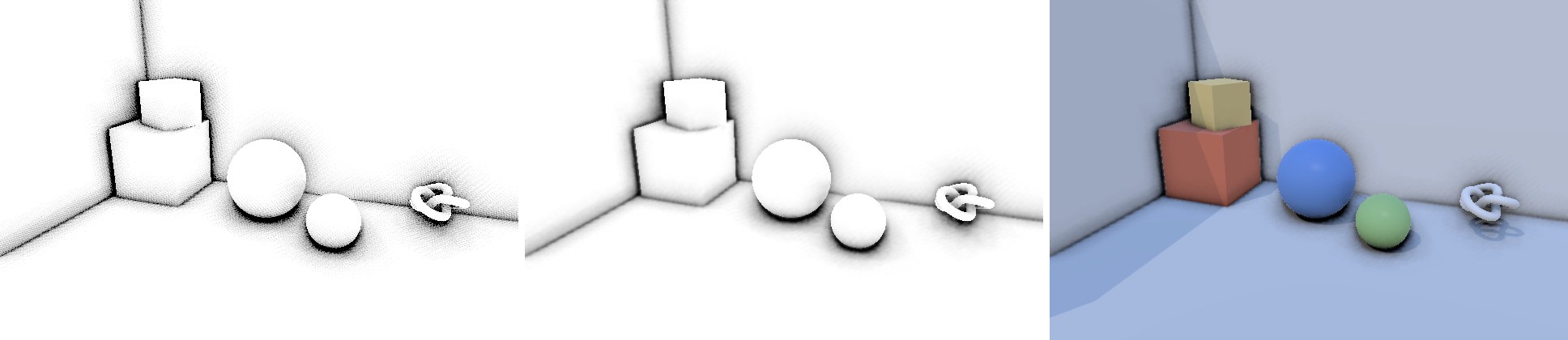
目标:自己实现一个法线半球采样的 SSAO:随机旋转 + 双边模糊,并按 URP 的约定把结果交给 Lit,只压暗间接光。
算法步骤:
- 由深度重建当前像素的世界坐标 p,从法线纹理读世界空间法线 n。
- 用 Interleaved Gradient Noise 给每个像素一个随机角度,构造绕 n 随机旋转的切线空间。随机旋转把“规则采样图案的条带”变成高频噪声,后者可以被模糊掉,前者不行。
- 在半球里取 N 个方向(余弦分布,黄金角螺旋排列),长度向中心聚集——近处的遮挡对 AO 更重要。
- 每个采样点投影回屏幕,比较“采样点自己的观察深度”和“屏幕上那里的场景深度”。场景表面更近 → 采样点被埋住 → 记一次遮挡。
- 范围检查:如果场景深度和中心点相差远超半径(例如背景前的前景物体边缘),这次遮挡不算,避免暗晕。
- 结果做两遍可分离的双边模糊(横、竖),权重同时考虑空间距离和深度差,AO 不会跨越物体边缘渗出去。
Assets/Cookbook/Ch28/SimpleSSAO.shader(节选:ao)
half4 FragAO(Varyings input) : SV_Target
{
    UNITY_SETUP_STEREO_EYE_INDEX_POST_VERTEX(input);
    float2 uv = input.texcoord;
    float depth = SampleDeviceDepth(uv);
    if (IsSkyDepth(depth)) return 1;

    float3 positionWS = ReconstructPositionWS(uv, depth);
    float3 normalWS = normalize(SampleSceneNormals(uv));   // URP 14 的法线纹理是世界空间
    float centerEye = LinearEyeDepth(positionWS, UNITY_MATRIX_V);

    // 每像素一个随机旋转角,把规则的采样图案打散成高频噪声,后面再模糊掉
    float noise = InterleavedGradientNoise(input.positionCS.xy, 0);
    float3 randomDir = float3(cos(noise * TWO_PI), sin(noise * TWO_PI), 0.37);
    float3 tangentWS = normalize(cross(normalWS, randomDir));
    float3 bitangentWS = cross(normalWS, tangentWS);

    int count = (int)_SampleCount;
    float occlusion = 0;
    for (int i = 0; i < count; i++)
    {
        // 余弦分布的半球方向(黄金角螺旋),长度向中心聚集:近处样本更重要
        float u = (i + 0.5) / count;
        float phi = i * 2.39996323;
        float cosTheta = sqrt(1 - u), sinTheta = sqrt(u);
        float3 dirTS = float3(cos(phi) * sinTheta, sin(phi) * sinTheta, cosTheta);
        float lenScale = lerp(0.1, 1.0, frac(u * 7.31 + noise) * frac(u * 7.31 + noise));
        float3 offsetWS = (tangentWS * dirTS.x + bitangentWS * dirTS.y + normalWS * dirTS.z) * (lenScale * _Radius);
        float3 sampleWS = positionWS + offsetWS;

        // 投影回屏幕,读那里的场景深度
        float2 sampleUV = ComputeNormalizedDeviceCoordinates(sampleWS, UNITY_MATRIX_VP);
        float sampleEye = LinearEyeDepth(sampleWS, UNITY_MATRIX_V);
        float sceneEye = EyeDepthAt(sampleUV);

        // 场景表面在样本点前面 → 样本点被埋住 → 记一次遮挡
        float occluded = sceneEye < sampleEye - _Bias ? 1 : 0;
        // 范围检查:深度差远大于半径的(背景前的前景边缘)不算,避免黑边光晕
        float rangeCheck = smoothstep(0, 1, _Radius / max(abs(centerEye - sceneEye), 1e-4));
        occlusion += occluded * rangeCheck;
    }
    float visibility = saturate(1 - occlusion / count * _Intensity);
    return half4(visibility, visibility, visibility, 1);
}
vec4 FragAO()
{
    vec2 uv = texcoord;
    float depth = SampleDeviceDepth(uv);
    if (IsSkyDepth(depth)) return vec4(1.0);

    vec3 positionWS = ReconstructPositionWS(uv, depth);
    vec3 normalWS = normalize(SampleSceneNormals(uv));   // URP 14 的法线纹理是世界空间
    float centerEye = LinearEyeDepthWS(positionWS);

    // 每像素一个随机旋转角,把规则的采样图案打散成高频噪声,后面再模糊掉
    float noise = InterleavedGradientNoise(gl_FragCoord.xy, 0);
    vec3 randomDir = vec3(cos(noise * TWO_PI), sin(noise * TWO_PI), 0.37);
    vec3 tangentWS = normalize(cross(normalWS, randomDir));
    vec3 bitangentWS = cross(normalWS, tangentWS);

    int count = int(_SampleCount);
    float occlusion = 0.0;
    for (int i = 0; i < count; i++)
    {
        // 余弦分布的半球方向(黄金角螺旋),长度向中心聚集:近处样本更重要
        float u = (float(i) + 0.5) / float(count);
        float phi = float(i) * 2.39996323;
        float cosTheta = sqrt(1.0 - u), sinTheta = sqrt(u);
        vec3 dirTS = vec3(cos(phi) * sinTheta, sin(phi) * sinTheta, cosTheta);
        float lenScale = mix(0.1, 1.0, fract(u * 7.31 + noise) * fract(u * 7.31 + noise));
        vec3 offsetWS = (tangentWS * dirTS.x + bitangentWS * dirTS.y + normalWS * dirTS.z) * (lenScale * _Radius);
        vec3 sampleWS = positionWS + offsetWS;

        // 投影回屏幕,读那里的场景深度
        vec2 sampleUV = ComputeNormalizedDeviceCoordinates(sampleWS, UNITY_MATRIX_VP);
        float sampleEye = LinearEyeDepthWS(sampleWS);
        float sceneEye = EyeDepthAt(sampleUV);

        // 场景表面在样本点前面 → 样本点被埋住 → 记一次遮挡
        float occluded = sceneEye < sampleEye - _Bias ? 1.0 : 0.0;
        // 范围检查:深度差远大于半径的(背景前的前景边缘)不算,避免黑边光晕
        float rangeCheck = smoothstep(0.0, 1.0, _Radius / max(abs(centerEye - sceneEye), 1e-4));
        occlusion += occluded * rangeCheck;
    }
    float visibility = saturate(1.0 - occlusion / float(count) * _Intensity);
    return vec4(visibility, visibility, visibility, 1.0);
}
采样点的屏幕坐标用 ComputeNormalizedDeviceCoordinates(sampleWS, UNITY_MATRIX_VP) 计算——它内部处理了 D3D/Metal 下的 y 翻转,得到的 UV 与 Blit.hlsl 的 texcoord 约定一致。采样点自身的观察深度用 core 的 LinearEyeDepth(positionWS, UNITY_MATRIX_V) 重载,它就是观察空间 z 取负。
Assets/Cookbook/Ch28/SimpleSSAO.shader(节选:blur)
// 双边模糊:高斯权重 × 深度相似度权重,跨越深度断层的样本被压低,AO 不会渗到背景上
half4 BilateralBlur(float2 uv, float2 dir)
{
    static const float w[4] = { 0.324, 0.232, 0.0855, 0.0205 };
    float centerEye = EyeDepthAt(uv);
    half sum = SAMPLE_TEXTURE2D_X(_BlitTexture, sampler_LinearClamp, uv).r * w[0];
    float wsum = w[0];
    for (int i = 1; i < 4; i++)
    {
        for (int s = -1; s <= 1; s += 2)
        {
            float2 suv = uv + dir * (i * s);
            float d = EyeDepthAt(suv);
            float wd = w[i] * exp(-abs(d - centerEye) / max(centerEye * 0.02, 1e-3));
            sum += SAMPLE_TEXTURE2D_X_LOD(_BlitTexture, sampler_LinearClamp, suv, 0).r * wd;
            wsum += wd;
        }
    }
    half v = sum / wsum;
    return half4(v, v, v, 1);
}
// 双边模糊:高斯权重 × 深度相似度权重,跨越深度断层的样本被压低,AO 不会渗到背景上
vec4 BilateralBlur(vec2 uv, vec2 dir)
{
    const float w[4] = float[4](0.324, 0.232, 0.0855, 0.0205);
    float centerEye = EyeDepthAt(uv);
    float sum = texture(_BlitTexture, uv).r * w[0];
    float wsum = w[0];
    for (int i = 1; i < 4; i++)
    {
        for (int s = -1; s <= 1; s += 2)
        {
            vec2 suv = uv + dir * float(i * s);
            float d = EyeDepthAt(suv);
            float wd = w[i] * exp(-abs(d - centerEye) / max(centerEye * 0.02, 1e-3));
            sum += textureLod(_BlitTexture, suv, 0.0).r * wd;
            wsum += wd;
        }
    }
    float v = sum / wsum;
    return vec4(v, v, v, 1.0);
}
坑:循环里的纹理采样第一次编译时 Metal 报了
unable to unroll loop … use the [unroll(n)] attribute。原因是循环次数由材质参数决定(动态循环),而循环体里调用了 SampleSceneDepth——它用的是 SAMPLE_TEXTURE2D_X,需要隐式的屏幕空间导数来选 Mip,而导数在分支/动态循环里没有定义,编译器只好尝试把循环完全展开,展开失败就报错。解决办法是在循环里一律使用显式 LOD 的采样:本章公共文件里提供了 SampleSceneDepthLod,模糊里也改用 SAMPLE_TEXTURE2D_X_LOD。这条规则对所有“步进类”屏幕空间算法(SSR、体积光、视差)都适用。C# 部分的关键是事件时机和交接方式:
Assets/Cookbook/Ch28/SimpleSSAOFeature.cs(节选:event)
// 进光照:必须在不透明物体之前,且要等深度/法线预通道画完(+1 与 URP 自带 SSAO 一致)
m_Pass.renderPassEvent = settings.mode == Mode.IntoLighting
    ? RenderPassEvent.AfterRenderingPrePasses + 1
    : RenderPassEvent.AfterRenderingOpaques;
// 要法线:Forward 路径下这会让 URP 执行 DepthNormals 预通道
m_Pass.ConfigureInput(ScriptableRenderPassInput.Depth | ScriptableRenderPassInput.Normal);
Assets/Cookbook/Ch28/SimpleSSAOFeature.cs(节选:execute)
public override void Execute(ScriptableRenderContext context, ref RenderingData renderingData)
{
    var mat = m_Settings.material;
    var cmd = CommandBufferPool.Get();
    using (new ProfilingScope(cmd, profilingSampler))
    {
        int w = m_AO.rt.width, h = m_AO.rt.height;
        mat.SetVector(s_TexelSize, new Vector4(1f / w, 1f / h, w, h));

        // 1) AO:没有输入纹理,直接画全屏三角形到 m_AO
        CoreUtils.SetRenderTarget(cmd, m_AO);
        Blitter.BlitTexture(cmd, new Vector4(1, 1, 0, 0), mat, 0);
        // 2) 可分离双边模糊:AO → Temp(横)→ AO(竖)
        if (m_Settings.blur)
        {
            Blitter.BlitCameraTexture(cmd, m_AO, m_AOTemp, mat, 1);
            Blitter.BlitCameraTexture(cmd, m_AOTemp, m_AO, mat, 2);
        }

        if (m_Settings.mode == Mode.IntoLighting)
        {
            // 3a) 按 URP 的约定把结果交给光照:纹理 + 关键字 + 参数(w = 直接光受 AO 影响的比例)
            cmd.SetGlobalTexture(s_URPOcclusionTex, m_AO);
            cmd.SetGlobalVector(s_URPOcclusionParam, new Vector4(1, 0, 0, m_Settings.directLightingStrength));
            CoreUtils.SetKeyword(cmd, k_URPKeyword, true);
        }
        else
        {
            // 3b) 直接乘到相机颜色上(或只显示 AO)
            cmd.SetGlobalTexture(s_Result, m_AO);
            Blitter.BlitCameraTexture(cmd, m_CameraColor, m_ColorCopy);
            Blitter.BlitCameraTexture(cmd, m_ColorCopy, m_CameraColor, mat, m_Settings.mode == Mode.ShowAO ? 4 : 3);
        }
    }
    context.ExecuteCommandBuffer(cmd);
    CommandBufferPool.Release(cmd);
}

public override void OnCameraCleanup(CommandBuffer cmd)
{
    // 关键字是全局状态,用完一定要关,否则会“漏”到下一台相机
    if (m_Settings != null && m_Settings.mode == Mode.IntoLighting)
        CoreUtils.SetKeyword(cmd, k_URPKeyword, false);
}
// 案例 28.4:简化版 SSAO 的 Renderer Feature(对应 Ch28/SimpleSSAOFeature.cs)。
//   IntoLighting        —— 像 URP 自带 SSAO 一样,在不透明物体之前算好 AO,作为 _ScreenSpaceOcclusionTexture 交给光照;
//   MultiplyAfterOpaque —— 不透明物体画完后直接把 AO 乘到颜色上;
//   ShowAO              —— 只显示 AO(调试)。
import { featureMaterial, RenderPassEvent } from '../engine/features.js';
import { renderDepthNormals } from './Cookbook.Ch28.ScreenSpaceUtil.js';

const Mode = { IntoLighting: 0, MultiplyAfterOpaque: 1, ShowAO: 2 };

export default class SimpleSSAOFeature {
  constructor(engine, data, scene) {
    this.engine = engine;
    this.scene = scene;
    this.settings = { material: null, mode: Mode.IntoLighting, blur: true, halfResolution: false, directLightingStrength: 0.25, ...((data && data.settings) || {}) };
  }

  async init() { this.material = featureMaterial(this.scene, this.settings.material); }

  addPasses(frame, enqueue) {
    const s = this.settings, mat = this.material;
    if (!mat) return;
    // 进光照:必须在不透明物体之前,且要等深度/法线预通道画完(+1 与 URP 自带 SSAO 一致)
    const event = s.mode === Mode.IntoLighting ? RenderPassEvent.AfterRenderingPrePasses + 1 : RenderPassEvent.AfterRenderingOpaques;
    // ConfigureInput(Depth | Normal):前向路径下 URP 会执行 DepthNormals 预通道
    enqueue(RenderPassEvent.AfterRenderingPrePasses, (fr) => renderDepthNormals(fr), 'DepthNormalPrepass');
    enqueue(event, (fr) => {
      const W = s.halfResolution ? Math.floor(fr.width / 2) : fr.width, H = s.halfResolution ? Math.floor(fr.height / 2) : fr.height;
      const ao = fr.getTemporaryRT('_SimpleSSAO', W, H, { color: 'RGBA8' });
      const aoTemp = fr.getTemporaryRT('_SimpleSSAOTemp', W, H, { color: 'RGBA8' });
      mat.setVector('_SSAOTexelSize', [1 / W, 1 / H, W, H]);
      // 1) AO:没有输入纹理,直接画全屏三角形
      fr.blit(null, ao, mat, 0);
      // 2) 可分离双边模糊:AO → Temp(横)→ AO(竖)
      if (s.blur) {
        fr.blit(ao.texture, aoTemp, mat, 1);
        fr.blit(aoTemp.texture, ao, mat, 2);
      }
      if (s.mode === Mode.IntoLighting) {
        // 3a) 按 URP 的约定把结果交给光照:纹理 + 参数(w = 直接光受 AO 影响的比例)
        fr.setGlobal('_ScreenSpaceOcclusionTexture', ao.texture);
        fr.setGlobal('_AmbientOcclusionParam', [1, 0, 0, s.directLightingStrength]);
      } else {
        // 3b) 直接乘到相机颜色上(或只显示 AO)
        fr.setGlobal('_SSAOResult', ao.texture);
        const copy = fr.getTemporaryRT('_SimpleSSAOColor', fr.width, fr.height, { filter: 'Point' });
        fr.blit(fr.cameraColorTexture(), copy);
        fr.blit(copy.texture, 'camera', mat, s.mode === Mode.ShowAO ? 4 : 3);
      }
      fr.bindCamera();
    }, 'SimpleSSAO');
  }
}
AfterRenderingPrePasses + 1 照抄自 URP 自带 SSAO:注释里解释了开启 Depth Priming 时,深度纹理要等 PrePasses 之后的一次解析才可用,所以至少要晚一个刻度。AO 算完后,三件事缺一不可:纹理绑到 _ScreenSpaceOcclusionTexture、设置 _AmbientOcclusionParam、开启关键字 _SCREEN_SPACE_OCCLUSION;并且在 OnCameraCleanup 里关掉关键字,否则它会泄漏到下一台相机(例如 UI 相机、反射相机),让它们读到一张不属于自己的 AO 图。
调参与性能提示:
- 半径决定 AO 的“尺度”。室内道具 0.3–0.6 米比较合适;它和场景单位直接相关,不要照搬别人的数字。
- Bias 太小会出现自遮挡的灰色噪点(尤其是倾斜的大平面),太大会让细小的接缝消失。
- 采样数是开销的主要来源:每个采样点一次深度读取。全分辨率 16 个采样在移动端通常承受不起,可以 8 个采样 + 半分辨率 + 更强的模糊。如果项目已经有 TAA,还可以每帧换一组随机旋转,让时间累积来降噪。
- 半分辨率时,合成阶段最好做深度感知上采样(取周围几个低分辨率样本中深度最接近的),否则物体边缘会出现一像素宽的 AO 漏光。
本案例出自《URP 渲染实战》第 28 章「屏幕空间技术」。在章节中阅读上下文 →