URP 渲染实战 / 第 28 章 屏幕空间技术 / 案例 28.2
案例 28.2扫描线 / 雷达波入门
目标:从某点向外扩散的一圈能量波,掠过地面和物体,波前是一条亮边,后面拖着带世界网格的渐隐尾迹。游戏里的“侦测技能”“全息扫描”几乎都是这个结构。
原理:有了每个像素的世界坐标,扫描线就只是一个距离判断。设扫描中心为 O、当前半径为 R,像素的水平距离 d = |Pxz − Oxz|,令 b = R − d,那么:
- |b| 很小 → 位于波前,画亮边;
- 0 < b < 尾迹宽度 → 已被扫过、但还在尾迹里,按 (1 − b/宽度)² 渐隐;
- b < 0 → 波还没到,不处理。
为什么用水平距离而不是三维距离?三维距离得到的是一个膨胀的球壳,扫到高处物体时亮边会“缩小”;只用 xz 得到的是一个竖直的圆柱面,扫过高墙时是一条竖直亮线,视觉上更像“贴地扩散”。两种都对,看设计需要。
Assets/Cookbook/Ch28/RadarScan.shader(节选:frag)
half4 Frag(VaryingsRay input) : SV_Target
{
    UNITY_SETUP_STEREO_EYE_INDEX_POST_VERTEX(input);
    float2 uv = input.texcoord;
    half4 color = SAMPLE_TEXTURE2D_X(_BlitTexture, sampler_PointClamp, uv);
    float rawDepth = SampleSceneDepth(uv);
    if (IsSkyDepth(rawDepth)) return color;
    float3 positionWS = ReconstructPositionWSFromRay(input.farRayWS, rawDepth);

    // 当前波前半径:运行时用 _Time 循环,拍摄/调试时用 _Progress 定格
    float t = _UseTime > 0.5 ? frac(_Time.y * _Speed) : _Progress;
    float radius = t * _MaxRadius;

    // 水平距离:只看 xz,扫描波像贴着地面向外扩
    float d = distance(positionWS.xz, _ScanCenter.xz);
    float behind = radius - d;                     // >0 表示已被波前扫过

    // 波前亮边:|behind| 很小的一圈
    float edge = 1 - smoothstep(0, _EdgeWidth, abs(behind));
    // 尾迹:波前后方 _TrailWidth 米内从 1 渐隐到 0
    float trail = (behind > 0) ? pow(saturate(1 - behind / _TrailWidth), 2) : 0;

    // 尾迹里的世界网格(xz 平面),fwidth 让线宽恒定为 ~1 像素
    float2 g = abs(frac(positionWS.xz / _GridSize + 0.5) - 0.5) * _GridSize;
    float2 gw = fwidth(positionWS.xz);
    float grid = 1 - min(smoothstep(gw.x * 0.5, gw.x * 1.5, g.x), smoothstep(gw.y * 0.5, gw.y * 1.5, g.y));

    // 越扩越淡,扫完一圈自然消失
    float fade = 1 - smoothstep(0.7, 1.0, t);
    float intensity = (edge * 1.5 + trail * (0.25 + 0.75 * grid)) * fade;
    color.rgb += _ScanColor.rgb * intensity;
    return color;
}
vec4 Frag()
{
    vec2 uv = texcoord;
    vec4 color = SamplePointClamp(_BlitTexture, uv);
    float rawDepth = SampleSceneDepth(uv);
    vec3 positionWS = ReconstructPositionWSFromRay(farRayWS, rawDepth);

    // 当前波前半径:运行时用 _Time 循环,拍摄/调试时用 _Progress 定格
    float t = _UseTime > 0.5 ? fract(_Time.y * _Speed) : _Progress;
    float radius = t * _MaxRadius;

    // 水平距离:只看 xz,扫描波像贴着地面向外扩
    float d = distance(positionWS.xz, _ScanCenter.xz);
    float behind = radius - d;                     // >0 表示已被波前扫过

    // 波前亮边:|behind| 很小的一圈
    float edge = 1.0 - smoothstep(0.0, _EdgeWidth, abs(behind));
    // 尾迹:波前后方 _TrailWidth 米内从 1 渐隐到 0
    float trail = (behind > 0.0) ? pow(saturate(1.0 - behind / _TrailWidth), 2.0) : 0.0;

    // 尾迹里的世界网格(xz 平面),fwidth 让线宽恒定为 ~1 像素
    vec2 g = abs(fract(positionWS.xz / _GridSize + 0.5) - 0.5) * _GridSize;
    vec2 gw = fwidth(positionWS.xz);
    float grid = 1.0 - min(smoothstep(gw.x * 0.5, gw.x * 1.5, g.x), smoothstep(gw.y * 0.5, gw.y * 1.5, g.y));

    // 越扩越淡,扫完一圈自然消失
    float fade = 1.0 - smoothstep(0.7, 1.0, t);
    float intensity = (edge * 1.5 + trail * (0.25 + 0.75 * grid)) * fade;
    // 天空没有几何:放在 fwidth 之后再返回(GLSL 的导数要求同一像素块里的控制流一致)
    if (IsSkyDepth(rawDepth)) return color;
    color.rgb += _ScanColor.rgb * intensity;
    return color;
}
时间的处理值得一提:运行时用 frac(_Time.y * _Speed) 让波周期性扩散;但截图、调试或者由 C# 控制“技能释放进度”时,更需要一个可直接设置的 _Progress。Shader 里同时保留两种驱动方式,用一个开关切换,是动画类效果的良好习惯。
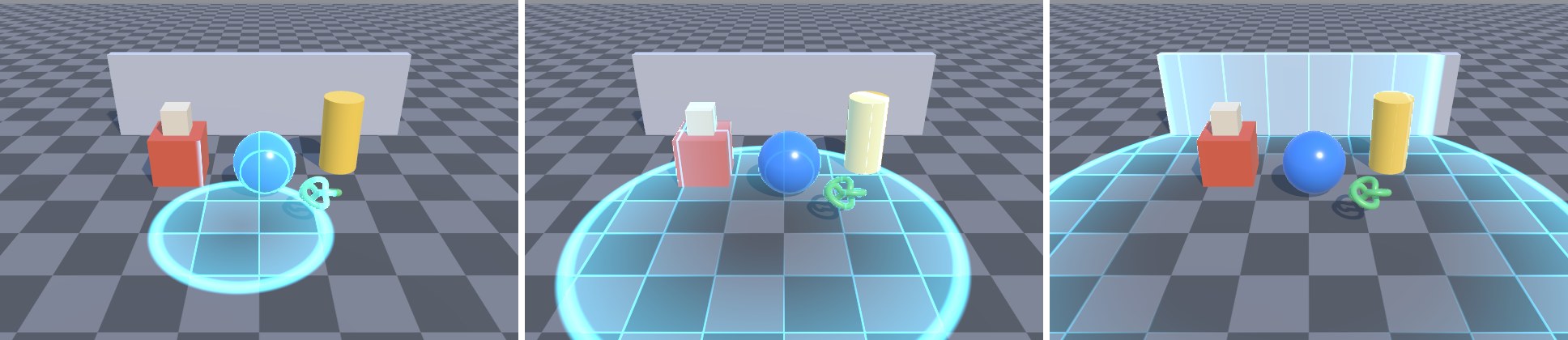
扩展方向:
- 多个扫描中心:把中心和半径做成数组,循环取最大值。
- 只高亮特定物体:效果本身不知道“哪个像素属于敌人”,可以先用 RenderObjects 把敌人画进一张遮罩 RT(第 25 章),在扫描 Shader 里采样遮罩,给敌人换一种颜色。
- 透明物体:全屏效果在透明物体之前执行时,透明物体不会被扫描;放在之后执行时,透明物体后面的场景会被扫描、它自己却不会(深度里没有它)。这是所有基于深度的屏幕空间效果的共性。
本案例出自《URP 渲染实战》第 28 章「屏幕空间技术」。在章节中阅读上下文 →