URP 渲染实战 / 第 28 章 屏幕空间技术 / 案例 28.1
案例 28.1可视化重建出的世界坐标入门
目标:用两种方法分别重建世界坐标并画出来,肉眼验证它们是对的——这是写任何屏幕空间效果前都应该先做的一步。
Assets/Cookbook/Ch28/ReconstructWorldPos.shader(节选:frag0)
half4 Frag(Varyings input) : SV_Target
{
    UNITY_SETUP_STEREO_EYE_INDEX_POST_VERTEX(input);
    float2 uv = input.texcoord;
    half4 sceneColor = SAMPLE_TEXTURE2D_X(_BlitTexture, sampler_PointClamp, uv);
    float depth = SampleDeviceDepth(uv);
    if (IsSkyDepth(depth)) return sceneColor * 0.35;   // 天空没有几何,压暗区分
    float3 positionWS = ReconstructPositionWS(uv, depth);
    // +0.5:避开地面 y=0 这种整数坐标,frac 在 0/1 之间来回跳会产生噪点
    return half4(frac(positionWS + 0.5), 1);
}
vec4 Frag()
{
    vec2 uv = texcoord;
    vec4 sceneColor = SamplePointClamp(_BlitTexture, uv);
    float depth = SampleDeviceDepth(uv);
    if (IsSkyDepth(depth)) return sceneColor * 0.35;   // 天空没有几何,压暗区分
    vec3 positionWS = ReconstructPositionWS(uv, depth);
    // +0.5:避开地面 y=0 这种整数坐标,frac 在 0/1 之间来回跳会产生噪点
    return vec4(fract(positionWS + 0.5), 1.0);
}
Assets/Cookbook/Ch28/ReconstructWorldPos.shader(节选:frag1)
half4 Frag(VaryingsRay input) : SV_Target
{
    UNITY_SETUP_STEREO_EYE_INDEX_POST_VERTEX(input);
    float2 uv = input.texcoord;
    half4 sceneColor = SAMPLE_TEXTURE2D_X(_BlitTexture, sampler_PointClamp, uv);
    float rawDepth = SampleSceneDepth(uv);
    if (IsSkyDepth(rawDepth)) return sceneColor;
    float3 positionWS = ReconstructPositionWSFromRay(input.farRayWS, rawDepth);

    // 1 米网格线:用 fwidth 把线宽换算成像素,远近粗细一致
    float3 dist = abs(frac(positionWS + 0.5) - 0.5);
    float3 width = fwidth(positionWS) * _GridWidth;
    float3 lines = 1 - smoothstep(width * 0.5, width * 1.5, dist);
    float grid = saturate(max(lines.x, max(lines.y, lines.z)));
    return lerp(sceneColor, _GridColor, grid * 0.85);
}
vec4 Frag()
{
    vec2 uv = texcoord;
    vec4 sceneColor = SamplePointClamp(_BlitTexture, uv);
    float rawDepth = SampleSceneDepth(uv);
    if (IsSkyDepth(rawDepth)) return sceneColor;
    vec3 positionWS = ReconstructPositionWSFromRay(farRayWS, rawDepth);

    // 1 米网格线:用 fwidth 把线宽换算成像素,远近粗细一致
    vec3 dist = abs(fract(positionWS + 0.5) - 0.5);
    vec3 width = fwidth(positionWS) * _GridWidth;
    vec3 lines = 1.0 - smoothstep(width * 0.5, width * 1.5, dist);
    float grid = saturate(max(lines.x, max(lines.y, lines.z)));
    return mix(sceneColor, _GridColor, grid * 0.85);
}
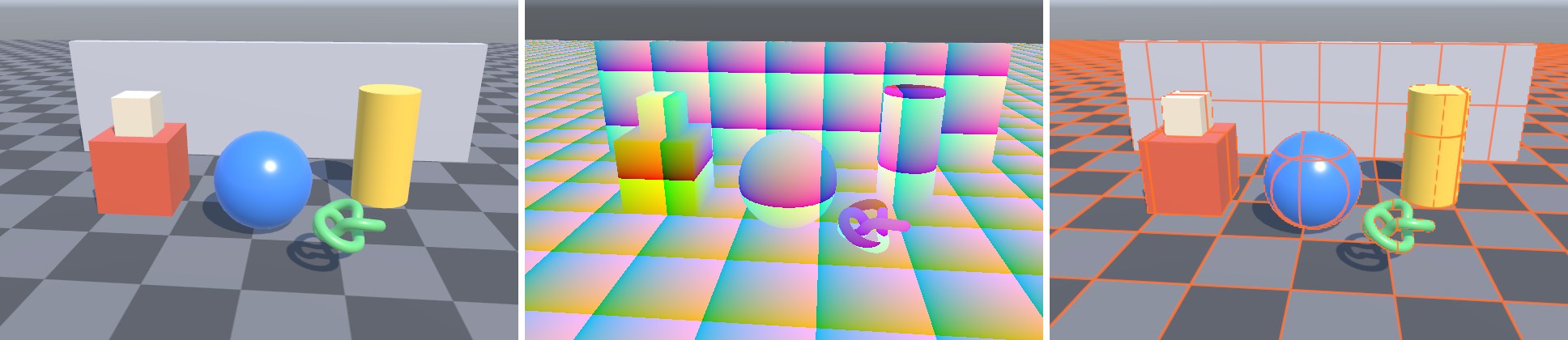
第一个 Pass 直接输出 frac(positionWS):每隔 1 米颜色循环一次,红绿蓝分别对应 x、y、z。如果重建正确,地面上会出现和棋盘格对齐的 1 米色块,立方体每个面的色块严格贴在面上,不会随相机移动而“游泳”。第二个 Pass 用视锥射线法,在原画面上叠加 1 米世界网格,网格线用 fwidth 换算成固定的像素宽度,远近粗细一致。
坑第一版这里输出的是
frac(positionWS),结果地面上出现了大片锯齿状的品红色块。原因是地面恰好在 y = 0,重建出的 y 在 ±0.0001 之间抖动,frac 在 0 和 0.9999 之间来回跳。这不是重建错误,而是“整数坐标处的 frac 不连续”,加 0.5 的偏移就好了。调试屏幕空间算法时,经常会遇到这类“看起来像 bug、其实是可视化方式问题”的现象,先想清楚数学再改代码。这个 Shader 还附带一个 Pass 2,输出两种方法结果之差乘以 1000。在实际工程里,把它挂上去看一眼几乎全黑,就能放心地在两种写法之间切换。
本案例出自《URP 渲染实战》第 28 章「屏幕空间技术」。在章节中阅读上下文 →