案例 26.9基于深度与法线的 Sobel 描边高阶
目标:全屏描边:所有物体的轮廓、折痕都画出线条,可以叠在原图上,也可以只显示线条做“线稿”效果。和第 14 章的法线外扩描边、第 25 章的遮罩描边相比,它不需要修改任何物体,对场景一视同仁。
原理:边就是“图像中某个量突然变化的地方”。我们用两个量:深度(物体与背景、前后物体之间的轮廓)和法线(同一物体上的折痕,比如立方体的棱)。用 Sobel 算子求它们在屏幕上的梯度:
Sobel 比更简单的 Roberts 交叉算子(2×2,只取对角差)多了中间一行/列的权重 2,相当于先在垂直方向做一次平滑再求导,对噪声更不敏感、线条更连续。对法线这种三维量,分别对 xyz 三个分量求梯度再合并长度。
声明输入:效果需要 _CameraDepthTexture 和 _CameraNormalsTexture。在框架里只需重写 RequiredInputs:
class Pass : SimplePostPass<EdgeDetectVolume>
{
    static readonly int s_Params = Shader.PropertyToID("_EdgeParams");     // x 强度, y 粗细, z 深度阈值, w 法线阈值
    static readonly int s_EdgeColor = Shader.PropertyToID("_EdgeColor");
    static readonly int s_BgColor = Shader.PropertyToID("_EdgeBgColor");   // a = edgesOnly

    public Pass(Material m) : base(m, "Ch26 Edge Detect") { }

    // 告诉 URP:本 Pass 需要 _CameraDepthTexture 和 _CameraNormalsTexture。
    // Normal 会让 URP 额外跑一遍 DepthNormals 预渲染(前向路径下),这是这个效果的主要开销。
    public override ScriptableRenderPassInput RequiredInputs =>
        ScriptableRenderPassInput.Depth | ScriptableRenderPassInput.Normal;

    protected override void Apply(EdgeDetectVolume v, ref RenderingData rd)
    {
        material.SetVector(s_Params, new Vector4(v.intensity.value, v.thickness.value, v.depthThreshold.value, v.normalThreshold.value));
        material.SetColor(s_EdgeColor, v.edgeColor.value);
        var bg = v.backgroundColor.value; bg.a = v.edgesOnly.value;
        material.SetColor(s_BgColor, bg);
    }
}
ScriptableRenderPassInput.Normal 会让 URP 在前向渲染路径下插入一次 DepthNormals 预渲染:所有不透明物体用各自 Shader 的 DepthNormals Pass 再画一遍,输出深度和世界空间法线(第 6 章讲过这个 Pass)。这是本效果最主要的开销——物体多的场景里相当于多画一遍几何体。没有 DepthNormals Pass 的自定义 Shader 不会出现在法线图里,描边也就缺了它的折痕线,这是使用这个效果前要检查的。
两个容易被忽略的归一化
// Sobel 核:Gx = [-1 0 1; -2 0 2; -1 0 1],Gy 为其转置
static const float2 kOffsets[8] = {
    float2(-1, -1), float2(0, -1), float2(1, -1),
    float2(-1,  0),                float2(1,  0),
    float2(-1,  1), float2(0,  1), float2(1,  1) };
static const float kGx[8] = { -1, 0, 1, -2, 2, -1, 0, 1 };
static const float kGy[8] = { -1, -2, -1, 0, 0, 1, 2, 1 };

half EdgeAt(float2 uv)
{
    float2 texel = _EdgeParams.y / _ScreenParams.xy;
    float  rawCenter = SampleSceneDepth(uv);
    float  centerDepth = LinearEyeDepth(rawCenter, _ZBufferParams);

    float2 gDepth = 0;
    float3 gNx = 0, gNy = 0;
    [unroll] for (int i = 0; i < 8; i++)
    {
        float2 suv = uv + kOffsets[i] * texel;
        float  d = LinearEyeDepth(SampleSceneDepth(suv), _ZBufferParams);
        float3 n = SampleSceneNormals(suv);
        gDepth += float2(kGx[i], kGy[i]) * d;
        gNx += kGx[i] * n;
        gNy += kGy[i] * n;
    }

    // 深度梯度除以中心深度:远处物体深度差天然更大,不归一化的话远景会全是线
    float depthEdge = length(gDepth) / max(centerDepth, 1e-3);

    // 掠射角修正:斜着看一个平面(例如远处地面)时,相邻像素深度变化很快,
    // 相对梯度约与 1/(N·V) 成正比。乘上 N·V 把这部分“假边”压下去
    float3 normalC = SampleSceneNormals(uv);
    float3 positionWS = ComputeWorldSpacePosition(uv, rawCenter, UNITY_MATRIX_I_VP);
    float3 viewDirWS = normalize(GetCameraPositionWS() - positionWS);
    float ndv = saturate(dot(normalC, viewDirWS));
    depthEdge *= ndv;

    float normalEdge = sqrt(dot(gNx, gNx) + dot(gNy, gNy));
    half e = max(step(_EdgeParams.z, depthEdge), step(_EdgeParams.w, normalEdge));
    return e;
}
// Sobel 核:Gx = [-1 0 1; -2 0 2; -1 0 1],Gy 为其转置
const vec2 kOffsets[8] = vec2[8](
    vec2(-1, -1), vec2(0, -1), vec2(1, -1),
    vec2(-1,  0),              vec2(1,  0),
    vec2(-1,  1), vec2(0,  1), vec2(1,  1));
const float kGx[8] = float[8](-1.0, 0.0, 1.0, -2.0, 2.0, -1.0, 0.0, 1.0);
const float kGy[8] = float[8](-1.0, -2.0, -1.0, 0.0, 0.0, 1.0, 2.0, 1.0);

float EdgeAt(vec2 uv)
{
    vec2 texel = _EdgeParams.y / _ScreenParams.xy;
    float rawCenter = SampleSceneDepth(uv);
    float centerDepth = LinearEyeDepth(rawCenter, _ZBufferParams);

    vec2 gDepth = vec2(0.0);
    vec3 gNx = vec3(0.0), gNy = vec3(0.0);
    for (int i = 0; i < 8; i++)
    {
        vec2 suv = uv + kOffsets[i] * texel;
        float d = LinearEyeDepth(SampleSceneDepth(suv), _ZBufferParams);
        vec3 n = SampleSceneNormalsRaw(suv);
        gDepth += vec2(kGx[i], kGy[i]) * d;
        gNx += kGx[i] * n;
        gNy += kGy[i] * n;
    }

    // 深度梯度除以中心深度:远处物体深度差天然更大,不归一化的话远景会全是线
    float depthEdge = length(gDepth) / max(centerDepth, 1e-3);

    // 掠射角修正:斜着看一个平面(例如远处地面)时,相邻像素深度变化很快,
    // 相对梯度约与 1/(N·V) 成正比。乘上 N·V 把这部分“假边”压下去
    vec3 normalC = SampleSceneNormalsRaw(uv);
    vec3 positionWS = ComputeWorldSpacePosition(uv, rawCenter, UNITY_MATRIX_I_VP);
    vec3 viewDirWS = normalize(GetCameraPositionWS() - positionWS);
    float ndv = saturate(dot(normalC, viewDirWS));
    depthEdge *= ndv;

    float normalEdge = sqrt(dot(gNx, gNx) + dot(gNy, gNy));
    float e = max(step(_EdgeParams.z, depthEdge), step(_EdgeParams.w, normalEdge));
    return e;
}
- 除以中心深度:两个前后相距 1 米的物体,在 5 米处和 50 米处产生的深度差相同,但我们希望近处描、远处也描——真正有意义的是“相对差”。除以中心深度让阈值与距离无关。
- 乘以 N·V:斜着看一个平面(远处的地面)时,相邻像素的深度变化很快,相对梯度约与 1/(N·V) 成正比,不处理的话地平线附近会出现一大片假的“边”。乘上 N·V 正好抵消这一项,而真正的轮廓(深度突变)即使乘了 N·V 仍远超阈值。早期版本没有这一步时,配图的地平线处有一条粗黑带。
深度/法线纹理在延迟渲染、开启“Accurate G-buffer Normals”时会采用八面体编码,SampleSceneNormals 靠 _GBUFFER_NORMALS_OCT 关键字决定是否解码,所以 Shader 里加了 #pragma multi_compile_fragment _ _GBUFFER_NORMALS_OCT。
[BookShot("ch26-edge", W = 640, H = 400, Panels = 3)]
static void Edge(Shot s)
{
    Stage(s);
    s.Feature<EdgeDetectFeature>();
    var v = s.Post().Add<EdgeDetectVolume>();
    v.intensity.Override(1f);
    v.thickness.Override(1f);
    switch (s.Panel)
    {
        case 0: v.edgesOnly.Override(1f); v.normalThreshold.Override(4f); break;   // 只用深度
        case 1: v.edgesOnly.Override(1f); break;                                     // 深度 + 法线
        default: v.edgesOnly.Override(0f); break;                                    // 叠在原图上
    }
}
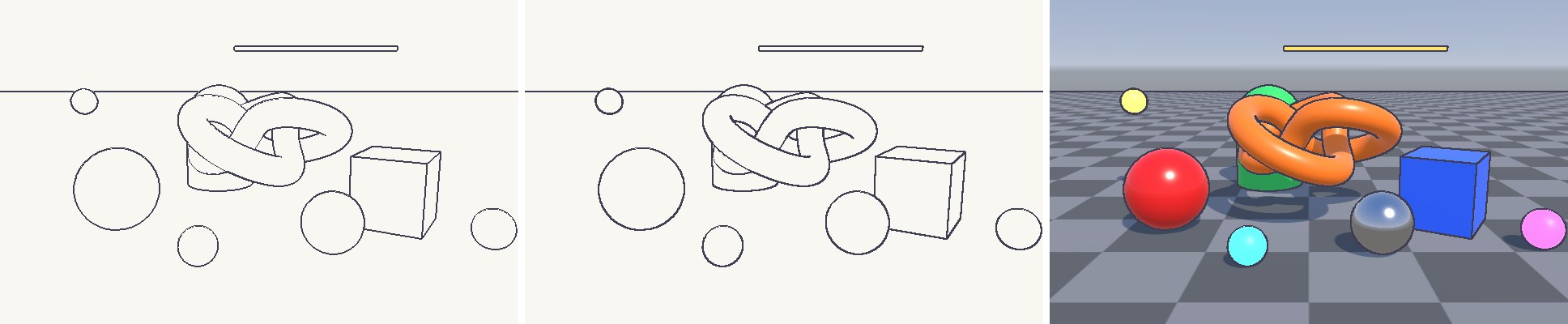
调参:depthThreshold 过小会把曲面上的深度变化也当成边,过大会漏掉贴得近的物体之间的轮廓;normalThreshold 过小时,高曲率的小物体(远处的小球)会被整个涂黑——因为每个像素之间法线变化都很大。线宽用 thickness 调,它放大的是采样间距,超过 2 像素时线条会出现断裂,需要更宽的线时应该先求边再做一次膨胀(案例 25.6 的方法)。