URP 渲染实战 / 第 26 章 自定义后处理 / 案例 26.6
案例 26.6色差与暗角:两个效果的叠加入门
目标:实现两种最常见的“镜头感”效果,并通过它们演示多个自定义后处理的组合。
色差(Chromatic Aberration)来自真实镜头对不同波长折射率不同:红光和蓝光在画面边缘的放大倍率略有差异,于是边缘出现彩色镶边。实现上,沿径向对不同颜色通道在略有不同的位置采样。只取 R、G、B 三次时,强度大了会出现三道分离的重影;这里在径向上取多个样本,每个样本按“光谱位置”给 RGB 三个权重(红→绿→蓝的三段帐篷函数),最后按通道归一化,色散就变成连续的彩虹过渡。偏移量与半径的平方成正比,中心几乎没有色差:
Assets/Cookbook/Ch26/MyChromaticAberration.shader(节选:frag)
half4 Frag(Varyings input) : SV_Target
{
    UNITY_SETUP_STEREO_EYE_INDEX_POST_VERTEX(input);
    float2 uv = input.texcoord;
    float2 d = uv - 0.5;
    // 偏移随半径平方增长:中心几乎无色差,边缘最强(和真实镜头的横向色差一致)
    float2 offset = d * dot(d, d) * _CAParams.x * 0.15;

    int n = (int)_CAParams.y;
    half3 sum = 0, wsum = 0;
    [loop] for (int i = 0; i < n; i++)
    {
        float t = i / (float)(n - 1);               // 0 = 红(向外)… 1 = 蓝(向内)
        half3 w = SpectrumWeight(t);
        float2 suv = uv + offset * (0.5 - t) * 2.0;
        sum += SAMPLE_TEXTURE2D_X(_BlitTexture, sampler_LinearClamp, suv).rgb * w;
        wsum += w;
    }
    return half4(sum / max(wsum, 1e-4), 1.0);
}
vec4 Frag()
{
    vec2 uv = texcoord;
    vec2 d = uv - 0.5;
    // 偏移随半径平方增长:中心几乎无色差,边缘最强(和真实镜头的横向色差一致)
    vec2 offset = d * dot(d, d) * _CAParams.x * 0.15;

    int n = int(_CAParams.y);
    vec3 sum = vec3(0.0), wsum = vec3(0.0);
    for (int i = 0; i < n; i++)
    {
        float t = float(i) / float(n - 1);         // 0 = 红(向外)… 1 = 蓝(向内)
        vec3 w = SpectrumWeight(t);
        vec2 suv = uv + offset * (0.5 - t) * 2.0;
        sum += texture(_BlitTexture, suv).rgb * w;
        wsum += w;
    }
    return vec4(sum / max(wsum, vec3(1e-4)), 1.0);
}
暗角(Vignette):画面向边缘逐渐变暗。以 center 为圆心计算半径,smoothstep 控制从哪里开始变暗、过渡带多宽;rounded 打开时按屏幕宽高比修正,使暗角是正圆而不是随屏幕拉伸的椭圆。颜色可以不是黑色——深红的暗角常用于表现紧张或受伤:
Assets/Cookbook/Ch26/MyVignette.shader(节选:frag)
half4 Frag(Varyings input) : SV_Target
{
    UNITY_SETUP_STEREO_EYE_INDEX_POST_VERTEX(input);
    float2 uv = input.texcoord;
    half4 color = SAMPLE_TEXTURE2D_X(_BlitTexture, sampler_LinearClamp, uv);

    float2 d = (uv - _VignetteParams.xy) * 2.0;                 // 屏幕边缘中点处 |d| = 1
    d.x *= lerp(1.0, _ScreenParams.x / _ScreenParams.y, _VignetteRounded);
    float r = length(d);

    // 强度决定暗角从哪里开始,柔和度决定过渡带宽度
    float inner = 1.3 - _VignetteParams.z;
    half mask = smoothstep(inner, inner + _VignetteParams.w, r);
    color.rgb = lerp(color.rgb, _VignetteColor.rgb, mask);
    return color;
}
vec4 Frag()
{
    vec2 uv = texcoord;
    vec4 color = texture(_BlitTexture, uv);

    vec2 d = (uv - _VignetteParams.xy) * 2.0;                 // 屏幕边缘中点处 |d| = 1
    d.x *= mix(1.0, _ScreenParams.x / _ScreenParams.y, _VignetteRounded);
    float r = length(d);

    // 强度决定暗角从哪里开始,柔和度决定过渡带宽度
    float inner = 1.3 - _VignetteParams.z;
    float mask = smoothstep(inner, inner + _VignetteParams.w, r);
    color.rgb = mix(color.rgb, _VignetteColor.rgb, mask);
    return color;
}
Assets/Cookbook/Ch26/LensEffects.cs(节选:volumes)
[Serializable, VolumeComponentMenuForRenderPipeline("Cookbook/My Chromatic Aberration", typeof(UniversalRenderPipeline))]
public sealed class MyChromaticAberration : VolumeComponent, IPostProcessComponent
{
    public ClampedFloatParameter intensity = new ClampedFloatParameter(0f, 0f, 1f);
    [Tooltip("沿径向分几段采样;3 = 只取 RGB 三次,越多色散越平滑")]
    public ClampedIntParameter samples = new ClampedIntParameter(6, 3, 16);
    public bool IsActive() => intensity.value > 0f;
    public bool IsTileCompatible() => false;
}

[Serializable, VolumeComponentMenuForRenderPipeline("Cookbook/My Vignette", typeof(UniversalRenderPipeline))]
public sealed class MyVignette : VolumeComponent, IPostProcessComponent
{
    public ColorParameter color = new ColorParameter(Color.black, false, false, true);
    public Vector2Parameter center = new Vector2Parameter(new Vector2(0.5f, 0.5f));
    public ClampedFloatParameter intensity = new ClampedFloatParameter(0f, 0f, 1f);
    public ClampedFloatParameter smoothness = new ClampedFloatParameter(0.5f, 0.05f, 1f);
    [Tooltip("勾选后按屏幕宽高比修正成正圆")]
    public BoolParameter rounded = new BoolParameter(false);
    public bool IsActive() => intensity.value > 0f;
    public bool IsTileCompatible() => false;
}
Assets/Cookbook/Ch26/Editor/Ch26Shots.cs(节选:shot-lens)
[BookShot("ch26-lens", W = 640, H = 400, Panels = 3)]
static void Lens(Shot s)
{
    Stage(s);
    // 两个 Feature 都在 BeforeRenderingPostProcessing:入队顺序 = Renderer 列表顺序
    s.Feature<MyChromaticAberrationFeature>();
    s.Feature<MyVignetteFeature>();
    var prof = s.Post();
    var ca = prof.Add<MyChromaticAberration>();
    var vg = prof.Add<MyVignette>();
    if (s.Panel != 1) ca.intensity.Override(1f);
    if (s.Panel != 0) { vg.intensity.Override(0.6f); vg.smoothness.Override(0.7f); vg.rounded.Override(true); }
    if (s.Panel == 2) vg.color.Override(new Color(0.12f, 0.02f, 0.05f));
}
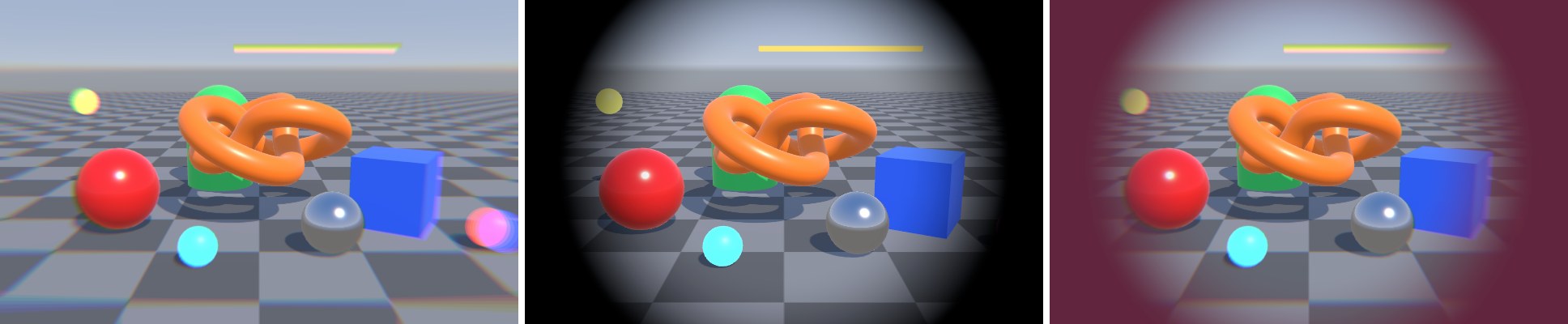
两个 Feature 都在 BeforeRenderingPostProcessing,执行顺序由 Renderer 上的列表顺序决定:先色差后暗角。顺序有时会影响结果:如果先暗角后色差,暗角的边界本身也会被色散成彩色。实际项目中,这两个效果更适合合并进一个 Pass(都是逐像素、都只读一次颜色),这正是 URP 把它们放进 Uber Post 的原因。