URP 渲染实战 / 第 26 章 自定义后处理 / 案例 26.5
案例 26.5径向模糊入门
目标:冲刺、爆炸冲击时的“速度感”:画面沿着指向某个中心的方向被拉出拖影,中心附近保持清晰。
原理:对每个像素,沿“像素 → 中心”方向在一段距离内均匀采样若干次求平均。拖影长度正比于像素到中心的距离,所以边缘模糊、中心清晰,这正是镜头快速推进时的观感。为了避免采样次数少时出现分层的“重影”,每个像素的起始位置加一个 0~1 的抖动,用的是 Interleaved Gradient Noise(Jimenez 2014),把规则的分层变成细密、均匀的噪点:
Assets/Cookbook/Ch26/RadialBlur.shader(节选:frag)
half4 Frag(Varyings input) : SV_Target
{
    UNITY_SETUP_STEREO_EYE_INDEX_POST_VERTEX(input);
    float2 uv = input.texcoord;
    float2 center = _RadialParams.xy;
    float2 dir = uv - center;                       // 指向外侧,长度 = 到中心的距离

    // 中心一圈保持清晰:按宽高比修正成正圆后再算距离
    float aspect = _ScreenParams.x / _ScreenParams.y;
    float dist = length(dir * float2(aspect, 1.0));
    float amount = _RadialParams.z * smoothstep(_ClearRadius, _ClearRadius + 0.25, dist);

    int count = (int)_RadialParams.w;
    // 每个像素的起点加一点抖动,把“分层的重影”变成细噪点
    float jitter = InterleavedGradientNoise(uv * _ScreenParams.xy);
    half3 sum = 0;
    [loop] for (int i = 0; i < count; i++)
    {
        float t = (i + jitter) / count;             // 0..1
        float2 s = uv - dir * amount * 0.3 * t;     // 向中心方向收缩
        sum += SAMPLE_TEXTURE2D_X(_BlitTexture, sampler_LinearClamp, s).rgb;
    }
    return half4(sum / count, 1.0);
}
vec4 Frag()
{
    vec2 uv = texcoord;
    vec2 center = _RadialParams.xy;
    vec2 dir = uv - center;                         // 指向外侧,长度 = 到中心的距离

    // 中心一圈保持清晰:按宽高比修正成正圆后再算距离
    float aspect = _ScreenParams.x / _ScreenParams.y;
    float dist = length(dir * vec2(aspect, 1.0));
    float amount = _RadialParams.z * smoothstep(_ClearRadius, _ClearRadius + 0.25, dist);

    int count = int(_RadialParams.w);
    // 每个像素的起点加一点抖动,把“分层的重影”变成细噪点
    float jitter = InterleavedGradientNoise(uv * _ScreenParams.xy);
    vec3 sum = vec3(0.0);
    for (int i = 0; i < count; i++)
    {
        float t = (float(i) + jitter) / float(count);   // 0..1
        vec2 s = uv - dir * amount * 0.3 * t;           // 向中心方向收缩
        sum += texture(_BlitTexture, s).rgb;
    }
    return vec4(sum / float(count), 1.0);
}
C# 只有参数传递(使用 SimplePostPass):
Assets/Cookbook/Ch26/RadialBlur.cs(节选:pass)
class RadialBlurPass : SimplePostPass<RadialBlurVolume>
{
    static readonly int s_Params = Shader.PropertyToID("_RadialParams");   // xy 中心, z 强度, w 采样数
    static readonly int s_ClearRadius = Shader.PropertyToID("_ClearRadius");
    public RadialBlurPass(Material m) : base(m, "Ch26 Radial Blur") { }

    protected override void Apply(RadialBlurVolume v, ref RenderingData renderingData)
    {
        var c = v.center.value;
        material.SetVector(s_Params, new Vector4(c.x, c.y, v.strength.value, v.samples.value));
        material.SetFloat(s_ClearRadius, v.clearRadius.value);
    }
}
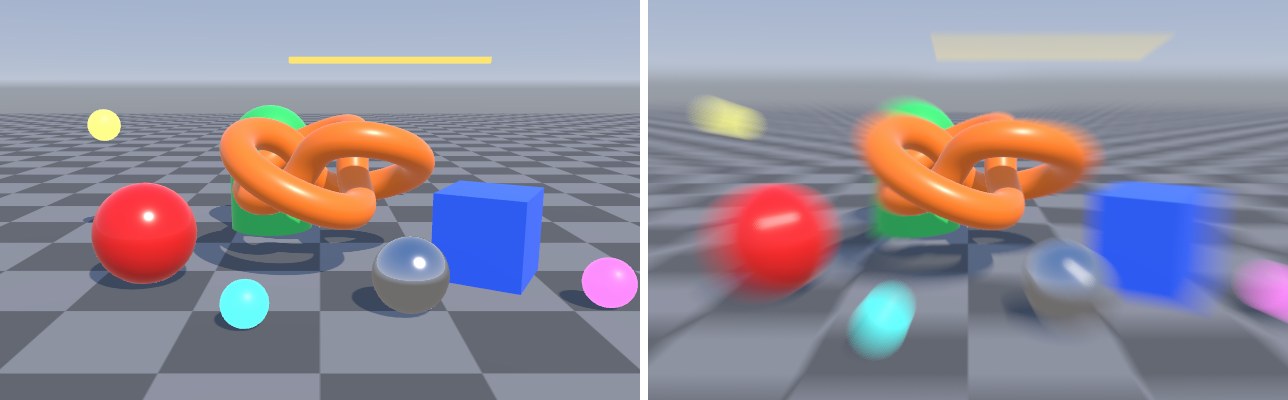
运行时把 strength 交给 Volume 权重动画(参见案例 26.10 的写法),就能做出冲刺开始时猛地一拉、随后迅速恢复的效果。中心点也可以每帧设为某个世界坐标投影到屏幕的位置(Camera.WorldToViewportPoint),做成“朝着爆炸点”的冲击模糊。