URP 渲染实战 / 第 26 章 自定义后处理 / 案例 26.2
案例 26.2可分离高斯模糊与降采样进阶
目标:实现可调强度的全屏高斯模糊,用于暂停菜单背景、UI 毛玻璃等。
原理:二维高斯函数可以拆成两个一维高斯的乘积:
所以一个 N×N 的二维卷积,等价于先做一遍水平 N 抽头卷积、再做一遍竖直 N 抽头卷积:每像素的采样数从 N² 降到 2N。9×9 的核从 81 次降到 18 次。
还能再省一半:利用 GPU 的双线性过滤,在两个相邻纹素之间的某个位置采样一次,硬件会自动按距离给两个纹素加权。只要采样位置选得恰当,一次采样就等于两个权重的加权和。设相邻两个抽头偏移为 、权重为 ,合并后:
用 9 个离散权重 [66, 220, 495, 792, 924, 792, 495, 220, 66]/4070 时,中心单独一次,两侧各把 (1,2)、(3,4) 两对合并,就得到偏移 1.3846 和 3.2308、权重 0.3162 和 0.0703——9 个权重只要 5 次采样。这组权重与 URP 自己 Bloom.shader 的模糊 Pass 相同:
Assets/Cookbook/Ch26/GaussianBlur.shader(节选:blur)
// 9 抽头核 [66 220 495 792 924 792 495 220 66]/4070(二项式第 12 行去掉最外两对后归一化,
// 与 URP Bloom.shader 用的是同一组权重)。相邻两项合并成一次双线性采样:
// 偏移 0, 1.3846, 3.2308(纹素),权重 0.2270, 0.3162, 0.0703 —— 9 个权重只要 5 次采样
half4 Blur1D(float2 uv, float2 dir)
{
    const float o1 = 1.3846153846, o2 = 3.2307692308;
    const half  w0 = 0.2270270270, w1 = 0.3162162162, w2 = 0.0702702703;
    float2 du = dir * _BlitTexture_TexelSize.xy * _Spread;
    half4 c = SAMPLE_TEXTURE2D_X(_BlitTexture, sampler_LinearClamp, uv) * w0;
    c += SAMPLE_TEXTURE2D_X(_BlitTexture, sampler_LinearClamp, uv + du * o1) * w1;
    c += SAMPLE_TEXTURE2D_X(_BlitTexture, sampler_LinearClamp, uv - du * o1) * w1;
    c += SAMPLE_TEXTURE2D_X(_BlitTexture, sampler_LinearClamp, uv + du * o2) * w2;
    c += SAMPLE_TEXTURE2D_X(_BlitTexture, sampler_LinearClamp, uv - du * o2) * w2;
    return c;
}
// 9 抽头核 [66 220 495 792 924 792 495 220 66]/4070(二项式第 12 行去掉最外两对后归一化,
// 与 URP Bloom.shader 用的是同一组权重)。相邻两项合并成一次双线性采样:
// 偏移 0, 1.3846, 3.2308(纹素),权重 0.2270, 0.3162, 0.0703 —— 9 个权重只要 5 次采样
vec4 Blur1D(vec2 uv, vec2 dir)
{
    const float o1 = 1.3846153846, o2 = 3.2307692308;
    const float w0 = 0.2270270270, w1 = 0.3162162162, w2 = 0.0702702703;
    vec2 du = dir * _BlitTexture_TexelSize.xy * _Spread;
    vec4 c = texture(_BlitTexture, uv) * w0;
    c += texture(_BlitTexture, uv + du * o1) * w1;
    c += texture(_BlitTexture, uv - du * o1) * w1;
    c += texture(_BlitTexture, uv + du * o2) * w2;
    c += texture(_BlitTexture, uv - du * o2) * w2;
    return c;
}
C# 侧:先双线性缩小到 1/N 分辨率(缩小本身就是一次低通滤波),在小图上做 n 次“水平+竖直”迭代,再双线性放大回相机颜色。_Spread 放大采样间距,进一步扩大有效半径:
Assets/Cookbook/Ch26/GaussianBlur.cs(节选:pass)
class GaussianBlurPass : PostPassBase
{
    static readonly int s_Spread = Shader.PropertyToID("_Spread");
    const int PassH = 0, PassV = 1;

    RTHandle m_A, m_B;          // 两张低分辨率 RT,来回倒(乒乓)
    int m_Iterations, m_Downsample;

    public GaussianBlurPass(Material m) : base(m, "Ch26 Gaussian Blur") { }

    public override bool Prepare(VolumeStack stack, ref RenderingData renderingData)
    {
        var v = stack.GetComponent<GaussianBlurVolume>();
        if (v == null || !v.IsActive()) return false;
        material.SetFloat(s_Spread, v.spread.value);
        m_Iterations = v.iterations.value;
        m_Downsample = v.downsample.value;
        return true;
    }

    public override void OnCameraSetup(CommandBuffer cmd, ref RenderingData renderingData)
    {
        var desc = ColorDesc(ref renderingData, m_Downsample);
        Alloc(ref m_A, desc, "_Ch26BlurA");
        Alloc(ref m_B, desc, "_Ch26BlurB");
    }

    protected override void Render(CommandBuffer cmd, ref RenderingData renderingData)
    {
        // 1) 降采样:双线性拷贝到小图,本身就相当于一次 2×2 盒式滤波
        Blitter.BlitCameraTexture(cmd, cameraColor, m_A, 0, true);
        // 2) 迭代:A →(水平)→ B →(竖直)→ A
        for (int i = 0; i < m_Iterations; i++)
        {
            Blitter.BlitCameraTexture(cmd, m_A, m_B, material, PassH);
            Blitter.BlitCameraTexture(cmd, m_B, m_A, material, PassV);
        }
        // 3) 放大回全分辨率(双线性),覆盖相机颜色
        Blitter.BlitCameraTexture(cmd, m_A, cameraColor, 0, true);
    }

    public override void Dispose()
    {
        Release(ref m_A);
        Release(ref m_B);
    }
}
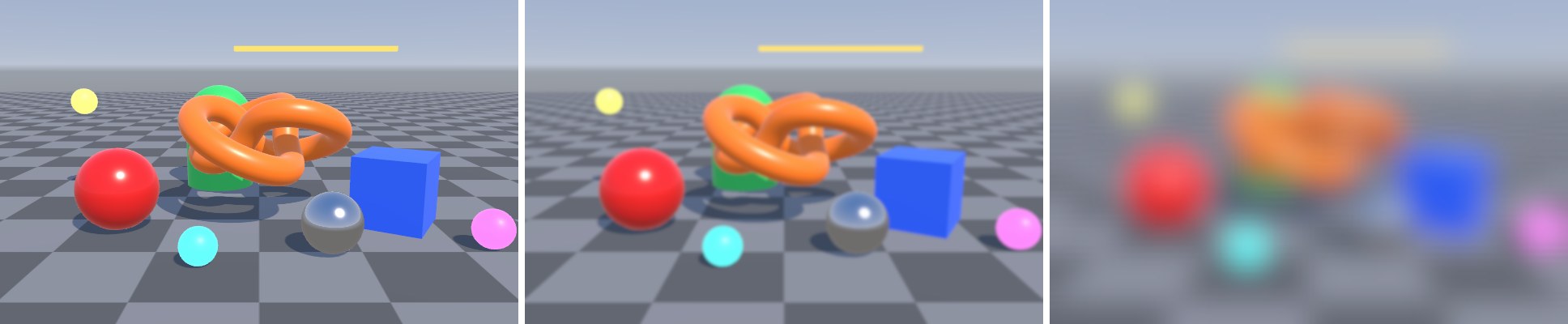
调参与开销:模糊半径大致正比于 downsample × spread × √iterations(多次高斯卷积的方差相加,标准差按平方根增长)。在开销上,降采样最划算:1/4 分辨率时像素数只有 1/16,迭代几次都很便宜。spread 不宜超过 2 左右,否则抽头之间的间隙会产生可见的重影条纹——想要更大的半径,加降采样或加迭代。
提示暂停菜单、毛玻璃面板通常只想让 UI 背后的画面模糊,而不是把整个相机颜色替换掉。做法是让模糊结果留在一张 RT 里,并在 Pass 末尾用
cmd.SetGlobalTexture("_UIBlurTexture", m_A) 把它暴露出去,UI 材质在片元着色器里用屏幕 UV 采样这张全局纹理即可;最后那一步“放大回相机颜色”删掉。由于菜单打开时画面通常是静止的,还可以只在打开的那一帧模糊一次、之后复用结果,开销几乎为零。