案例 26.1饱和度与对比度:第一个 Volume 驱动的后处理入门
目标:写一个可以在 Volume 上添加的 “Cookbook/Saturation” 覆盖项,支持饱和度(0 = 灰度)与对比度;完整地、不借助任何基类写一遍。
先是 Volume 组件。VolumeComponentMenuForRenderPipeline 让它出现在 Add Override 菜单里,并只在 URP 下显示;ClampedFloatParameter 会在 Inspector 里画成滑条:
// VolumeComponentMenuForRenderPipeline:出现在 Volume 的 Add Override 菜单里,并且只对 URP 显示
[Serializable, VolumeComponentMenuForRenderPipeline("Cookbook/Saturation", typeof(UniversalRenderPipeline))]
public sealed class SaturationVolume : VolumeComponent, IPostProcessComponent
{
    // 默认值要等于“无效果”的值:没有任何 Volume 覆盖时,栈里拿到的就是默认值
    [Tooltip("0 = 灰度,1 = 原图,>1 = 更鲜艳")]
    public ClampedFloatParameter saturation = new ClampedFloatParameter(1f, 0f, 2f);

    [Tooltip("围绕中灰 0.18(线性)缩放的对比度")]
    public ClampedFloatParameter contrast = new ClampedFloatParameter(1f, 0f, 2f);

    // 由 Feature 调用:没有效果时整个 Pass 都不入队,零开销
    public bool IsActive() => saturation.value != 1f || contrast.value != 1f;

    // 接口要求实现;URP 14 源码里并没有调用它,返回 false 即可
    public bool IsTileCompatible() => false;
}
Shader 的饱和度部分很直接:在同亮度的灰与原色之间插值,参数大于 1 时就是外插,颜色更鲜艳。对比度则值得说一下:常见写法是 (c - 0.5) * contrast + 0.5,但这是给 sRGB 编码的 LDR 颜色设计的;在线性 HDR 缓冲里,0.5 并不是视觉上的中灰(线性中灰约为 0.18),而且大于 1 的高光会被推到非常大的值。这里在 log2 空间以 0.18 为支点缩放,等价于对亮度做幂次变换 ,暗部和亮部都按“档位”(stop)对称地拉开或压缩,URP 自己的 Color Adjustments 也采用以中灰为支点的思路:
half4 Frag(Varyings input) : SV_Target
{
    UNITY_SETUP_STEREO_EYE_INDEX_POST_VERTEX(input);
    half4 color = SAMPLE_TEXTURE2D_X(_BlitTexture, sampler_LinearClamp, input.texcoord);

    // 饱和度:在“原色”与“同亮度的灰”之间插值,>1 时外插 = 更鲜艳
    half luma = dot(color.rgb, half3(0.2126, 0.7152, 0.0722));
    color.rgb = lerp(luma.xxx, color.rgb, _Saturation);

    // 对比度:在 log2 空间以中灰为支点缩放,HDR 亮部不会被直接截断
    const half midGrey = 0.18;
    half3 logC = log2(max(color.rgb, 1e-5) / midGrey);
    color.rgb = midGrey * exp2(logC * _Contrast);
    return color;
}
vec4 Frag()
{
    vec4 color = texture(_BlitTexture, texcoord);

    // 饱和度:在“原色”与“同亮度的灰”之间插值,>1 时外插 = 更鲜艳
    float luma = dot(color.rgb, vec3(0.2126, 0.7152, 0.0722));
    color.rgb = mix(vec3(luma), color.rgb, _Saturation);

    // 对比度:在 log2 空间以中灰为支点缩放,HDR 亮部不会被直接截断
    const float midGrey = 0.18;
    vec3 logC = log2(max(color.rgb, 1e-5) / midGrey);
    color.rgb = midGrey * exp2(logC * _Contrast);
    return color;
}
Feature 的关键部分是 AddRenderPasses:
public override void AddRenderPasses(ScriptableRenderer renderer, ref RenderingData renderingData)
{
    if (m_Pass == null) return;
    ref var cameraData = ref renderingData.cameraData;
    if (cameraData.cameraType == CameraType.Preview || cameraData.cameraType == CameraType.Reflection) return;
    // 和 URP 自带后处理保持一致:相机没勾 Post Processing 就不做
    if (!cameraData.postProcessEnabled) return;

    // VolumeManager 已经在渲染这个相机之前,按相机位置/层把所有 Volume 混合进 stack
    var volume = VolumeManager.instance.stack.GetComponent<SaturationVolume>();
    if (volume == null || !volume.IsActive()) return;   // 没效果就不入队

    m_Pass.renderPassEvent = passEvent;
    m_Pass.Setup(volume);
    renderer.EnqueuePass(m_Pass);
}
addPasses(frame, enqueue) {
  if (!this.material) return;
  // 和 URP 自带后处理保持一致:相机没勾 Post Processing 就不做
  if (!frame.camera.postProcessing) return;
  // 按优先级、权重混合后的 Volume 参数
  const volume = frame.getVolume(VOLUME);
  if (!volume || !isActive(volume)) return;   // 没效果就不入队

  // SaturationPass.Setup:.value 是混合后的最终值
  this.material.setFloat('_Saturation', volume.saturation);
  this.material.setFloat('_Contrast', volume.contrast);
  enqueue(this.passEvent, (fr) => {
    const temp = fr.getTemporaryRT('_Ch26SaturationTemp', fr.width, fr.height);
    fr.blit(fr.cameraColorTexture(), temp, this.material, 0);
    fr.blit(temp.texture, 'camera');
    fr.bindCamera();
  }, 'Ch26 Saturation');
}
cameraData.postProcessEnabled对应相机上的 Post Processing 勾选框。和内置后处理保持一致,用户关掉相机的后处理时,我们的效果也应该消失。- 栈在这个时间点已经是当前相机的混合结果:URP 先
UpdateVolumeFramework,再走到渲染流程里的AddRenderPasses,同一帧不同相机看到的是各自的栈。 - 参数在
Setup(volume)里写进材质。这些值在本帧内对这个相机不变,用material.SetFloat没问题。
Pass 和第 25 章的 TintPass 完全同构(拷出处理、拷回、恢复目标),这里不再重复讲解:
class SaturationPass : ScriptableRenderPass
{
    static readonly int s_Saturation = Shader.PropertyToID("_Saturation");
    static readonly int s_Contrast = Shader.PropertyToID("_Contrast");

    readonly Material m_Material;
    RTHandle m_Color, m_Depth, m_Temp;

    public SaturationPass(Material m)
    {
        m_Material = m;
        profilingSampler = new ProfilingSampler("Ch26 Saturation");
    }

    public void Setup(SaturationVolume v)
    {
        // .value 是混合后的最终值(多个 Volume 按权重插值的结果)
        m_Material.SetFloat(s_Saturation, v.saturation.value);
        m_Material.SetFloat(s_Contrast, v.contrast.value);
    }

    public void SetTarget(RTHandle color, RTHandle depth) { m_Color = color; m_Depth = depth; }

    public override void OnCameraSetup(CommandBuffer cmd, ref RenderingData renderingData)
    {
        var desc = renderingData.cameraData.cameraTargetDescriptor;
        desc.msaaSamples = 1;
        desc.depthBufferBits = 0;
        RenderingUtils.ReAllocateIfNeeded(ref m_Temp, desc, FilterMode.Bilinear, TextureWrapMode.Clamp, name: "_Ch26SaturationTemp");
    }

    public override void Execute(ScriptableRenderContext context, ref RenderingData renderingData)
    {
        var cmd = CommandBufferPool.Get();
        using (new ProfilingScope(cmd, profilingSampler))
        {
            Blitter.BlitCameraTexture(cmd, m_Color, m_Temp, m_Material, 0);
            Blitter.BlitCameraTexture(cmd, m_Temp, m_Color);
            CoreUtils.SetRenderTarget(cmd, m_Color, m_Depth);
        }
        context.ExecuteCommandBuffer(cmd);
        CommandBufferPool.Release(cmd);
    }

    public void Dispose()
    {
        m_Temp?.Release();
        m_Temp = null;
    }
}
// 案例 26.1:读取 Volume 的后处理 Feature(对应 Ch26/SaturationFeature.cs + SaturationVolume.cs,不依赖基类)。
import { Material } from '../engine/shader.js';
import { RenderPassEvent } from '../engine/features.js';
import { defineVolume } from './Cookbook.Ch26.PostFeatureBase.js';

// 默认值要等于“无效果”的值:没有任何 Volume 覆盖时,栈里拿到的就是默认值
const VOLUME = 'Cookbook.Ch26.SaturationVolume';
defineVolume(VOLUME, { saturation: 1, contrast: 1 });
const isActive = (v) => v.saturation !== 1 || v.contrast !== 1;

export default class SaturationFeature {
  constructor(engine, data) {
    this.engine = engine;
    this.data = data || {};
    this.passEvent = this.data.passEvent ?? RenderPassEvent.BeforeRenderingPostProcessing;
  }

  async init() {
    const name = (this.data.shader && this.data.shader.shader) || 'Cookbook/Ch26/Saturation';
    this.material = new Material(await this.engine.shaders.get(name));
  }

  addPasses(frame, enqueue) {
    if (!this.material) return;
    // 和 URP 自带后处理保持一致:相机没勾 Post Processing 就不做
    if (!frame.camera.postProcessing) return;
    // 按优先级、权重混合后的 Volume 参数
    const volume = frame.getVolume(VOLUME);
    if (!volume || !isActive(volume)) return;   // 没效果就不入队

    // SaturationPass.Setup:.value 是混合后的最终值
    this.material.setFloat('_Saturation', volume.saturation);
    this.material.setFloat('_Contrast', volume.contrast);
    enqueue(this.passEvent, (fr) => {
      const temp = fr.getTemporaryRT('_Ch26SaturationTemp', fr.width, fr.height);
      fr.blit(fr.cameraColorTexture(), temp, this.material, 0);
      fr.blit(temp.texture, 'camera');
      fr.bindCamera();
    }, 'Ch26 Saturation');
  }
}
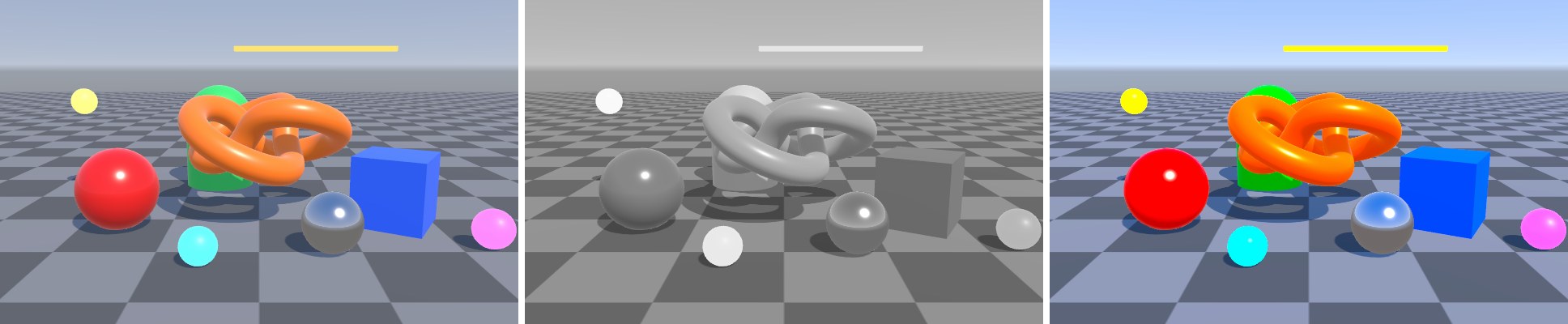
[BookShot("ch26-saturation", W = 640, H = 400, Panels = 3)]
static void Saturation(Shot s)
{
    Stage(s);
    s.Feature<SaturationFeature>();
    var v = s.Post().Add<SaturationVolume>();
    if (s.Panel == 1) v.saturation.Override(0f);
    if (s.Panel == 2) { v.saturation.Override(1.6f); v.contrast.Override(1.25f); }
}
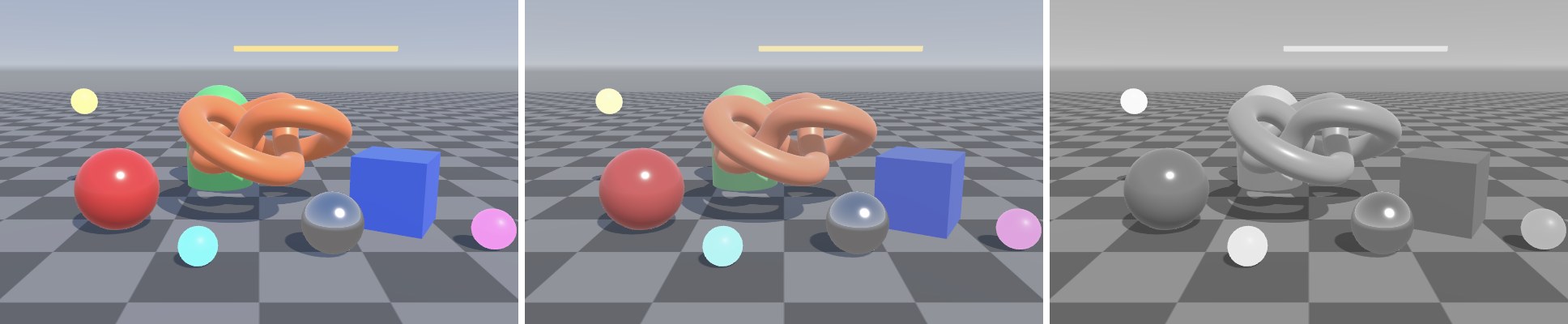
下面这组图只改了全局 Volume 的 weight,Profile 里 saturation 一直是 0。可以看到权重如何把栈里的值从默认值 1 线性地拉向 0:
在编辑器里使用:
- Renderer Data 上 ,拖入 Shader。
- 场景里选中(或新建)一个 Volume,,勾选 saturation 前的复选框并调整。
- 确认相机勾选了 。
参数类型怎么选
core 包在 VolumeParameter.cs 里预定义了几十种参数类型,最常用的是下面这些。选型时同时考虑三件事:Inspector 里怎么显示、能不能插值、默认值是什么。
| 类型 | Inspector | 插值 | 典型用途 |
|---|---|---|---|
ClampedFloatParameter(v, min, max) | 滑条 | 线性 | 强度、比例类参数,首选 |
MinFloatParameter(v, min) | 数值框,下限截断 | 线性 | 阈值、HDR 强度这类没有上限的量 |
ClampedIntParameter(v, min, max) | 整数滑条 | 线性后截断 | 迭代次数、采样数 |
BoolParameter(v) | 复选框 | 跳变 | 开关类选项 |
ColorParameter(v, hdr, showAlpha, showEyeDropper) | 拾色器 | RGB 线性 | 染色、暗角颜色;HDR 颜色把第二个参数设为 true |
Vector2Parameter(v) | 两个数值框 | 线性 | 屏幕中心点 |
TextureParameter(v) | 纹理槽 | 跳变 | LUT、镜头污渍贴图 |
NoInterpClampedFloatParameter 等 NoInterp 系列 | 同对应类型 | 不插值(跳变) | “质量档位”之类在两个 Volume 之间渐变没有意义的量 |
自定义 VolumeParameter<TEnum> 子类 | 下拉框 | 跳变 | 模式选择(见案例 26.3 的 KawaseModeParameter) |
枚举参数要声明一个具体的、带 [Serializable] 的子类,而不是直接写 VolumeParameter<KawaseMode> 字段——URP 自己的 TonemappingModeParameter 也是这样做的,保证序列化与 Inspector 绘制在各版本上都稳定。另一个常见失误与反射有关:VolumeComponent 在 OnEnable 里用反射收集所有 VolumeParameter 类型的字段(公有、私有都算,按声明顺序)建立参数列表。写成属性({ get; set; })就不会被收集,也就不参与混合;私有字段虽然会被收集,但没有 [SerializeField] 就不会写进 Profile 资产,Inspector 里调的值保存不下来;字段没有初始化(为 null)时,控制台会出现 “contains a null parameter” 警告,该参数被忽略。最省心的写法就是本章这样:公有字段 + 声明时直接 new 出默认值。