URP 渲染实战 / 第 25 章 Renderer Feature 与 RTHandle / 案例 25.7
案例 25.7把一个 Layer 渲染到 RT 再合成:整体半透明的“幽灵”高阶
目标:让一个由多个部件拼成的角色整体半透明(隐身、灵魂、回放残影等),并且看不到它内部互相穿插的结构,同时被场景里的物体正确遮挡。
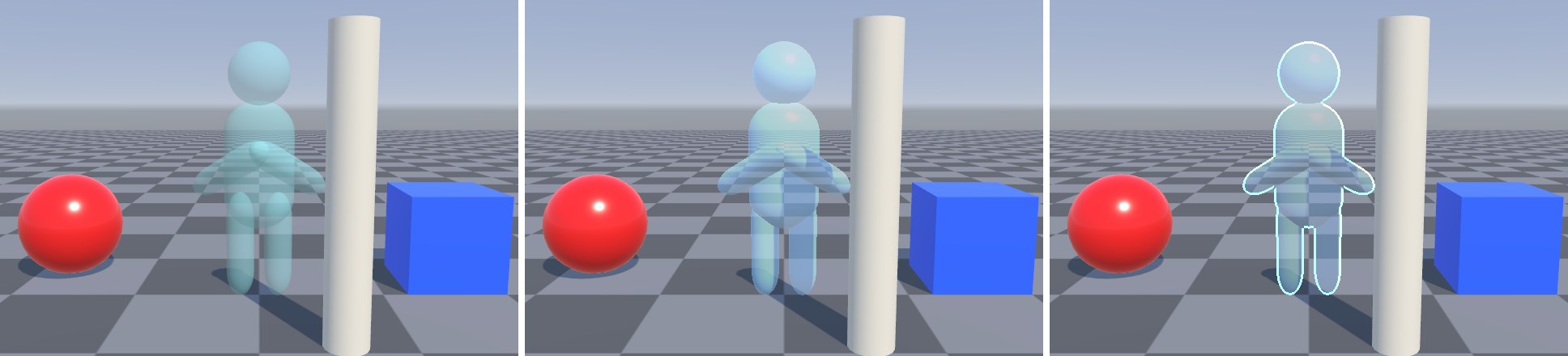
问题:最直接的做法是给每个部件用半透明材质。但半透明物体逐个混合,手臂和身体重叠的地方被叠加了两次,看起来更不透明;身体内部被手臂“插进去”的部分也能透过表面看到——这就是图 25-12 左边的样子。根本原因是:半透明是逐物体、逐表面的,而我们要的是“这个角色作为一张图”整体半透明。
原理:先把这个 Layer 的物体用它们原本的不透明材质,画到一张单独的离屏 RT 上(自带深度缓冲,所以内部穿插的面已经被深度测试正确剔除,RT 里只剩最外层表面);再把这张 RT 当成一张图,统一乘以透明度合成回屏幕。为了被场景正确遮挡,合成时比较“离屏深度”和“场景深度”:
LayerPass:颜色用 R16G16B16A16_SFloat(HDR 光照结果 + Alpha 作为覆盖率),深度用纯深度格式 D32_SFloat(之后要在 Shader 里当纹理采样)。ConfigureClear(ClearFlag.All, Color.clear) 把颜色清成全透明、深度清成最远——这次清的是我们自己的 RT,可以放心用 All。绘制时不设置替换材质,物体用自己的 Lit 材质正常打光。URP Lit 的不透明模式输出 Alpha 恒为 1(OutputAlpha 对非透明表面返回 1),所以 RT 的 Alpha 通道就是覆盖率:
Assets/Cookbook/Ch25/GhostLayerFeature.cs(节选:layer-pass)
class LayerPass : ScriptableRenderPass
{
    static readonly List<ShaderTagId> s_ShaderTags = new List<ShaderTagId>
    {
        new ShaderTagId("UniversalForward"),
        new ShaderTagId("UniversalForwardOnly"),
        new ShaderTagId("SRPDefaultUnlit"),
    };

    public LayerMask layerMask;
    public RTHandle color, depth;

    public LayerPass() { profilingSampler = new ProfilingSampler("Ch25 Ghost Layer"); }

    public override void OnCameraSetup(CommandBuffer cmd, ref RenderingData renderingData)
    {
        var desc = renderingData.cameraData.cameraTargetDescriptor;
        desc.msaaSamples = 1;

        // 颜色:带 Alpha 的半精度浮点(HDR 光照结果 + 覆盖率)
        var colorDesc = desc;
        colorDesc.graphicsFormat = GraphicsFormat.R16G16B16A16_SFloat;
        colorDesc.depthBufferBits = 0;
        RenderingUtils.ReAllocateIfNeeded(ref color, colorDesc, FilterMode.Bilinear,
            TextureWrapMode.Clamp, name: "_Ch25GhostColor");

        // 深度:纯深度格式的 RT,之后还要在合成 Shader 里当纹理采样
        var depthDesc = desc;
        depthDesc.graphicsFormat = GraphicsFormat.None;
        depthDesc.depthStencilFormat = GraphicsFormat.D32_SFloat;
        depthDesc.depthBufferBits = 32;
        RenderingUtils.ReAllocateIfNeeded(ref depth, depthDesc, FilterMode.Point,
            TextureWrapMode.Clamp, name: "_Ch25GhostDepth");

        ConfigureTarget(color, depth);
        ConfigureClear(ClearFlag.All, Color.clear);   // 颜色清成全透明,深度清成最远
    }

    public override void Execute(ScriptableRenderContext context, ref RenderingData renderingData)
    {
        var cmd = CommandBufferPool.Get();
        using (new ProfilingScope(cmd, profilingSampler))
        {
            context.ExecuteCommandBuffer(cmd);
            cmd.Clear();
            // 不覆盖材质:用物体自己的 Lit 材质正常打光,只是画到了另一张 RT 上
            var drawing = CreateDrawingSettings(s_ShaderTags, ref renderingData,
                renderingData.cameraData.defaultOpaqueSortFlags);
            var filtering = new FilteringSettings(RenderQueueRange.opaque, layerMask);
            context.DrawRenderers(renderingData.cullResults, ref drawing, ref filtering);
        }
        context.ExecuteCommandBuffer(cmd);
        CommandBufferPool.Release(cmd);
    }

    public void Dispose()
    {
        color?.Release(); color = null;
        depth?.Release(); depth = null;
    }
}
layerPass(fr) {
  const gl = fr.gl;
  // 颜色:带 Alpha 的半精度浮点(HDR 光照结果 + 覆盖率);深度:之后还要在合成 Shader 里当纹理采样
  const rt = fr.getTemporaryRT('_Ch25GhostColor', fr.width, fr.height, { color: 'RGBA16F', depth: 'DEPTH24' });
  fr.engine.bindTarget(rt);
  // ConfigureClear(ClearFlag.All, Color.clear):颜色清成全透明,深度清成最远
  gl.colorMask(true, true, true, true); gl.depthMask(true);
  gl.clearColor(0, 0, 0, 0); gl.clearDepth(1);
  gl.clear(gl.COLOR_BUFFER_BIT | gl.DEPTH_BUFFER_BIT);
  // 不覆盖材质:用物体自己的 Lit 材质正常打光,只是画到了另一张 RT 上
  fr.drawRenderers({ queue: 'opaque', lightModes: SHADER_TAGS, layerMask: layerMask(this.settings.layerMask) });
  this.layer = rt;
  fr.bindCamera();
}
合成 Shader:深度比较统一换算成线性深度,避免和 Reversed-Z 纠缠;再用 Alpha 在邻域里的最小值找出剪影边缘,加一圈轮廓光:
Assets/Cookbook/Ch25/GhostComposite.shader(节选:frag)
half4 Frag(Varyings input) : SV_Target
{
    UNITY_SETUP_STEREO_EYE_INDEX_POST_VERTEX(input);
    float2 uv = input.texcoord;
    half4 ghost = SAMPLE_TEXTURE2D_X(_BlitTexture, sampler_PointClamp, uv);

    // 1) 遮挡:幽灵层深度 与 场景深度 都换成线性深度再比较,与平台的 Reversed-Z 无关
    float ghostEye = LinearEyeDepth(SAMPLE_TEXTURE2D_X(_GhostDepth, sampler_PointClamp, uv).r, _ZBufferParams);
    float sceneEye = LinearEyeDepth(SampleSceneDepth(uv), _ZBufferParams);
    half visible = step(ghostEye, sceneEye + 0.01);

    // 2) 轮廓光:覆盖率(alpha)在邻域里的最小值 < 1 说明靠近剪影边缘
    float2 r = _BlitTexture_TexelSize.xy * _RimWidth;
    half minA = ghost.a;
    minA = min(minA, SAMPLE_TEXTURE2D_X(_BlitTexture, sampler_LinearClamp, uv + float2( r.x, 0)).a);
    minA = min(minA, SAMPLE_TEXTURE2D_X(_BlitTexture, sampler_LinearClamp, uv + float2(-r.x, 0)).a);
    minA = min(minA, SAMPLE_TEXTURE2D_X(_BlitTexture, sampler_LinearClamp, uv + float2(0,  r.y)).a);
    minA = min(minA, SAMPLE_TEXTURE2D_X(_BlitTexture, sampler_LinearClamp, uv + float2(0, -r.y)).a);
    half rim = ghost.a * (1.0 - minA);

    // 3) 整层统一透明度:内部的穿插面在离屏 RT 里已被深度测试剔除,合成时看不到
    half3 rgb = ghost.rgb * _Tint.rgb + _RimColor.rgb * rim;
    half alpha = saturate(ghost.a * _Opacity + rim) * visible;
    return half4(rgb, alpha);
}
vec4 Frag()
{
    vec2 uv = texcoord;
    // sampler_PointClamp:按纹素整数坐标取,不做双线性
    ivec2 pix = ivec2(uv * _BlitTexture_TexelSize.zw);
    vec4 ghost = texelFetch(_BlitTexture, pix, 0);

    // 1) 遮挡:幽灵层深度 与 场景深度 都换成线性深度再比较,与平台的 Reversed-Z 无关
    float ghostEye = LinearEyeDepth(texelFetch(_GhostDepth, pix, 0).r, _ZBufferParams);
    float sceneEye = LinearEyeDepth(SampleSceneDepth(uv), _ZBufferParams);
    float visible = step(ghostEye, sceneEye + 0.01);

    // 2) 轮廓光:覆盖率(alpha)在邻域里的最小值 < 1 说明靠近剪影边缘
    vec2 r = _BlitTexture_TexelSize.xy * _RimWidth;
    float minA = ghost.a;
    minA = min(minA, texture(_BlitTexture, uv + vec2( r.x, 0.0)).a);
    minA = min(minA, texture(_BlitTexture, uv + vec2(-r.x, 0.0)).a);
    minA = min(minA, texture(_BlitTexture, uv + vec2(0.0,  r.y)).a);
    minA = min(minA, texture(_BlitTexture, uv + vec2(0.0, -r.y)).a);
    float rim = ghost.a * (1.0 - minA);

    // 3) 整层统一透明度:内部的穿插面在离屏 RT 里已被深度测试剔除,合成时看不到
    vec3 rgb = ghost.rgb * _Tint.rgb + _RimColor.rgb * rim;
    float alpha = saturate(ghost.a * _Opacity + rim) * visible;
    return vec4(rgb, alpha);
}
Assets/Cookbook/Ch25/GhostLayerFeature.cs(节选:composite-pass)
class CompositePass : ScriptableRenderPass
{
    static readonly int s_GhostDepth = Shader.PropertyToID("_GhostDepth");
    static readonly int s_Opacity = Shader.PropertyToID("_Opacity");
    static readonly int s_Tint = Shader.PropertyToID("_Tint");
    static readonly int s_RimColor = Shader.PropertyToID("_RimColor");
    static readonly int s_RimWidth = Shader.PropertyToID("_RimWidth");

    readonly Material m_Material;
    LayerPass m_Layer;
    RTHandle m_CameraColor, m_CameraDepth;

    public CompositePass(Material m)
    {
        m_Material = m;
        profilingSampler = new ProfilingSampler("Ch25 Ghost Composite");
    }

    public void Setup(Settings s, LayerPass layer)
    {
        m_Layer = layer;
        m_Material.SetFloat(s_Opacity, s.opacity);
        m_Material.SetColor(s_Tint, s.tint);
        m_Material.SetColor(s_RimColor, s.rimColor);
        m_Material.SetFloat(s_RimWidth, s.rimWidth);
    }

    public void SetTarget(RTHandle color, RTHandle depth) { m_CameraColor = color; m_CameraDepth = depth; }

    public override void OnCameraSetup(CommandBuffer cmd, ref RenderingData renderingData)
        => ConfigureTarget(m_CameraColor, m_CameraDepth);

    public override void Execute(ScriptableRenderContext context, ref RenderingData renderingData)
    {
        var cmd = CommandBufferPool.Get();
        using (new ProfilingScope(cmd, profilingSampler))
        {
            cmd.SetGlobalTexture(s_GhostDepth, m_Layer.depth);
            Blitter.BlitTexture(cmd, m_Layer.color, new Vector4(1, 1, 0, 0), m_Material, 0);
        }
        context.ExecuteCommandBuffer(cmd);
        CommandBufferPool.Release(cmd);
    }
}
// 案例 25.7:把某个 Layer 单独渲染到离屏 RT(颜色+自己的深度),再整体半透明合成回屏幕(对应 Ch25/GhostLayerFeature.cs)。
// 用法:把该 Layer 从 Renderer 的 Opaque Layer Mask 里去掉(否则它会在主 Pass 里再画一次)。
import { Material } from '../engine/shader.js';
import { RenderPassEvent, layerMask } from '../engine/features.js';

const SHADER_TAGS = ['UniversalForward', 'UniversalForwardOnly', 'SRPDefaultUnlit'];

export default class GhostLayerFeature {
  constructor(engine, data, scene) {
    this.engine = engine;
    this.data = data || {};
    this.settings = { layerMask: 1 << 9, opacity: 0.45, tint: [0.75, 0.95, 1.1, 1], rimColor: [0.3, 1.2, 2.0, 1], rimWidth: 3, ...(this.data.settings || {}) };
  }

  async init() {
    const name = (this.data.compositeShader && this.data.compositeShader.shader) || 'Cookbook/Ch25/GhostComposite';
    this.material = new Material(await this.engine.shaders.get(name));
  }

  addPasses(frame, enqueue) {
    const s = this.settings, m = this.material;
    // CompositePass.Setup
    m.setFloat('_Opacity', s.opacity);
    // 注意:C# 的 material.SetColor 写的是 Properties 块里没声明的属性,Unity 原样上传、不做 sRGB→线性(和书中图实测一致),所以用 setVector
    m.setVector('_Tint', s.tint);
    m.setVector('_RimColor', s.rimColor);
    m.setFloat('_RimWidth', s.rimWidth);
    // 合成时要和场景深度比较 → 需要 _CameraDepthTexture
    frame.requireDepth = true;
    enqueue(RenderPassEvent.AfterRenderingOpaques, (fr) => this.layerPass(fr), 'Ch25 Ghost Layer');
    enqueue(RenderPassEvent.AfterRenderingTransparents, (fr) => {
      fr.blit(this.layer.texture, 'camera', m, 0, { _GhostDepth: this.layer.depthTexture });
    }, 'Ch25 Ghost Composite');
  }

  layerPass(fr) {
    const gl = fr.gl;
    // 颜色:带 Alpha 的半精度浮点(HDR 光照结果 + 覆盖率);深度:之后还要在合成 Shader 里当纹理采样
    const rt = fr.getTemporaryRT('_Ch25GhostColor', fr.width, fr.height, { color: 'RGBA16F', depth: 'DEPTH24' });
    fr.engine.bindTarget(rt);
    // ConfigureClear(ClearFlag.All, Color.clear):颜色清成全透明,深度清成最远
    gl.colorMask(true, true, true, true); gl.depthMask(true);
    gl.clearColor(0, 0, 0, 0); gl.clearDepth(1);
    gl.clear(gl.COLOR_BUFFER_BIT | gl.DEPTH_BUFFER_BIT);
    // 不覆盖材质:用物体自己的 Lit 材质正常打光,只是画到了另一张 RT 上
    fr.drawRenderers({ queue: 'opaque', lightModes: SHADER_TAGS, layerMask: layerMask(this.settings.layerMask) });
    this.layer = rt;
    fr.bindCamera();
  }
}
Assets/Cookbook/Ch25/Editor/Ch25Shots.cs(节选:shot-ghost)
[BookShot("ch25-ghost", W = 640, H = 440, Panels = 3)]
static void Ghost(Shot s)
{
    GhostStage(s, naive: s.Panel == 0);
    if (s.Panel == 0) return;    // 第 1 格:逐物体半透明(对照组)

    // 幽灵层不参与主不透明 Pass,只由 Feature 单独绘制
    s.Renderer.opaqueLayerMask = ~(1 << LayerB);
    var f = s.Feature<GhostLayerFeature>();
    f.settings.layerMask = 1 << LayerB;
    if (s.Panel == 1) { f.settings.rimWidth = 0; f.settings.opacity = 0.45f; }
    else { f.settings.rimWidth = 3; f.settings.opacity = 0.3f; }
}
要点与扩展:
- 一定要从 Opaque Layer Mask 里去掉这一层,否则它会先被主 Pass 不透明地画一次,合成就没有意义了。代码里是
s.Renderer.opaqueLayerMask = ~(1 << LayerB),编辑器里在 Renderer Data 的 Filtering 区域设置。 - 深度比较加了 1 厘米的偏移(
sceneEye + 0.01),防止幽灵贴着地面时因为精度问题闪烁。 - 阴影:这一层仍会投射阴影(阴影 Pass 不看 Opaque Layer Mask),如果不希望半透明的幽灵投出实心阴影,就像配图脚本那样把它的 Shadow Casting Mode 关掉,或在合成时按透明度处理阴影(需要更复杂的方案)。
- 降分辨率:离屏 RT 可以用半分辨率,合成时双线性放大,对于本来就半透明、边缘模糊的效果几乎看不出差别,开销降到 1/4。此时深度比较要注意低分辨率深度与全分辨率深度的不一致(可以取 2×2 邻域里最近的深度)。
- 同样的“分层离屏渲染 + 合成”结构还能做:只给角色做的局部后处理(比如角色单独做描边或色调)、画中画小地图、第一人称武器层等。