URP 渲染实战 / 第 24 章 Shader Graph / 案例 24.5
案例 24.5Lit Graph 的溶解效果入门
目标:保留 URP Lit 的完整 PBR 光照,只在表面上做噪声溶解和边缘发光。这类“表面效果 + 标准光照”正是 Lit Graph 最擅长的:不用管任何光照代码,阴影、GI、雾、Forward+ 全部自动正确。
- 新建 Lit Shader Graph,Graph Settings 勾选 Alpha Clipping,Master Stack 出现 Alpha 和 Alpha Clip Threshold。
- Blackboard 添加 Noise(Texture2D)、Progress(Float,Slider 0~1)、Edge Width(Float)、Edge Color(Color,HDR 模式)。
- Sample Texture 2D 采样 Noise 取 R,与 Progress、Edge Width 一起接入 Custom Function
Dissolve(也可以用 Subtract、Step、Smoothstep 节点拼出来)。 - Dissolve 的 AlphaOut 接 Alpha,Alpha Clip Threshold 填 0.5;Edge × Edge Color 接 Emission;Base Color 乘以 (1 − Edge),让发光边缘不再叠加漫反射。
Assets/Cookbook/Ch24/StylizedFunctions.hlsl(节选:dissolve)
// 溶解:Noise 小于 Progress 的部分被裁掉;在裁剪边界外侧 EdgeWidth 范围内输出发光遮罩。
// AlphaOut 直接接 Master Stack 的 Alpha,Alpha Clip Threshold 填 0.5。
void Dissolve_float(float Noise, float Progress, float EdgeWidth, out float AlphaOut, out float Edge)
{
    // 让 Progress = 0 时完全不溶解、= 1 时完全消失:把阈值区间扩展到 [-EdgeWidth, 1]
    float threshold = Progress * (1.0 + EdgeWidth) - EdgeWidth;
    float d = Noise - threshold;           // > 0 保留,< 0 裁掉
    AlphaOut = step(0.0, d);
    Edge = 1.0 - smoothstep(0.0, EdgeWidth, d);   // 越靠近裁剪边界越接近 1
    Edge *= AlphaOut;
}

void Dissolve_half(half Noise, half Progress, half EdgeWidth, out half AlphaOut, out half Edge)
{
    float a, e;
    Dissolve_float(Noise, Progress, EdgeWidth, a, e);
    AlphaOut = a; Edge = e;
}
// 溶解:Noise 小于 Progress 的部分被裁掉;在裁剪边界外侧 EdgeWidth 范围内输出发光遮罩。
// AlphaOut 直接接 Master Stack 的 Alpha,Alpha Clip Threshold 填 0.5。
void Dissolve_float(float Noise, float Progress, float EdgeWidth, out float AlphaOut, out float Edge)
{
    // 让 Progress = 0 时完全不溶解、= 1 时完全消失:把阈值区间扩展到 [-EdgeWidth, 1]
    float threshold = Progress * (1.0 + EdgeWidth) - EdgeWidth;
    float d = Noise - threshold;           // > 0 保留,< 0 裁掉
    AlphaOut = step(0.0, d);
    Edge = 1.0 - smoothstep(0.0, EdgeWidth, d);   // 越靠近裁剪边界越接近 1
    Edge *= AlphaOut;
}

void Dissolve_half(float Noise, float Progress, float EdgeWidth, out float AlphaOut, out float Edge)
{
    float a, e;
    Dissolve_float(Noise, Progress, EdgeWidth, a, e);
    AlphaOut = a; Edge = e;
}
Progress 映射到 [−EdgeWidth, 1] 的阈值区间,保证 Progress = 0 时一点都不溶解(连发光边都没有)、Progress = 1 时完全消失。Lit Graph 的 Forward Pass 最终就是把 Master Stack 的各个 Block 填进 SurfaceData 再交给 UniversalFragmentPBR,等价代码如下:
Assets/Cookbook/Ch24/SGDissolveEquivalent.shader(节选:frag)
half4 frag(Varyings i) : SV_Target
{
    float alpha, edge;
    DissolveGraph(i.uv, alpha, edge);
    clip(alpha - 0.5);                         // Alpha Clip Threshold = 0.5

    SurfaceData surface = (SurfaceData)0;      // ← Master Stack 的各个 Block
    surface.albedo     = _BaseColor.rgb * (1 - edge);
    surface.metallic   = _Metallic;
    surface.smoothness = _Smoothness;
    surface.occlusion  = 1;
    surface.emission   = edge * _EdgeColor.rgb;
    surface.alpha      = 1;
    surface.normalTS   = half3(0, 0, 1);

    InputData input = (InputData)0;
    input.positionWS = i.positionWS;
    input.normalWS = normalize(i.normalWS);
    input.viewDirectionWS = GetWorldSpaceNormalizeViewDir(i.positionWS);
    input.shadowCoord = TransformWorldToShadowCoord(i.positionWS);
    input.bakedGI = SampleSH(input.normalWS);
    input.normalizedScreenSpaceUV = GetNormalizedScreenSpaceUV(i.positionCS);
    input.shadowMask = half4(1, 1, 1, 1);
    return UniversalFragmentPBR(input, surface);
}
vec4 frag()
{
    float alpha, edge;
    DissolveGraph(uv, alpha, edge);
    if (alpha - 0.5 < 0.0) discard;              // Alpha Clip Threshold = 0.5

    SurfaceData surface = InitSurfaceData();     // ← Master Stack 的各个 Block
    surface.albedo     = _BaseColor.rgb * (1.0 - edge);
    surface.metallic   = _Metallic;
    surface.smoothness = _Smoothness;
    surface.occlusion  = 1.0;
    surface.emission   = edge * _EdgeColor.rgb;
    surface.alpha      = 1.0;
    surface.normalTS   = vec3(0, 0, 1);

    InputData inputData = InitInputData();
    inputData.positionWS = positionWS;
    inputData.normalWS = normalize(normalWS);
    inputData.viewDirectionWS = GetWorldSpaceNormalizeViewDir(positionWS);
    inputData.shadowCoord = TransformWorldToShadowCoord(positionWS);
    inputData.bakedGI = SampleSH(inputData.normalWS);
    inputData.normalizedScreenSpaceUV = GetNormalizedScreenSpaceUV(gl_FragCoord);
    inputData.shadowMask = vec4(1, 1, 1, 1);
    return UniversalFragmentPBR(inputData, surface);
}
手写时最容易忘的是:溶解掉的部分不应该再投影。Shader Graph 会自动把 Alpha Clip 带进 ShadowCaster 和 DepthOnly Pass;手写就必须在每个 Pass 里重复同样的裁剪:
Assets/Cookbook/Ch24/SGDissolveEquivalent.shader(节选:caster)
Pass
{
    // Shader Graph 会自动把 Alpha Clip 带进 ShadowCaster / DepthOnly;手写时最容易忘
    Name "ShadowCaster"
    Tags { "LightMode"="ShadowCaster" }
    ZWrite On ZTest LEqual ColorMask 0
    HLSLPROGRAM
    #pragma vertex vert
    #pragma fragment frag
    #pragma multi_compile_vertex _ _CASTING_PUNCTUAL_LIGHT_SHADOW
    #include "Assets/Cookbook/Ch23/Ch23Common.hlsl"
    struct Attributes { float4 positionOS : POSITION; float3 normalOS : NORMAL; float2 uv : TEXCOORD0; };
    struct Varyings { float4 positionCS : SV_POSITION; float2 uv : TEXCOORD0; };
    Varyings vert(Attributes v)
    {
        Varyings o;
        CasterAttributes c; c.positionOS = v.positionOS; c.normalOS = v.normalOS;
        o.positionCS = Ch23ShadowCasterVert(c);
        o.uv = v.uv;
        return o;
    }
    half4 frag(Varyings i) : SV_Target
    {
        float alpha, edge;
        DissolveGraph(i.uv, alpha, edge);
        clip(alpha - 0.5);
        return 0;
    }
    ENDHLSL
}
Pass
{
    // Shader Graph 会自动把 Alpha Clip 带进 ShadowCaster / DepthOnly;手写时最容易忘
    Name "ShadowCaster"
    Tags { "LightMode"="ShadowCaster" }
    ZWrite On ZTest LEqual ColorMask 0
    GLSLPROGRAM
    #include "Ch23/Ch23Common.glsl"
    VARYING vec2 uv;
    #ifdef VERTEX
    void main()
    {
        gl_Position = Ch23ShadowCasterVert();
        uv = texcoord0.xy;
    }
    #endif
    #ifdef FRAGMENT
    void main()
    {
        float alpha, edge;
        DissolveGraph(uv, alpha, edge);
        if (alpha - 0.5 < 0.0) discard;
        fragColor = vec4(0.0);
    }
    #endif
    ENDGLSL
}
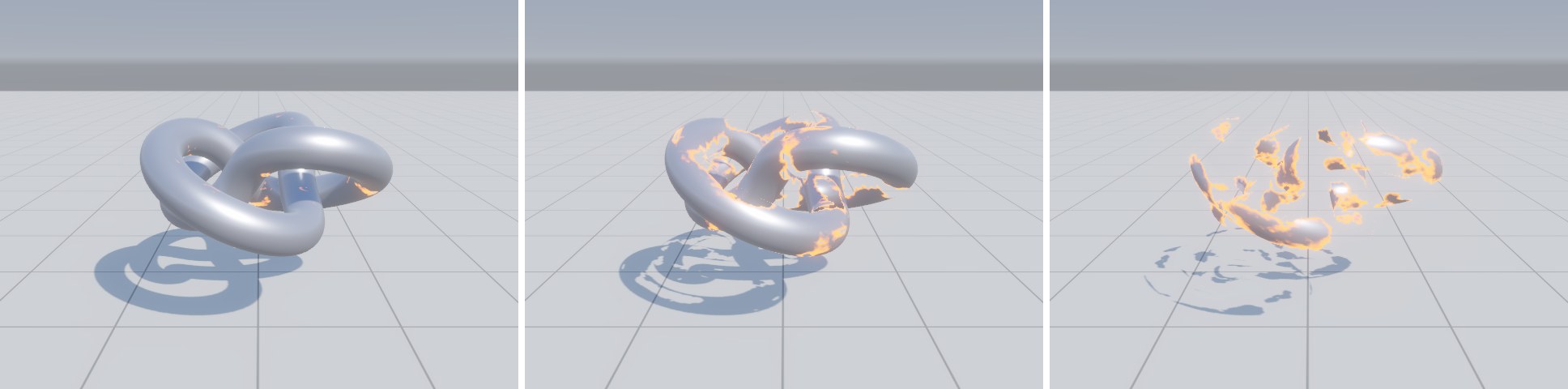
动画方面,拍图时 _Time 不可控,所以这里的 Progress 是材质参数;实际使用时可以在图里用 Time 节点驱动,或者由脚本 material.SetFloat("_Progress", …) 控制,后者更容易与游戏逻辑同步。