案例 19.10平面反射:C# 反射相机 + RenderTexture高阶
目标:水面倒映出岸上的柱子、石头和木栈道,而不只是天空。
为什么天空反射不够
案例 19.5 的反射来自天空盒(或反射探针),它只知道“某个方向上很远的地方是什么颜色”,不知道水面附近有一根柱子。反射探针可以捕捉场景,但它是从探针位置看出去的立方体贴图,对于一个大平面上近处物体的倒影,位置会严重错位。对于水面、镜面地板这类大平面,最准确的实时做法是平面反射:再架一台相机,从水面下方“镜像”的位置往上看,把画面渲染到一张 RT 里,水面采样它。
镜像矩阵与斜裁剪
平面用 (n, d) 表示,平面上的点满足 n·p + d = 0。点 p 关于平面的镜像是
写成 4×4 矩阵 R,反射相机的视图矩阵就是主相机视图矩阵乘以 R:worldToCameraMatrix = cam.。它的含义是“先把世界镜像一次,再用主相机去看”。这样渲染出来的画面里,倒影点恰好出现在主相机看到的对应水面像素位置上——所以水面直接用自己的屏幕 UV 采样反射 RT 即可,不需要任何额外的坐标变换。
还有两个必须处理的问题:
- 水面以下的东西不能进反射:反射相机在水面下方,它会看到水底、水中的柱子下半截。用
Camera.构造“斜裁剪投影”:把投影矩阵的近裁剪面替换成水面本身,水面以下的几何直接被裁掉。传入的平面必须是观察空间中的平面,所以先用反射相机的视图矩阵把它变换过去。CalculateObliqueMatrix - 三角形绕序反了:镜像矩阵的行列式为 −1,它把左手系变成右手系,所有三角形的顺时针/逆时针颠倒,正常的背面剔除会把正面剔掉。渲染反射前设置
GL.invertCulling = true,渲染后恢复。
void SetupReflectionCamera(Camera cam)
{
    m_ReflCam.CopyFrom(cam);                 // 视场角、远近裁剪面、清屏方式等与主相机一致
    m_ReflCam.enabled = false;
    m_ReflCam.targetTexture = null;          // 由渲染请求临时指定
    m_ReflCam.cullingMask = reflectLayers;
    m_ReflCam.cameraType = CameraType.Reflection;
    m_ReflCam.useOcclusionCulling = false;

    Vector3 normal = transform.up;
    Vector3 pos = transform.position;
    Vector4 plane = new Vector4(normal.x, normal.y, normal.z, -Vector3.Dot(normal, pos));
    Matrix4x4 reflection = ReflectionMatrix(plane);

    // 相机位置也镜像过去:_WorldSpaceCameraPos、视线方向等都要基于镜像后的位置
    m_ReflCam.transform.position = reflection.MultiplyPoint(cam.transform.position);
    m_ReflCam.transform.rotation = Quaternion.LookRotation(
        Vector3.Reflect(cam.transform.forward, normal), Vector3.Reflect(cam.transform.up, normal));
    m_ReflCam.worldToCameraMatrix = cam.worldToCameraMatrix * reflection;

    // 斜裁剪(Oblique)投影:把近裁剪面换成水面,水面以下的东西不进反射
    Vector4 clipPlane = CameraSpacePlane(m_ReflCam.worldToCameraMatrix,
                                         pos - normal * clipPlaneOffset, normal);
    m_ReflCam.projectionMatrix = cam.CalculateObliqueMatrix(clipPlane);
}

// 关于平面 (n, d) 的镜像矩阵:p' = p - 2 (n·p + d) n
static Matrix4x4 ReflectionMatrix(Vector4 p)
{
    var m = Matrix4x4.identity;
    m.m00 = 1 - 2 * p.x * p.x;  m.m01 = -2 * p.x * p.y;
    m.m02 = -2 * p.x * p.z;     m.m03 = -2 * p.w * p.x;
    m.m10 = -2 * p.y * p.x;     m.m11 = 1 - 2 * p.y * p.y;
    m.m12 = -2 * p.y * p.z;     m.m13 = -2 * p.w * p.y;
    m.m20 = -2 * p.z * p.x;     m.m21 = -2 * p.z * p.y;
    m.m22 = 1 - 2 * p.z * p.z;  m.m23 = -2 * p.w * p.z;
    return m;   // 第四行保持 (0, 0, 0, 1)
}

// 把世界空间的平面变换到观察空间(CalculateObliqueMatrix 需要观察空间平面)
static Vector4 CameraSpacePlane(Matrix4x4 worldToCamera, Vector3 pos, Vector3 normal)
{
    Vector3 cpos = worldToCamera.MultiplyPoint(pos);
    Vector3 cnormal = worldToCamera.MultiplyVector(normal).normalized;
    return new Vector4(cnormal.x, cnormal.y, cnormal.z, -Vector3.Dot(cpos, cnormal));
}
setupReflectionCamera(cam) {
  // 平面:法线 = 水面物体的 up,经过物体原点
  const m = this.obj.matrix;
  const normal = vec3.normalize([m[4], m[5], m[6]]);
  const pos = [m[12], m[13], m[14]];
  const plane = [normal[0], normal[1], normal[2], -vec3.dot(normal, pos)];
  const reflection = reflectionMatrix(plane);

  // 视图矩阵 = 主相机视图 × 镜像:相机位置、_WorldSpaceCameraPos 都随之镜像
  const view = mat4.mul(cam.view, reflection);

  // 斜裁剪(Oblique)投影:把近裁剪面换成水面,水面以下的东西不进反射
  const clipPlane = cameraSpacePlane(view, vec3.sub(pos, vec3.scale(normal, this.clipPlaneOffset)), normal);
  const proj = calculateObliqueMatrix(cam.projection(), clipPlane);

  return {
    json: cam.json, view, projection: () => proj,
    fov: cam.fov, aspect: cam.aspect, near: cam.near, far: cam.far,
    orthographic: cam.orthographic, orthoSize: cam.orthoSize,
    clearFlags: cam.clearFlags, background: cam.background,
    cullingMask: this.reflectLayers,
    allowHDR: cam.allowHDR, allowMSAA: false,
    renderShadows: this.renderShadows, postProcessing: false, antialiasing: 0,
  };
}
URP 14 里怎么让一台相机渲染一次
这是平面反射在 URP 里最容易写错的地方。网上流传最广的写法来自 URP 早期版本:订阅 RenderPipelineManager.,在回调里调用 UniversalRenderPipeline.。在 URP 14.0.12 里,这个函数已经被标记为过时:
// 摘自 URP 14 Runtime/UniversalRenderPipeline.cs
[Obsolete("RenderSingleCamera is obsolete, please use RenderPipeline.SubmitRenderRequest with UniversalRenderer.SingleCameraRequest as RequestData type", false)]
public static void RenderSingleCamera(ScriptableRenderContext context, Camera camera)
提示里说的新方式是 RenderPipeline.,请求类型是嵌套在 UniversalRenderPipeline 里的 SingleCameraRequest(提示文字里写的是 UniversalRenderer.,但在 14.0.12 源码中这个类实际定义在 UniversalRenderPipeline 内部,以源码为准)。读 ProcessRenderRequests 的实现可以看到,它临时把相机的 targetTexture 换成请求里的 destination,依次调用 BeginContextRendering、BeginCameraRendering、渲染、EndCameraRendering、EndContextRendering,最后把 targetTexture 恢复原样。
那么,能不能把新 API 直接放进 beginCameraRendering 回调里,替换掉旧的 RenderSingleCamera?不能。拍摄本章配图时实测,在回调里调用 SubmitRenderRequest,Unity 会报错:
Recursive rendering is not supported in SRP (are you calling Camera.Render from within a render pipeline?).
原因是 beginCameraRendering 发生在 SRP 渲染循环内部,而 SubmitRenderRequest 本身要启动一次完整的渲染循环——这是一次递归渲染。旧的 RenderSingleCamera 能在回调里用,是因为它直接把命令录进主相机正在使用的 context,并不开启新的循环;但它已过时;本书在 URP 14 下试验这种写法时,程序能运行,但主相机水面的折射与焦散全部失效、反射画面也不正确(推测是两台相机共用同一个 context 时,相机相关的全局纹理与状态互相覆盖),因此不建议继续使用。
正确的做法是在渲染循环之外提交请求:运行时在 LateUpdate 里为主相机渲染一次反射(LateUpdate 在所有相机渲染之前执行,此时主相机的位置已经被 Update 里的逻辑更新完毕);编辑器拍图时,在主相机 Render() 之前手动调用一次。
/// 在渲染循环之外调用(LateUpdate、或者主相机 Render 之前)。
/// 不要在 beginCameraRendering 回调里调用它:回调发生在 SRP 渲染循环内部,再提交请求会报
/// “Recursive rendering is not supported in SRP”(本书拍摄时实测)。
public void RenderFor(Camera cam)
{
    if (m_Rendering) return;
    m_Rendering = true;
    EnsureResources(cam);
    SetupReflectionCamera(cam);

    var request = new UniversalRenderPipeline.SingleCameraRequest { destination = m_RT };
    if (RenderPipeline.SupportsRenderRequest(m_ReflCam, request))
    {
        // 镜像矩阵把左手系变成右手系,三角形绕序反了:临时反转剔除,否则只看得到物体的背面
        GL.invertCulling = true;
        RenderPipeline.SubmitRenderRequest(m_ReflCam, request);
        GL.invertCulling = false;
    }
    Shader.SetGlobalTexture(s_TexId, m_RT);
    m_Rendering = false;
}
renderFor(cam, time, dt) {
  if (this.rendering) return;
  this.rendering = true;
  const E = this.engine, gl = E.gl;
  const W = E.canvas.width, H = E.canvas.height;
  const w = Math.max(1, (W * this.resolutionScale) | 0), h = Math.max(1, (H * this.resolutionScale) | 0);
  // 反射 RT:主相机允许 HDR 就用浮点格式(C# 版的 DefaultHDR),自带深度,不开 MSAA
  const rt = E.rt('planarReflection', w, h, { color: cam.allowHDR ? 'RGBA16F' : 'SRGB8_ALPHA8', depth: 'DEPTH24_STENCIL8', samples: 1 });

  const reflCam = this.setupReflectionCamera(cam);
  // 用一个“只换了相机”的场景视图建 Frame:灯光、材质、物体都和主相机共用
  const view = Object.create(this.scene);
  view.camera = reflCam;
  const prevVP = E.prevViewProj;
  const frame = new Frame(E, view, w, h, time, dt);
  frame.requireDepth = false;    // requiresDepthOption = Off
  frame.requireOpaque = false;   // requiresColorOption = Off
  frame.setupCamera();
  frame.setupLights();
  frame.setupEnvironment();
  frame.renderShadows();         // reflCam.renderShadows = false 时只是把阴影关掉

  // 清屏(和主相机的清屏方式一致)
  frame.cameraTarget = rt;
  E.bindTarget(rt);
  gl.depthMask(true); gl.colorMask(true, true, true, true); gl.stencilMask(255);
  const bg = reflCam.clearFlags === 'SolidColor' ? reflCam.background : [0, 0, 0, 0];
  gl.clearColor(bg[0], bg[1], bg[2], bg[3]); gl.clearDepth(1); gl.clearStencil(0);
  gl.clear(gl.COLOR_BUFFER_BIT | gl.DEPTH_BUFFER_BIT | gl.STENCIL_BUFFER_BIT);

  // 镜像矩阵把左手系变成右手系,三角形绕序反了:临时反转剔除(C# 版的 GL.invertCulling = true),
  // 否则只看得到物体的背面。引擎按物体的 flip 标志决定正面绕序,这里把它们临时取反
  const rs = this.scene.renderers;
  rs.forEach((o) => (o.flip = !o.flip));
  try {
    frame.renderOpaques();
    frame.renderSkybox();
    frame.renderTransparents();
  } finally {
    rs.forEach((o) => (o.flip = !o.flip));
  }

  E.prevViewProj = prevVP;
  E.setGlobal('_PlanarReflectionTex', rt.texture);
  this.rendering = false;
}
完整的组件:
// 案例 19.9:平面反射。用一台“镜像相机”从水面下方往上看,把画面渲染进 RenderTexture,
// 再设成全局纹理 _PlanarReflectionTex,水面 Shader 用屏幕 UV 采样它。
// URP 14 推荐的渲染方式:RenderPipeline.SubmitRenderRequest + UniversalRenderPipeline.SingleCameraRequest
// (UniversalRenderPipeline.RenderSingleCamera 在 14 里已标记为 Obsolete)。
using UnityEngine;
using UnityEngine.Rendering;
using UnityEngine.Rendering.Universal;

namespace Cookbook.Ch19
{
    [ExecuteAlways]
    public class PlanarReflection : MonoBehaviour
    {
        public enum UpdateMode
        {
            /// 在 LateUpdate 里为 Camera.main 提交渲染请求(SubmitRenderRequest,推荐)
            LateUpdate,
            /// 不自动渲染,由外部调用 RenderFor(camera)
            Manual,
        }

        public UpdateMode updateMode = UpdateMode.LateUpdate;
        [Tooltip("反射相机渲染哪些层。水面自己必须排除在外,否则会把自己画进反射里")]
        public LayerMask reflectLayers = ~(1 << 4);          // 4 = 内置的 Water 层
        [Range(0.25f, 1f)] public float resolutionScale = 0.5f;
        [Tooltip("裁剪平面相对水面的偏移,略低于水面可以避免岸边出现缝隙")]
        public float clipPlaneOffset = 0.05f;
        public bool renderShadows = false;

        static readonly int s_TexId = Shader.PropertyToID("_PlanarReflectionTex");
        Camera m_ReflCam;
        RenderTexture m_RT;
        bool m_Rendering;           // 防止重入

        void OnDisable()
        {
            if (m_ReflCam != null) DestroyImmediate(m_ReflCam.gameObject);
            if (m_RT != null) { m_RT.Release(); DestroyImmediate(m_RT); }
            m_ReflCam = null; m_RT = null;
        }

        void LateUpdate()
        {
            if (updateMode == UpdateMode.LateUpdate && Camera.main != null) RenderFor(Camera.main);
        }

        /// 在渲染循环之外调用(LateUpdate、或者主相机 Render 之前)。
        /// 不要在 beginCameraRendering 回调里调用它:回调发生在 SRP 渲染循环内部,再提交请求会报
        /// “Recursive rendering is not supported in SRP”(本书拍摄时实测)。
        public void RenderFor(Camera cam)
        {
            if (m_Rendering) return;
            m_Rendering = true;
            EnsureResources(cam);
            SetupReflectionCamera(cam);

            var request = new UniversalRenderPipeline.SingleCameraRequest { destination = m_RT };
            if (RenderPipeline.SupportsRenderRequest(m_ReflCam, request))
            {
                // 镜像矩阵把左手系变成右手系,三角形绕序反了:临时反转剔除,否则只看得到物体的背面
                GL.invertCulling = true;
                RenderPipeline.SubmitRenderRequest(m_ReflCam, request);
                GL.invertCulling = false;
            }
            Shader.SetGlobalTexture(s_TexId, m_RT);
            m_Rendering = false;
        }

        void EnsureResources(Camera cam)
        {
            int w = Mathf.Max(1, (int)(cam.pixelWidth * resolutionScale));
            int h = Mathf.Max(1, (int)(cam.pixelHeight * resolutionScale));
            if (m_RT == null || m_RT.width != w || m_RT.height != h)
            {
                if (m_RT != null) { m_RT.Release(); DestroyImmediate(m_RT); }
                var fmt = cam.allowHDR ? RenderTextureFormat.DefaultHDR : RenderTextureFormat.Default;
                m_RT = new RenderTexture(w, h, 24, fmt) { name = "_PlanarReflectionTex", hideFlags = HideFlags.DontSave };
                m_RT.Create();
            }
            if (m_ReflCam == null)
            {
                var go = new GameObject("Planar Reflection Camera") { hideFlags = HideFlags.HideAndDontSave };
                m_ReflCam = go.AddComponent<Camera>();
                m_ReflCam.enabled = false;           // 不参与正常的相机循环,只在我们提交请求时渲染
                var data = go.AddComponent<UniversalAdditionalCameraData>();
                data.renderPostProcessing = false;   // 后处理留给主相机统一做
                data.requiresColorOption = CameraOverrideOption.Off;
                data.requiresDepthOption = CameraOverrideOption.Off;
                data.SetRenderer(0);
            }
            m_ReflCam.GetComponent<UniversalAdditionalCameraData>().renderShadows = renderShadows;
        }

        void SetupReflectionCamera(Camera cam)
        {
            m_ReflCam.CopyFrom(cam);                 // 视场角、远近裁剪面、清屏方式等与主相机一致
            m_ReflCam.enabled = false;
            m_ReflCam.targetTexture = null;          // 由渲染请求临时指定
            m_ReflCam.cullingMask = reflectLayers;
            m_ReflCam.cameraType = CameraType.Reflection;
            m_ReflCam.useOcclusionCulling = false;

            Vector3 normal = transform.up;
            Vector3 pos = transform.position;
            Vector4 plane = new Vector4(normal.x, normal.y, normal.z, -Vector3.Dot(normal, pos));
            Matrix4x4 reflection = ReflectionMatrix(plane);

            // 相机位置也镜像过去:_WorldSpaceCameraPos、视线方向等都要基于镜像后的位置
            m_ReflCam.transform.position = reflection.MultiplyPoint(cam.transform.position);
            m_ReflCam.transform.rotation = Quaternion.LookRotation(
                Vector3.Reflect(cam.transform.forward, normal), Vector3.Reflect(cam.transform.up, normal));
            m_ReflCam.worldToCameraMatrix = cam.worldToCameraMatrix * reflection;

            // 斜裁剪(Oblique)投影:把近裁剪面换成水面,水面以下的东西不进反射
            Vector4 clipPlane = CameraSpacePlane(m_ReflCam.worldToCameraMatrix,
                                                 pos - normal * clipPlaneOffset, normal);
            m_ReflCam.projectionMatrix = cam.CalculateObliqueMatrix(clipPlane);
        }

        // 关于平面 (n, d) 的镜像矩阵:p' = p - 2 (n·p + d) n
        static Matrix4x4 ReflectionMatrix(Vector4 p)
        {
            var m = Matrix4x4.identity;
            m.m00 = 1 - 2 * p.x * p.x;  m.m01 = -2 * p.x * p.y;
            m.m02 = -2 * p.x * p.z;     m.m03 = -2 * p.w * p.x;
            m.m10 = -2 * p.y * p.x;     m.m11 = 1 - 2 * p.y * p.y;
            m.m12 = -2 * p.y * p.z;     m.m13 = -2 * p.w * p.y;
            m.m20 = -2 * p.z * p.x;     m.m21 = -2 * p.z * p.y;
            m.m22 = 1 - 2 * p.z * p.z;  m.m23 = -2 * p.w * p.z;
            return m;   // 第四行保持 (0, 0, 0, 1)
        }

        // 把世界空间的平面变换到观察空间(CalculateObliqueMatrix 需要观察空间平面)
        static Vector4 CameraSpacePlane(Matrix4x4 worldToCamera, Vector3 pos, Vector3 normal)
        {
            Vector3 cpos = worldToCamera.MultiplyPoint(pos);
            Vector3 cnormal = worldToCamera.MultiplyVector(normal).normalized;
            return new Vector4(cnormal.x, cnormal.y, cnormal.z, -Vector3.Dot(cpos, cnormal));
        }
    }
}
// 案例 19.9:平面反射(JS 版,对应 Ch19/PlanarReflection.cs)。
// 用一台“镜像相机”从水面下方往上看,把画面渲染进一张 RenderTexture,
// 再设成全局纹理 _PlanarReflectionTex,水面 Shader 用屏幕 UV 采样它。
//
// C# 版用 RenderPipeline.SubmitRenderRequest 让 URP 为反射相机完整渲染一次;
// 网页版在 update() 里(主相机渲染之前)用引擎的 Frame 为镜像相机画一遍:不透明 → 天空盒 → 半透明。
// 和 C# 版一样:不画阴影、不做后处理、不生成深度/不透明贴图。
import { Frame } from '../engine/pipeline.js';
import { mat4, vec3 } from '../engine/math.js';
import { layerMask } from '../engine/features.js';

export default class PlanarReflection {
  constructor(engine, json, obj, scene) {
    this.engine = engine;
    this.obj = obj;            // 水面物体
    this.scene = scene;
    const d = json.data || {};
    this.enabled = json.enabled !== false && d.m_Enabled !== false;
    this.reflectLayers = layerMask(d.reflectLayers ?? ~(1 << 4));   // 4 = 内置的 Water 层
    this.resolutionScale = d.resolutionScale ?? 0.5;
    this.clipPlaneOffset = d.clipPlaneOffset ?? 0.05;
    this.renderShadows = !!d.renderShadows;
    this.rendering = false;   // 防止重入
  }

  // C# 版的 LateUpdate / 拍图时的 RenderFor(Camera.main):每帧在主相机渲染之前调用
  update(time, dt) {
    if (!this.enabled || !this.obj.active || !this.scene.camera) return;
    this.renderFor(this.scene.camera, time, dt);
  }

  renderFor(cam, time, dt) {
    if (this.rendering) return;
    this.rendering = true;
    const E = this.engine, gl = E.gl;
    const W = E.canvas.width, H = E.canvas.height;
    const w = Math.max(1, (W * this.resolutionScale) | 0), h = Math.max(1, (H * this.resolutionScale) | 0);
    // 反射 RT:主相机允许 HDR 就用浮点格式(C# 版的 DefaultHDR),自带深度,不开 MSAA
    const rt = E.rt('planarReflection', w, h, { color: cam.allowHDR ? 'RGBA16F' : 'SRGB8_ALPHA8', depth: 'DEPTH24_STENCIL8', samples: 1 });

    const reflCam = this.setupReflectionCamera(cam);
    // 用一个“只换了相机”的场景视图建 Frame:灯光、材质、物体都和主相机共用
    const view = Object.create(this.scene);
    view.camera = reflCam;
    const prevVP = E.prevViewProj;
    const frame = new Frame(E, view, w, h, time, dt);
    frame.requireDepth = false;    // requiresDepthOption = Off
    frame.requireOpaque = false;   // requiresColorOption = Off
    frame.setupCamera();
    frame.setupLights();
    frame.setupEnvironment();
    frame.renderShadows();         // reflCam.renderShadows = false 时只是把阴影关掉

    // 清屏(和主相机的清屏方式一致)
    frame.cameraTarget = rt;
    E.bindTarget(rt);
    gl.depthMask(true); gl.colorMask(true, true, true, true); gl.stencilMask(255);
    const bg = reflCam.clearFlags === 'SolidColor' ? reflCam.background : [0, 0, 0, 0];
    gl.clearColor(bg[0], bg[1], bg[2], bg[3]); gl.clearDepth(1); gl.clearStencil(0);
    gl.clear(gl.COLOR_BUFFER_BIT | gl.DEPTH_BUFFER_BIT | gl.STENCIL_BUFFER_BIT);

    // 镜像矩阵把左手系变成右手系,三角形绕序反了:临时反转剔除(C# 版的 GL.invertCulling = true),
    // 否则只看得到物体的背面。引擎按物体的 flip 标志决定正面绕序,这里把它们临时取反
    const rs = this.scene.renderers;
    rs.forEach((o) => (o.flip = !o.flip));
    try {
      frame.renderOpaques();
      frame.renderSkybox();
      frame.renderTransparents();
    } finally {
      rs.forEach((o) => (o.flip = !o.flip));
    }

    E.prevViewProj = prevVP;
    E.setGlobal('_PlanarReflectionTex', rt.texture);
    this.rendering = false;
  }

  setupReflectionCamera(cam) {
    // 平面:法线 = 水面物体的 up,经过物体原点
    const m = this.obj.matrix;
    const normal = vec3.normalize([m[4], m[5], m[6]]);
    const pos = [m[12], m[13], m[14]];
    const plane = [normal[0], normal[1], normal[2], -vec3.dot(normal, pos)];
    const reflection = reflectionMatrix(plane);

    // 视图矩阵 = 主相机视图 × 镜像:相机位置、_WorldSpaceCameraPos 都随之镜像
    const view = mat4.mul(cam.view, reflection);

    // 斜裁剪(Oblique)投影:把近裁剪面换成水面,水面以下的东西不进反射
    const clipPlane = cameraSpacePlane(view, vec3.sub(pos, vec3.scale(normal, this.clipPlaneOffset)), normal);
    const proj = calculateObliqueMatrix(cam.projection(), clipPlane);

    return {
      json: cam.json, view, projection: () => proj,
      fov: cam.fov, aspect: cam.aspect, near: cam.near, far: cam.far,
      orthographic: cam.orthographic, orthoSize: cam.orthoSize,
      clearFlags: cam.clearFlags, background: cam.background,
      cullingMask: this.reflectLayers,
      allowHDR: cam.allowHDR, allowMSAA: false,
      renderShadows: this.renderShadows, postProcessing: false, antialiasing: 0,
    };
  }
}

// 关于平面 (n, d) 的镜像矩阵:p' = p - 2 (n·p + d) n(列主序,下标 m[列*4+行])
function reflectionMatrix(p) {
  const [x, y, z, w] = p;
  return new Float32Array([
    1 - 2 * x * x, -2 * y * x, -2 * z * x, 0,
    -2 * x * y, 1 - 2 * y * y, -2 * z * y, 0,
    -2 * x * z, -2 * y * z, 1 - 2 * z * z, 0,
    -2 * w * x, -2 * w * y, -2 * w * z, 1,
  ]);
}

// 把世界空间的平面变换到观察空间(斜裁剪需要观察空间平面)
function cameraSpacePlane(worldToCamera, pos, normal) {
  const cpos = mat4.transformPoint(worldToCamera, pos);
  const cn = vec3.normalize(mat4.transformDir(worldToCamera, normal));
  return [cn[0], cn[1], cn[2], -vec3.dot(cpos, cn)];
}

// Unity 的 Camera.CalculateObliqueMatrix(Lengyel 的斜裁剪近平面):替换投影矩阵第 3 行
function calculateObliqueMatrix(projection, c) {
  const P = new Float32Array(projection);
  const g = (r, col) => P[col * 4 + r];
  const sgn = (v) => (v > 0 ? 1 : v < 0 ? -1 : 0);
  const q = [(sgn(c[0]) + g(0, 2)) / g(0, 0), (sgn(c[1]) + g(1, 2)) / g(1, 1), -1, (1 + g(2, 2)) / g(2, 3)];
  const s = 2 / (c[0] * q[0] + c[1] * q[1] + c[2] * q[2] + c[3] * q[3]);
  P[0 * 4 + 2] = c[0] * s;
  P[1 * 4 + 2] = c[1] * s;
  P[2 * 4 + 2] = c[2] * s + 1;
  P[3 * 4 + 2] = c[3] * s;
  return P;
}
关键细节
- 反射相机本身:用
HideAndDontSave创建,enabled = false,它不会参与正常的相机循环,只在我们提交请求时渲染。挂上UniversalAdditionalCameraData,关闭后处理、关闭它自己的深度/不透明纹理需求、默认关闭阴影——反射里的阴影通常看不出来,省掉一整套阴影贴图的渲染。 - 层:
reflectLayers默认排除 Water 层,否则水面会把自己渲染进反射里(在镜像相机看来,水面正好在近裁剪面上,会产生各种闪烁)。 - 分辨率:默认半分辨率。水面的反射会被法线扰动,半分辨率几乎看不出差别,渲染开销却只有四分之一。
- Shader 端:RT 用
Shader.设为全局纹理。水面 Shader 在 CBUFFER 外声明SetGlobalTexture("_ PlanarReflectionTex", rt) TEXTURE2D(_,用屏幕 UV 加上一点法线扰动采样它,替换掉天空反射。PlanarReflectionTex)
在本书的拍摄脚本里,平面反射是这样触发的(摄影棚没有 LateUpdate,所以先给主相机挂一个临时 RT 确定分辨率与宽高比,手动渲染一次反射,再交给拍摄流程):
var pr = water.AddComponent<PlanarReflection>();
pr.updateMode = PlanarReflection.UpdateMode.Manual;
var tmp = RenderTexture.GetTemporary(w, h, 24);
s.Cam.targetTexture = tmp; s.Cam.aspect = (float)w / h;
pr.RenderFor(s.Cam);                 // 在主相机渲染之前、渲染循环之外
s.Cam.targetTexture = null;
RenderTexture.ReleaseTemporary(tmp);
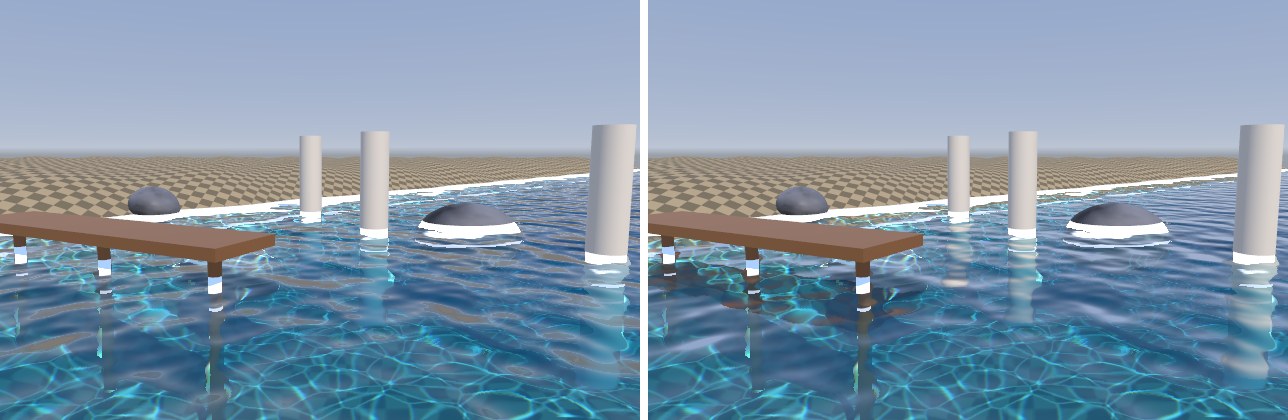
屏幕空间反射(SSR)简介
平面反射的代价是“整个场景再渲染一遍”,而且只适用于一个平面——起伏很大的海面就不准确了。另一种思路是屏幕空间反射(Screen Space Reflection):沿反射方向在深度图里做光线步进,找到交点后从当前画面取颜色。它不需要额外的相机,适用于任意形状的表面,但只能反射屏幕上已经存在的东西:画面边缘、被遮挡的物体、相机背后的物体都反射不出来,需要退回到反射探针。URP 14 没有内置 SSR,第 28 章会介绍它的原理。实际项目里,水面常见的组合是:平面反射(或 SSR)负责近处物体,反射探针/天空负责其余部分,用菲涅尔和距离混合。