案例 18.7能量护盾(下):六边形网格与受击涟漪高阶
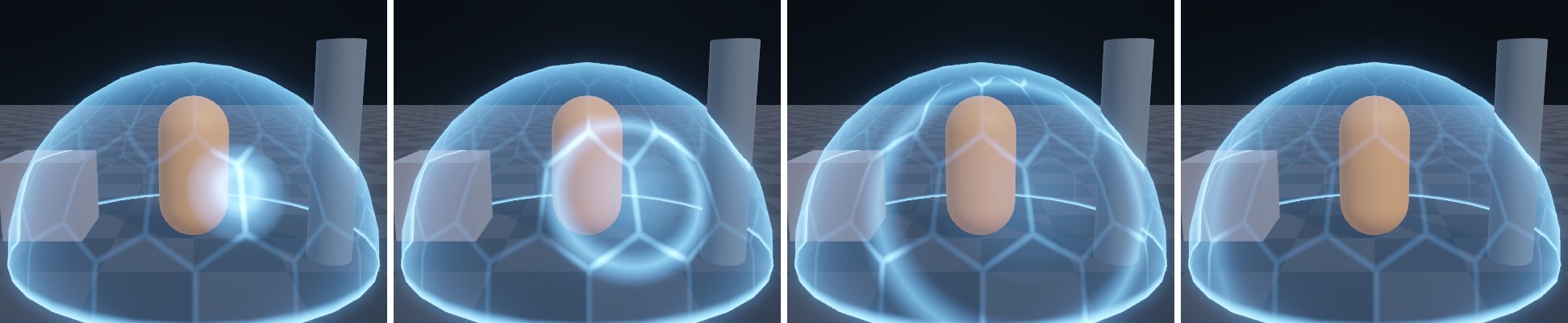
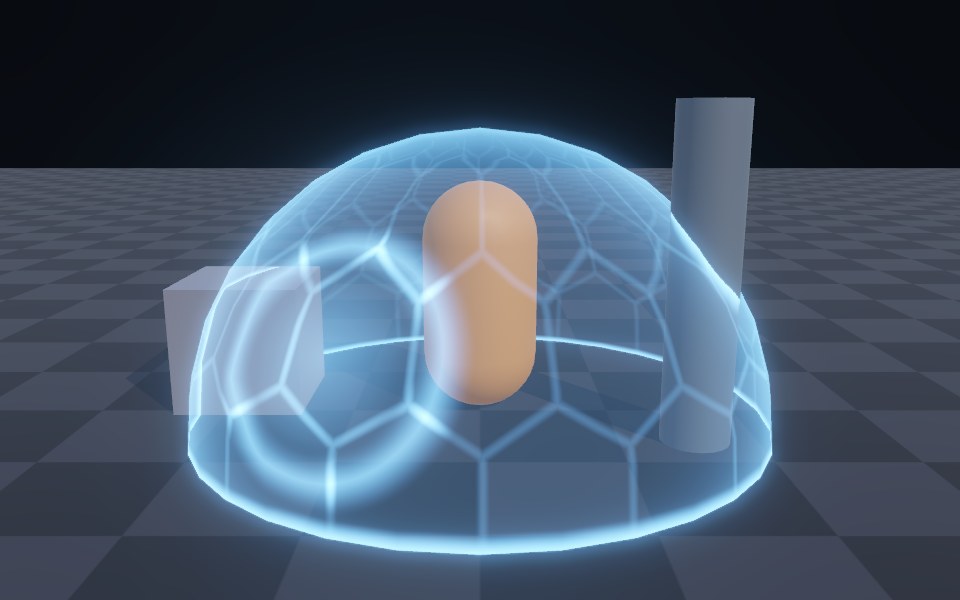
目标:给护盾加上蜂窝状六边形网格,每个格子有自己的明暗呼吸;被击中时,从命中点扩散出一圈光环,光环经过的格子被点亮,护盾表面同时鼓起一圈波纹。
六边形网格的数学
正六边形可以密铺平面,它的中心构成一个“错位的矩形网格”:把平面看成两套矩形网格的叠加,格子尺寸都是 1 × √3,第二套相对第一套偏移 (0.5, √3/2)。对任意点 p,分别求出它在两套网格里所属格子的中心,离哪个中心更近,p 就属于哪个六边形。
// 六边形网格:返回到最近六边形中心的局部坐标(xy)与格子 id(zw)
float4 HexGrid(float2 p)
{
    const float2 s = float2(1.0, 1.7320508);           // (1, √3)
    float4 c = floor(float4(p, p - float2(0.5, 1.0)) / s.xyxy) + 0.5;
    float4 h = float4(p - c.xy * s, p - (c.zw + 0.5) * s);
    return dot(h.xy, h.xy) < dot(h.zw, h.zw) ? float4(h.xy, c.xy) : float4(h.zw, c.zw + 0.5);
}

// 六边形的“距离”:中心为 0,边上为 0.5
float HexDist(float2 p)
{
    p = abs(p);
    return max(dot(p, float2(0.5, 0.8660254)), p.x);
}
// 六边形网格:返回到最近六边形中心的局部坐标(xy)与格子 id(zw)
vec4 HexGrid(vec2 p)
{
    const vec2 s = vec2(1.0, 1.7320508);           // (1, √3)
    vec4 c = floor(vec4(p, p - vec2(0.5, 1.0)) / s.xyxy) + 0.5;
    vec4 h = vec4(p - c.xy * s, p - (c.zw + 0.5) * s);
    return dot(h.xy, h.xy) < dot(h.zw, h.zw) ? vec4(h.xy, c.xy) : vec4(h.zw, c.zw + 0.5);
}

// 六边形的“距离”:中心为 0,边上为 0.5
float HexDist(vec2 p)
{
    p = abs(p);
    return max(dot(p, vec2(0.5, 0.8660254)), p.x);
}
HexDist 求的是六边形意义下的“半径”:利用对称性先取绝对值,六边形的边由两组直线围成——竖直边 x = 常数,斜边法线方向是 (0.5, √3/2),取两者最大值就是到中心的“六边形距离”。HexGrid 返回的 zw 是格子 id,用它做哈希,每个格子就能拥有自己的随机相位,实现各自独立的明暗呼吸。
贴到球面上
球体的 UV 是经纬度展开:U 绕赤道一圈(周长 2πR),V 从南极到北极(πR)。要让格子不被拉伸,V 方向的格子数应该是 U 方向的一半;_HexScale 取整数时,U=0 和 U=1 的接缝处正好是网格周期的整数倍,可以无缝衔接。经纬度展开在两极会把整行格子挤成一点,所以用 1 − |normalOS. 在两极附近把六边形淡出。半球护盾的极点在顶上,从正常视角看占的面积很小,这个处理已经足够;如果护盾需要从正上方看,可以改用立方体球(Cube Sphere)的网格与 UV。
受击涟漪
涟漪是另一种“距离遮罩 + 边带”:以命中点为圆心,到命中点的距离为 d,环的半径随进度增长 r = progress × R,1 − |d − r| / width 就是一条环形带。环越往外越淡(乘 1 − progress),命中点本身再加一个快速消退的亮斑。
// 受击涟漪:以命中点为圆心向外扩散的一圈环,越往外越淡
half HitRing(float3 positionWS)
{
    float d = distance(positionWS, _HitPos.xyz);
    float r = _HitProgress * _HitRadius;
    float width = 0.12 + 0.25 * _HitProgress;
    half ring = saturate(1.0 - abs(d - r) / width);
    half fade = (1.0 - _HitProgress) * step(0.001, _HitProgress);
    // 命中点本身还有一个快速消退的亮斑
    half spot = saturate(1.0 - d / (0.4 + r * 0.3)) * (1.0 - _HitProgress) * (1.0 - _HitProgress);
    return (ring * ring + spot) * fade;
}
// 受击涟漪:以命中点为圆心向外扩散的一圈环,越往外越淡
float HitRing(vec3 pWS)
{
    float d = distance(pWS, _HitPos.xyz);
    float r = _HitProgress * _HitRadius;
    float width = 0.12 + 0.25 * _HitProgress;
    float ring = saturate(1.0 - abs(d - r) / width);
    float fade = (1.0 - _HitProgress) * step(0.001, _HitProgress);
    // 命中点本身还有一个快速消退的亮斑
    float spot = saturate(1.0 - d / (0.4 + r * 0.3)) * (1.0 - _HitProgress) * (1.0 - _HitProgress);
    return (ring * ring + spot) * fade;
}
同一个函数在顶点着色器里再调用一次,把顶点沿法线推出去一点点,护盾表面就会随光环鼓起一圈波纹。这里用的是世界空间的直线距离(弦长),不是球面上的弧长;涟漪半径不大时两者差别很小,看不出区别。
完整 Shader:
// 案例 18.6~18.7:能量护盾。深度交接高亮 + 六边形网格 + 菲涅尔 + 受击涟漪。
// 透明队列读取 _CameraDepthTexture(URP Asset 需开启 Depth Texture)。
Shader "Cookbook/Ch18/Shield"
{
    Properties
    {
        [HDR] _ShieldColor ("Shield Color", Color) = (0.2,0.7,1.6,1)
        _BaseAlpha ("Base Intensity", Range(0,1)) = 0.04
        _RimPower ("Rim Power", Range(0.5,8)) = 3
        [Header(Intersection)]
        _IntersectWidth ("Intersect Width (m)", Range(0,1)) = 0.25
        _IntersectStrength ("Intersect Strength", Range(0,8)) = 3
        [Header(Hexagon)]
        _HexScale ("Hex Count (around)", Float) = 16
        _HexLine ("Hex Line Width", Range(0.005,0.2)) = 0.05
        _HexStrength ("Hex Strength", Range(0,2)) = 0.6
        [Header(Hit)]
        _HitPos ("Hit Position (World)", Vector) = (0,1,-2,0)
        _HitProgress ("Hit Progress", Range(0,1)) = 0
        _HitRadius ("Hit Max Radius (m)", Float) = 2.5
        _HitStrength ("Hit Strength", Range(0,10)) = 4
        _HitDisplace ("Hit Displacement (m)", Range(0,0.3)) = 0.06
        [Header(Time)]
        [Toggle] _AutoPlay ("Auto Play (_Time)", Float) = 0
        _Phase ("Phase (seconds)", Float) = 0
    }

    SubShader
    {
        Tags { "RenderType"="Transparent" "Queue"="Transparent" "RenderPipeline"="UniversalPipeline" }

        Pass
        {
            Name "Shield"
            Tags { "LightMode"="UniversalForward" }
            Blend One One
            ZWrite Off
            Cull Off            // 双面:从外面也能看到球的内壁,更有“罩子”的体积感

            HLSLPROGRAM
            #pragma vertex vert
            #pragma fragment frag
            #include "Assets/Cookbook/Ch18/Ch18Common.hlsl"
            #include "Packages/com.unity.render-pipelines.universal/ShaderLibrary/DeclareDepthTexture.hlsl"

            CBUFFER_START(UnityPerMaterial)
                half4  _ShieldColor;
                half   _BaseAlpha;
                half   _RimPower;
                half   _IntersectWidth;
                half   _IntersectStrength;
                float  _HexScale;
                half   _HexLine;
                half   _HexStrength;
                float4 _HitPos;
                half   _HitProgress;
                float  _HitRadius;
                half   _HitStrength;
                half   _HitDisplace;
                half   _AutoPlay;
                float  _Phase;
            CBUFFER_END

            struct Attributes { float4 positionOS : POSITION; float3 normalOS : NORMAL; float2 uv : TEXCOORD0; };
            struct Varyings
            {
                float4 positionCS : SV_POSITION;
                float3 positionWS : TEXCOORD0;
                half3  normalWS   : TEXCOORD1;
                float2 uv         : TEXCOORD2;
                float  eyeDepth   : TEXCOORD3;   // 本片元到相机的观察空间深度(米)
                half   poleFade   : TEXCOORD4;
            };

            float ShieldTime() { return _AutoPlay > 0.5 ? _Time.y : _Phase; }

            // 受击涟漪:以命中点为圆心向外扩散的一圈环,越往外越淡
            half HitRing(float3 positionWS)
            {
                float d = distance(positionWS, _HitPos.xyz);
                float r = _HitProgress * _HitRadius;
                float width = 0.12 + 0.25 * _HitProgress;
                half ring = saturate(1.0 - abs(d - r) / width);
                half fade = (1.0 - _HitProgress) * step(0.001, _HitProgress);
                // 命中点本身还有一个快速消退的亮斑
                half spot = saturate(1.0 - d / (0.4 + r * 0.3)) * (1.0 - _HitProgress) * (1.0 - _HitProgress);
                return (ring * ring + spot) * fade;
            }

            Varyings vert(Attributes v)
            {
                Varyings o;
                float3 positionWS = TransformObjectToWorld(v.positionOS.xyz);
                float3 normalWS = TransformObjectToWorldNormal(v.normalOS);
                // 涟漪经过的地方顶点沿法线鼓起一点点
                positionWS += normalWS * HitRing(positionWS) * _HitDisplace;
                o.positionWS = positionWS;
                o.positionCS = TransformWorldToHClip(positionWS);
                o.normalWS = normalWS;
                o.uv = v.uv;
                o.eyeDepth = -TransformWorldToView(positionWS).z;   // 观察空间看向 -Z,取负得正的深度
                o.poleFade = 1.0 - pow(abs(v.normalOS.y), 6.0);      // 球面 UV 在两极挤成一点,六边形淡出
                return o;
            }

            // 六边形网格:返回到最近六边形中心的局部坐标(xy)与格子 id(zw)
            float4 HexGrid(float2 p)
            {
                const float2 s = float2(1.0, 1.7320508);           // (1, √3)
                float4 c = floor(float4(p, p - float2(0.5, 1.0)) / s.xyxy) + 0.5;
                float4 h = float4(p - c.xy * s, p - (c.zw + 0.5) * s);
                return dot(h.xy, h.xy) < dot(h.zw, h.zw) ? float4(h.xy, c.xy) : float4(h.zw, c.zw + 0.5);
            }

            // 六边形的“距离”:中心为 0,边上为 0.5
            float HexDist(float2 p)
            {
                p = abs(p);
                return max(dot(p, float2(0.5, 0.8660254)), p.x);
            }

            half4 frag(Varyings i, FRONT_FACE_TYPE face : FRONT_FACE_SEMANTIC) : SV_Target
            {
                float t = ShieldTime();
                half3 normalWS = normalize(i.normalWS) * IS_FRONT_VFACE(face, 1.0h, -1.0h);
                half3 viewWS = GetWorldSpaceNormalizeViewDir(i.positionWS);

                // 1) 深度交接:场景深度 - 自身深度 越小,说明越贴近别的物体表面
                float2 screenUV = GetNormalizedScreenSpaceUV(i.positionCS);
                float sceneEye = LinearEyeDepth(SampleSceneDepth(screenUV), _ZBufferParams);
                float gap = sceneEye - i.eyeDepth;
                half intersect = 1.0h - saturate(gap / max(_IntersectWidth, 1e-4h));
                intersect = intersect * intersect * _IntersectStrength;

                // 2) 菲涅尔轮廓(背面也算,球的内壁边缘同样会亮)
                half rim = FresnelRim(normalWS, viewWS, _RimPower);

                // 3) 六边形:球面 U 绕一圈(2πR),V 从南极到北极(πR),
                //    所以 V 方向只铺 U 的一半,格子才不被拉伸;_HexScale 取整数,U 的接缝处就能无缝衔接
                float2 hp = i.uv * float2(_HexScale, _HexScale * 0.5);
                float4 hex = HexGrid(hp);
                half edge = smoothstep(0.5 - _HexLine, 0.5, HexDist(hex.xy));
                // 每个格子一个随机相位,缓慢呼吸明暗
                half cellPulse = 0.5 + 0.5 * sin(t * 2.0 + Hash21(hex.zw) * 6.2831);
                half hexMask = (edge + cellPulse * 0.15h) * _HexStrength * i.poleFade;

                // 4) 受击:环经过的地方六边形整体点亮
                half hit = HitRing(i.positionWS);
                half hitHex = hit * (0.35h + edge) * _HitStrength;

                half back = IS_FRONT_VFACE(face, 1.0h, 0.45h);    // 内壁暗一些,前后有层次
                half intensity = (_BaseAlpha + rim + hexMask * (0.3h + rim)) * back + intersect + hitHex;
                return half4(_ShieldColor.rgb * intensity, 1);
            }
            ENDHLSL
        }
    }
}
// 案例 18.6~18.7:能量护盾。深度交接高亮 + 六边形网格 + 菲涅尔 + 受击涟漪。
// 透明队列读取 _CameraDepthTexture(URP Asset 需开启 Depth Texture)。(GLSL 版,对应 Ch18/Shield.shader)
Shader "Cookbook/Ch18/Shield"
{
    SubShader
    {
        Tags { "RenderType"="Transparent" "Queue"="Transparent" "RenderPipeline"="UniversalPipeline" }

        Pass
        {
            Name "Shield"
            Tags { "LightMode"="UniversalForward" }
            Blend One One
            ZWrite Off
            Cull Off            // 双面:从外面也能看到球的内壁,更有“罩子”的体积感

            GLSLPROGRAM
            #include "Ch18/Ch18Common.glsl"
            // _CameraDepthTexture / SampleSceneDepth 在 Core.glsl 里(对应 DeclareDepthTexture.hlsl)

            uniform vec4  _ShieldColor;
            uniform float _BaseAlpha;
            uniform float _RimPower;
            uniform float _IntersectWidth;
            uniform float _IntersectStrength;
            uniform float _HexScale;
            uniform float _HexLine;
            uniform float _HexStrength;
            uniform vec4  _HitPos;
            uniform float _HitProgress;
            uniform float _HitRadius;
            uniform float _HitStrength;
            uniform float _HitDisplace;
            uniform float _AutoPlay;
            uniform float _Phase;

            VARYING vec3  positionWS;
            VARYING vec3  normalWS;
            VARYING vec2  uv;
            VARYING float eyeDepth;   // 本片元到相机的观察空间深度(米)
            VARYING float poleFade;

            float ShieldTime() { return _AutoPlay > 0.5 ? _Time.y : _Phase; }

            // 受击涟漪:以命中点为圆心向外扩散的一圈环,越往外越淡
            float HitRing(vec3 pWS)
            {
                float d = distance(pWS, _HitPos.xyz);
                float r = _HitProgress * _HitRadius;
                float width = 0.12 + 0.25 * _HitProgress;
                float ring = saturate(1.0 - abs(d - r) / width);
                float fade = (1.0 - _HitProgress) * step(0.001, _HitProgress);
                // 命中点本身还有一个快速消退的亮斑
                float spot = saturate(1.0 - d / (0.4 + r * 0.3)) * (1.0 - _HitProgress) * (1.0 - _HitProgress);
                return (ring * ring + spot) * fade;
            }

            #ifdef VERTEX
            void main()
            {
                vec3 pWS = TransformObjectToWorld(positionOS.xyz);
                vec3 nWS = TransformObjectToWorldNormal(normalOS);
                // 涟漪经过的地方顶点沿法线鼓起一点点
                pWS += nWS * HitRing(pWS) * _HitDisplace;
                positionWS = pWS;
                gl_Position = TransformWorldToHClip(pWS);
                normalWS = nWS;
                uv = texcoord0.xy;
                eyeDepth = -TransformWorldToView(pWS).z;   // 观察空间看向 -Z,取负得正的深度
                poleFade = 1.0 - pow(abs(normalOS.y), 6.0); // 球面 UV 在两极挤成一点,六边形淡出
            }
            #endif

            #ifdef FRAGMENT
            // 六边形网格:返回到最近六边形中心的局部坐标(xy)与格子 id(zw)
            vec4 HexGrid(vec2 p)
            {
                const vec2 s = vec2(1.0, 1.7320508);           // (1, √3)
                vec4 c = floor(vec4(p, p - vec2(0.5, 1.0)) / s.xyxy) + 0.5;
                vec4 h = vec4(p - c.xy * s, p - (c.zw + 0.5) * s);
                return dot(h.xy, h.xy) < dot(h.zw, h.zw) ? vec4(h.xy, c.xy) : vec4(h.zw, c.zw + 0.5);
            }

            // 六边形的“距离”:中心为 0,边上为 0.5
            float HexDist(vec2 p)
            {
                p = abs(p);
                return max(dot(p, vec2(0.5, 0.8660254)), p.x);
            }

            void main()
            {
                float t = ShieldTime();
                vec3 N = normalize(normalWS) * (gl_FrontFacing ? 1.0 : -1.0);
                vec3 viewWS = GetWorldSpaceNormalizeViewDir(positionWS);

                // 1) 深度交接:场景深度 - 自身深度 越小,说明越贴近别的物体表面
                vec2 screenUV = GetNormalizedScreenSpaceUV(gl_FragCoord);
                float sceneEye = LinearEyeDepth(SampleSceneDepth(screenUV), _ZBufferParams);
                float gap = sceneEye - eyeDepth;
                float intersect = 1.0 - saturate(gap / max(_IntersectWidth, 1e-4));
                intersect = intersect * intersect * _IntersectStrength;

                // 2) 菲涅尔轮廓(背面也算,球的内壁边缘同样会亮)
                float rim = FresnelRim(N, viewWS, _RimPower);

                // 3) 六边形:球面 U 绕一圈(2πR),V 从南极到北极(πR),
                //    所以 V 方向只铺 U 的一半,格子才不被拉伸;_HexScale 取整数,U 的接缝处就能无缝衔接
                vec2 hp = uv * vec2(_HexScale, _HexScale * 0.5);
                vec4 hex = HexGrid(hp);
                float edge = smoothstep(0.5 - _HexLine, 0.5, HexDist(hex.xy));
                // 每个格子一个随机相位,缓慢呼吸明暗
                float cellPulse = 0.5 + 0.5 * sin(t * 2.0 + Hash21(hex.zw) * 6.2831);
                float hexMask = (edge + cellPulse * 0.15) * _HexStrength * poleFade;

                // 4) 受击:环经过的地方六边形整体点亮
                float hit = HitRing(positionWS);
                float hitHex = hit * (0.35 + edge) * _HitStrength;

                float back = gl_FrontFacing ? 1.0 : 0.45;    // 内壁暗一些,前后有层次
                float intensity = (_BaseAlpha + rim + hexMask * (0.3 + rim)) * back + intersect + hitHex;
                fragColor = vec4(_ShieldColor.rgb * intensity, 1.0);
            }
            #endif
            ENDGLSL
        }
    }
}
从 C# 发送命中点
护盾通常挂一个碰撞体,子弹命中时把命中点和起始时间交给材质:
void OnCollisionEnter(Collision c)
{
    m_Mat.SetVector("_HitPos", c.GetContact(0).point);
    m_HitStart = Time.time;
}
void Update()
{
    float p = (Time.time - m_HitStart) / hitDuration;   // 0~1,超过 1 即结束
    m_Mat.SetFloat("_HitProgress", p >= 1f ? 0f : p);
}
想同时显示多个命中点,可以把命中点做成数组:在 CBUFFER 里声明 float4 _Hits[4](xyz 位置、w 进度),用 Material.SetVectorArray 设置,Shader 里循环累加。数组长度要固定,并且同一材质所有 Pass 的声明保持一致。