案例 18.6能量护盾(上):深度交接高亮进阶
目标:一个半球形能量护盾罩在地面上,护盾与地面、与穿过它的物体相交的地方出现一圈亮线,就像能量场被“挤压”一样。
原理:比较两个深度
护盾是透明物体,它在 Transparent 队列里绘制。到那个时候,所有不透明物体都已经画完了,URP 会把它们的深度复制到 _CameraDepthTexture(需要 URP Asset 里开启 Depth Texture)。于是在护盾的每个像素上,我们知道两个距离:
- 场景深度:沿这个像素的视线,最近的不透明表面离相机多远——从
_CameraDepthTexture采样再线性化; - 护盾深度:护盾自身这个片元离相机多远——在顶点着色器里算出观察空间深度传下来。
两者之差 gap = 场景深度 − 护盾深度。gap 接近 0,说明护盾表面紧贴着某个不透明表面——这就是“相交处”。用 1 − saturate( 就得到一条宽度为 width 米的交接遮罩。
URP 14 里读取深度图
URP 提供了现成的头文件 DeclareDepthTexture.hlsl,摘录如下(URP 14 ShaderLibrary/DeclareDepthTexture.):
TEXTURE2D_X_FLOAT(_CameraDepthTexture);
SAMPLER(sampler_CameraDepthTexture);

float SampleSceneDepth(float2 uv)
{
    return SAMPLE_TEXTURE2D_X(_CameraDepthTexture, sampler_CameraDepthTexture, UnityStereoTransformScreenSpaceTex(uv)).r;
}
它返回的是原始设备深度:非线性,并且在 Metal/D3D/Vulkan 等平台上是反转的(近处为 1,远处为 0,即 Reversed-Z,第 1 章)。要和“米”比较,必须用 LinearEyeDepth( 转成观察空间深度。屏幕 UV 用 GetNormalizedScreenSpaceUV(——在片元着色器里,SV_POSITION 的 xy 是像素坐标,这个函数除以屏幕尺寸并处理了平台的 UV 翻转。
护盾自身的深度在顶点着色器里算:-TransformWorldToView(。观察空间是右手系,相机看向 −Z,所以取负。也可以用 Common.hlsl 里的重载 LinearEyeDepth(,结果相同(第 19 章就用了这个写法)。
half4 frag(Varyings i, FRONT_FACE_TYPE face : FRONT_FACE_SEMANTIC) : SV_Target
{
    float t = ShieldTime();
    half3 normalWS = normalize(i.normalWS) * IS_FRONT_VFACE(face, 1.0h, -1.0h);
    half3 viewWS = GetWorldSpaceNormalizeViewDir(i.positionWS);

    // 1) 深度交接:场景深度 - 自身深度 越小,说明越贴近别的物体表面
    float2 screenUV = GetNormalizedScreenSpaceUV(i.positionCS);
    float sceneEye = LinearEyeDepth(SampleSceneDepth(screenUV), _ZBufferParams);
    float gap = sceneEye - i.eyeDepth;
    half intersect = 1.0h - saturate(gap / max(_IntersectWidth, 1e-4h));
    intersect = intersect * intersect * _IntersectStrength;

    // 2) 菲涅尔轮廓(背面也算,球的内壁边缘同样会亮)
    half rim = FresnelRim(normalWS, viewWS, _RimPower);

    // 3) 六边形:球面 U 绕一圈(2πR),V 从南极到北极(πR),
    //    所以 V 方向只铺 U 的一半,格子才不被拉伸;_HexScale 取整数,U 的接缝处就能无缝衔接
    float2 hp = i.uv * float2(_HexScale, _HexScale * 0.5);
    float4 hex = HexGrid(hp);
    half edge = smoothstep(0.5 - _HexLine, 0.5, HexDist(hex.xy));
    // 每个格子一个随机相位,缓慢呼吸明暗
    half cellPulse = 0.5 + 0.5 * sin(t * 2.0 + Hash21(hex.zw) * 6.2831);
    half hexMask = (edge + cellPulse * 0.15h) * _HexStrength * i.poleFade;

    // 4) 受击:环经过的地方六边形整体点亮
    half hit = HitRing(i.positionWS);
    half hitHex = hit * (0.35h + edge) * _HitStrength;

    half back = IS_FRONT_VFACE(face, 1.0h, 0.45h);    // 内壁暗一些,前后有层次
    half intensity = (_BaseAlpha + rim + hexMask * (0.3h + rim)) * back + intersect + hitHex;
    return half4(_ShieldColor.rgb * intensity, 1);
}
void main()
{
    float t = ShieldTime();
    vec3 N = normalize(normalWS) * (gl_FrontFacing ? 1.0 : -1.0);
    vec3 viewWS = GetWorldSpaceNormalizeViewDir(positionWS);

    // 1) 深度交接:场景深度 - 自身深度 越小,说明越贴近别的物体表面
    vec2 screenUV = GetNormalizedScreenSpaceUV(gl_FragCoord);
    float sceneEye = LinearEyeDepth(SampleSceneDepth(screenUV), _ZBufferParams);
    float gap = sceneEye - eyeDepth;
    float intersect = 1.0 - saturate(gap / max(_IntersectWidth, 1e-4));
    intersect = intersect * intersect * _IntersectStrength;

    // 2) 菲涅尔轮廓(背面也算,球的内壁边缘同样会亮)
    float rim = FresnelRim(N, viewWS, _RimPower);

    // 3) 六边形:球面 U 绕一圈(2πR),V 从南极到北极(πR),
    //    所以 V 方向只铺 U 的一半,格子才不被拉伸;_HexScale 取整数,U 的接缝处就能无缝衔接
    vec2 hp = uv * vec2(_HexScale, _HexScale * 0.5);
    vec4 hex = HexGrid(hp);
    float edge = smoothstep(0.5 - _HexLine, 0.5, HexDist(hex.xy));
    // 每个格子一个随机相位,缓慢呼吸明暗
    float cellPulse = 0.5 + 0.5 * sin(t * 2.0 + Hash21(hex.zw) * 6.2831);
    float hexMask = (edge + cellPulse * 0.15) * _HexStrength * poleFade;

    // 4) 受击:环经过的地方六边形整体点亮
    float hit = HitRing(positionWS);
    float hitHex = hit * (0.35 + edge) * _HitStrength;

    float back = gl_FrontFacing ? 1.0 : 0.45;    // 内壁暗一些,前后有层次
    float intensity = (_BaseAlpha + rim + hexMask * (0.3 + rim)) * back + intersect + hitHex;
    fragColor = vec4(_ShieldColor.rgb * intensity, 1.0);
}
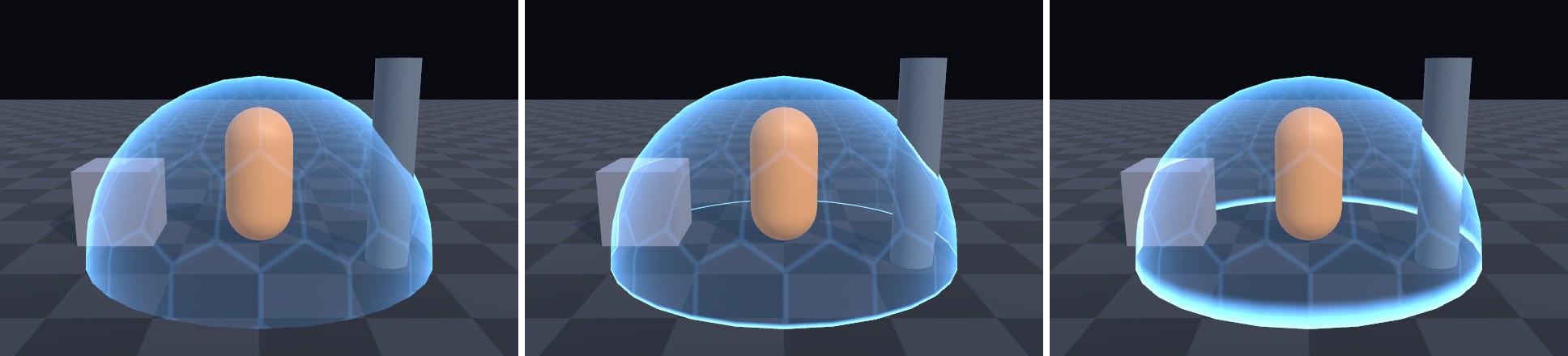
常见坑
- 没有效果 / 全屏都亮:先确认 URP Asset(或相机)开启了 Depth Texture。没开时
_CameraDepthTexture是一张默认贴图,交接遮罩会变成全 0 或全 1。 - 透明物体不参与:深度图只包含不透明物体(以及写深度的 Alpha Test 物体)。护盾和别的透明物体(比如另一个护盾、粒子)之间不会有交接线。
- 正交相机:
LinearEyeDepth按透视投影的公式线性化。正交相机的深度本来就是线性的,要用LinearDepthToEyeDepth(URP 14ShaderVariablesFunctions.),并根据hlsl unity_OrthoParams.w判断投影类型。 - 双面:本例
Cull Off,护盾的内壁也参与计算,所以从外面能透过前壁看到后壁与地面的交线。内壁亮度乘了 0.45,制造前后层次。