URP 渲染实战 / 第 17 章 顶点动画 / 案例 17.6
案例 17.6碎裂与吸附重组进阶
目标:物体沿某个方向逐渐碎成三角形碎片:碎片绕自身中心旋转、沿面法线飞出、受“重力”下落并缩小,刚脱落时发出橙色辉光;把进度反过来播放,就是碎片飞回来吸附成形。
原理:要让一个三角形作为一个整体运动,三个顶点必须知道“我属于哪块碎片”——碎片的中心、随机数、面法线。和重心坐标线框一样,这要求先把共享顶点拆开,再把每个三角形的公共数据写进它的三个顶点:
Assets/Cookbook/Ch17/ShatterMesh.cs(节选:build)
public static Mesh Build(Mesh src, int seed = 3, float boundsPadding = 3f)
{
    var rnd = new System.Random(seed);
    var sv = src.vertices; var sn = src.normals; var suv = src.uv; var tris = src.triangles;
    int n = tris.Length;
    var v = new Vector3[n]; var nr = new Vector3[n]; var uv = new Vector2[n];
    var uv1 = new Vector4[n]; var uv2 = new Vector4[n]; var idx = new int[n];
    for (int t = 0; t < n; t += 3)
    {
        Vector3 a = sv[tris[t]], b = sv[tris[t + 1]], c = sv[tris[t + 2]];
        Vector3 center = (a + b + c) / 3f;
        Vector3 face = Vector3.Cross(b - a, c - a).normalized;     // Unity 的绕序下这就是朝外的面法线
        float r = (float)rnd.NextDouble();
        for (int k = 0; k < 3; k++)
        {
            int i = t + k, s = tris[i];
            v[i] = sv[s]; nr[i] = sn.Length > 0 ? sn[s] : face; uv[i] = suv.Length > 0 ? suv[s] : Vector2.zero;
            uv1[i] = new Vector4(center.x, center.y, center.z, r);
            uv2[i] = new Vector4(face.x, face.y, face.z, 0);
            idx[i] = i;
        }
    }
    var m = new Mesh { name = src.name + "_Shatter", indexFormat = IndexFormat.UInt32 };
    m.vertices = v; m.normals = nr; m.uv = uv; m.SetUVs(1, uv1); m.SetUVs(2, uv2); m.triangles = idx;
    m.RecalculateBounds();
    var bounds = m.bounds; bounds.Expand(boundsPadding);   // 碎片会飞出原包围盒
    m.bounds = bounds;
    return m;
}
Shader 中每块碎片有自己的局部进度 p:碎片中心在扫描方向上越靠前,开始得越早,再加一点随机,“裂解前沿”就有了参差感。然后依次做三件事:
- 旋转并缩小:把顶点相对碎片中心的偏移,绕一根随机轴旋转 p ×
_Spin弧度,再乘以 (1 − p ×_Shrink)。旋转矩阵用 Core RP 的RotationFromAxisAngle(GeometricTools.hlsl,即罗德里格斯旋转公式的矩阵形式)。 - 飞出:沿面法线移动,距离随随机数浮动;再加一个抛物线:先略微上抛,再按 p² 下落。
- 法线:碎片是刚体旋转,法线乘同一个旋转矩阵即可,不需要重算。
Assets/Cookbook/Ch17/Shatter.shader(节选:deform)
void Deform(inout VAAttributes v)
{
    float3 center = v.uv1.xyz;
    float rnd = v.uv1.w;
    float3 faceN = v.uv2.xyz;

    // 1) 这块碎片自己的进度 p:沿扫描方向越靠前越早开始,再加一点随机
    // 物体空间坐标大致在 -1..1,映射到 0..1 后乘以 _Spread
    float start = saturate(dot(center, normalize(_SweepDir.xyz)) * 0.5 + 0.5) * _Spread + rnd * 0.2;
    float p = saturate(_Progress * (1.0 + _Spread + 0.2) - start);
    float ease = p * p * (3.0 - 2.0 * p);                  // smoothstep 曲线,起步柔和

    // 2) 绕碎片中心、绕一根随机轴旋转,并逐渐缩小
    float3 axis = normalize(float3(rnd - 0.5, frac(rnd * 7.13) - 0.5, frac(rnd * 3.71) - 0.5) + 1e-4);
    float angle = ease * _Spin * (0.5 + rnd);
    float3x3 R = RotationFromAxisAngle(axis, sin(angle), cos(angle));
    float3 local = mul(R, v.positionOS.xyz - center) * (1.0 - ease * _Shrink);

    // 3) 沿面法线飞出 + 抛物线下落(物体空间的 -Y)
    float3 offset = faceN * ease * _Distance * (0.6 + rnd) + float3(0, 1, 0) * (0.3 * ease - _Gravity * ease * ease);

    v.positionOS.xyz = center + local + offset;
    v.normalOS = mul(R, v.normalOS);                     // 法线跟着碎片一起转
    v.uv2.w = p;                                         // 进度交给片元做发光
}
void Deform(inout VAAttributes v)
{
    vec3 center = v.uv1.xyz;
    float rnd = v.uv1.w;
    vec3 faceN = v.uv2.xyz;

    // 1) 这块碎片自己的进度 p:沿扫描方向越靠前越早开始,再加一点随机
    // 物体空间坐标大致在 -1..1,映射到 0..1 后乘以 _Spread
    float start = saturate(dot(center, normalize(_SweepDir.xyz)) * 0.5 + 0.5) * _Spread + rnd * 0.2;
    float p = saturate(_Progress * (1.0 + _Spread + 0.2) - start);
    float ease = p * p * (3.0 - 2.0 * p);                  // smoothstep 曲线,起步柔和

    // 2) 绕碎片中心、绕一根随机轴旋转,并逐渐缩小
    vec3 axis = normalize(vec3(rnd - 0.5, fract(rnd * 7.13) - 0.5, fract(rnd * 3.71) - 0.5) + 1e-4);
    float angle = ease * _Spin * (0.5 + rnd);
    mat3 R = RotationFromAxisAngle(axis, sin(angle), cos(angle));
    vec3 local = (R * (v.positionOS.xyz - center)) * (1.0 - ease * _Shrink);

    // 3) 沿面法线飞出 + 抛物线下落(物体空间的 -Y)
    vec3 offset = faceN * ease * _Distance * (0.6 + rnd) + vec3(0.0, 1.0, 0.0) * (0.3 * ease - _Gravity * ease * ease);

    v.positionOS.xyz = center + local + offset;
    v.normalOS = R * v.normalOS;                         // 法线跟着碎片一起转
    v.uv2.w = p;                                         // 进度交给片元做发光
}
进度 p 先经过 smoothstep 曲线 p²(3 − 2p) 再用于运动,起步和结束都很柔和;原始的 p 通过 uv2.w 传给片元,用 saturate(p·6)·(1 − p) 做出“刚脱落时最亮、飞远后冷却”的辉光。
Assets/Cookbook/Ch17/Shatter.shader
// 碎裂与吸附重组:每个三角形是一块碎片,围绕自己的中心旋转、沿面法线飞出并受“重力”下落。
// _Progress 从 0 到 1 是碎裂;反过来从 1 到 0 播放,就是碎片飞回来“吸附”成形。
// 碎片开始运动的时间由它在 _SweepDir 方向上的位置决定,形成一道扫过模型的“裂解前沿”。
Shader "Cookbook/Ch17/Shatter"
{
    Properties
    {
        _BaseColor ("Color", Color) = (0.75, 0.78, 0.85, 1)
        [HDR] _GlowColor ("Glow Color", Color) = (2.5, 0.9, 0.3, 1)
        _Progress ("Progress", Range(0, 1)) = 0.4
        _SweepDir ("Sweep Direction", Vector) = (0, 1, 0, 0)
        _Spread ("Sweep Spread", Range(0, 2)) = 1
        _Distance ("Fly Distance", Range(0, 3)) = 0.8
        _Spin ("Spin (radians)", Range(0, 20)) = 8
        _Gravity ("Gravity", Range(0, 3)) = 0.6
        _Shrink ("Shrink", Range(0, 1)) = 0.6
    }
    SubShader
    {
        Tags { "RenderType"="Opaque" "RenderPipeline"="UniversalPipeline" "Queue"="Geometry" }

        HLSLINCLUDE
        #include "Packages/com.unity.render-pipelines.universal/ShaderLibrary/Core.hlsl"
        #include "Packages/com.unity.render-pipelines.core/ShaderLibrary/GeometricTools.hlsl"
        CBUFFER_START(UnityPerMaterial)
            half4 _BaseColor, _GlowColor;
            float4 _SweepDir;
            float _Progress, _Spread, _Distance, _Spin, _Gravity, _Shrink;
        CBUFFER_END
        #include "Assets/Cookbook/Ch17/VertexAnimCommon.hlsl"

        void Deform(inout VAAttributes v)
        {
            float3 center = v.uv1.xyz;
            float rnd = v.uv1.w;
            float3 faceN = v.uv2.xyz;

            // 1) 这块碎片自己的进度 p:沿扫描方向越靠前越早开始,再加一点随机
            // 物体空间坐标大致在 -1..1,映射到 0..1 后乘以 _Spread
            float start = saturate(dot(center, normalize(_SweepDir.xyz)) * 0.5 + 0.5) * _Spread + rnd * 0.2;
            float p = saturate(_Progress * (1.0 + _Spread + 0.2) - start);
            float ease = p * p * (3.0 - 2.0 * p);                  // smoothstep 曲线,起步柔和

            // 2) 绕碎片中心、绕一根随机轴旋转,并逐渐缩小
            float3 axis = normalize(float3(rnd - 0.5, frac(rnd * 7.13) - 0.5, frac(rnd * 3.71) - 0.5) + 1e-4);
            float angle = ease * _Spin * (0.5 + rnd);
            float3x3 R = RotationFromAxisAngle(axis, sin(angle), cos(angle));
            float3 local = mul(R, v.positionOS.xyz - center) * (1.0 - ease * _Shrink);

            // 3) 沿面法线飞出 + 抛物线下落(物体空间的 -Y)
            float3 offset = faceN * ease * _Distance * (0.6 + rnd) + float3(0, 1, 0) * (0.3 * ease - _Gravity * ease * ease);

            v.positionOS.xyz = center + local + offset;
            v.normalOS = mul(R, v.normalOS);                     // 法线跟着碎片一起转
            v.uv2.w = p;                                         // 进度交给片元做发光
        }

        #include "Assets/Cookbook/Ch17/VertexAnimPasses.hlsl"
        ENDHLSL

        Pass
        {
            Name "ForwardLit"
            Tags { "LightMode"="UniversalForwardOnly" }
            Cull Off    // 碎片翻转后会露出背面
            HLSLPROGRAM
            #pragma vertex VAForwardVert
            #pragma fragment frag
            #pragma multi_compile _ _MAIN_LIGHT_SHADOWS _MAIN_LIGHT_SHADOWS_CASCADE _MAIN_LIGHT_SHADOWS_SCREEN
            #pragma multi_compile_fragment _ _SHADOWS_SOFT _SHADOWS_SOFT_LOW _SHADOWS_SOFT_MEDIUM _SHADOWS_SOFT_HIGH
            half4 frag(VAVaryings i, FRONT_FACE_TYPE face : FRONT_FACE_SEMANTIC) : SV_Target
            {
                float3 N = normalize(i.normalWS) * IS_FRONT_VFACE(face, 1.0, -1.0);
                half3 col = VALighting(_BaseColor.rgb, N, i.positionWS, 0.6h, 64.0h);
                // 刚脱离的碎片最亮,飞远后逐渐冷却
                half p = i.extra.w;
                half glow = saturate(p * 6.0h) * (1.0h - p);
                return half4(col + _GlowColor.rgb * glow, 1);
            }
            ENDHLSL
        }

        Pass
        {
            Name "ShadowCaster"
            Tags { "LightMode"="ShadowCaster" }
            ZWrite On ZTest LEqual ColorMask 0 Cull Off
            HLSLPROGRAM
            #pragma vertex VAShadowVert
            #pragma fragment VANullFrag
            ENDHLSL
        }

        Pass
        {
            Name "DepthOnly"
            Tags { "LightMode"="DepthOnly" }
            ZWrite On ColorMask R Cull Off
            HLSLPROGRAM
            #pragma vertex VADepthVert
            #pragma fragment VANullFrag
            ENDHLSL
        }
    }
}
// 碎裂与吸附重组:每个三角形是一块碎片,围绕自己的中心旋转、沿面法线飞出并受“重力”下落。(GLSL 版)
// _Progress 从 0 到 1 是碎裂;反过来从 1 到 0 播放,就是碎片飞回来“吸附”成形。
// 碎片开始运动的时间由它在 _SweepDir 方向上的位置决定,形成一道扫过模型的“裂解前沿”。
Shader "Cookbook/Ch17/Shatter"
{
    SubShader
    {
        Tags { "RenderType"="Opaque" "RenderPipeline"="UniversalPipeline" "Queue"="Geometry" }

        GLSLINCLUDE
        uniform vec4 _BaseColor, _GlowColor;
        uniform vec4 _SweepDir;
        uniform float _Progress, _Spread, _Distance, _Spin, _Gravity, _Shrink;
        #include "Ch17/VertexAnimCommon.glsl"

        // URP Core 的 GeometricTools.hlsl 里的 RotationFromAxisAngle(绕单位轴 A 旋转)。
        // HLSL 的 float3x3(...) 按行构造,GLSL 的 mat3(...) 按列构造,所以外面套一个 transpose
        mat3 RotationFromAxisAngle(vec3 A, float sinAngle, float cosAngle)
        {
            float c = cosAngle, s = sinAngle;
            return transpose(mat3(
                A.x * A.x * (1.0 - c) + c,       A.x * A.y * (1.0 - c) - A.z * s, A.x * A.z * (1.0 - c) + A.y * s,
                A.x * A.y * (1.0 - c) + A.z * s, A.y * A.y * (1.0 - c) + c,       A.y * A.z * (1.0 - c) - A.x * s,
                A.x * A.z * (1.0 - c) - A.y * s, A.y * A.z * (1.0 - c) + A.x * s, A.z * A.z * (1.0 - c) + c));
        }

        void Deform(inout VAAttributes v)
        {
            vec3 center = v.uv1.xyz;
            float rnd = v.uv1.w;
            vec3 faceN = v.uv2.xyz;

            // 1) 这块碎片自己的进度 p:沿扫描方向越靠前越早开始,再加一点随机
            // 物体空间坐标大致在 -1..1,映射到 0..1 后乘以 _Spread
            float start = saturate(dot(center, normalize(_SweepDir.xyz)) * 0.5 + 0.5) * _Spread + rnd * 0.2;
            float p = saturate(_Progress * (1.0 + _Spread + 0.2) - start);
            float ease = p * p * (3.0 - 2.0 * p);                  // smoothstep 曲线,起步柔和

            // 2) 绕碎片中心、绕一根随机轴旋转,并逐渐缩小
            vec3 axis = normalize(vec3(rnd - 0.5, fract(rnd * 7.13) - 0.5, fract(rnd * 3.71) - 0.5) + 1e-4);
            float angle = ease * _Spin * (0.5 + rnd);
            mat3 R = RotationFromAxisAngle(axis, sin(angle), cos(angle));
            vec3 local = (R * (v.positionOS.xyz - center)) * (1.0 - ease * _Shrink);

            // 3) 沿面法线飞出 + 抛物线下落(物体空间的 -Y)
            vec3 offset = faceN * ease * _Distance * (0.6 + rnd) + vec3(0.0, 1.0, 0.0) * (0.3 * ease - _Gravity * ease * ease);

            v.positionOS.xyz = center + local + offset;
            v.normalOS = R * v.normalOS;                         // 法线跟着碎片一起转
            v.uv2.w = p;                                         // 进度交给片元做发光
        }

        #include "Ch17/VertexAnimPasses.glsl"
        ENDGLSL

        Pass
        {
            Name "ForwardLit"
            Tags { "LightMode"="UniversalForwardOnly" }
            Cull Off    // 碎片翻转后会露出背面
            GLSLPROGRAM
            #ifdef VERTEX
            void main() { VAForwardVert(); }
            #endif
            #ifdef FRAGMENT
            void main()
            {
                vec3 N = normalize(normalWS) * (gl_FrontFacing ? 1.0 : -1.0);
                vec3 col = VALighting(_BaseColor.rgb, N, positionWS, 0.6, 64.0);
                // 刚脱离的碎片最亮,飞远后逐渐冷却
                float p = extra.w;
                float glow = saturate(p * 6.0) * (1.0 - p);
                fragColor = vec4(col + _GlowColor.rgb * glow, 1.0);
            }
            #endif
            ENDGLSL
        }

        Pass
        {
            Name "ShadowCaster"
            Tags { "LightMode"="ShadowCaster" }
            ZWrite On ZTest LEqual ColorMask 0 Cull Off
            GLSLPROGRAM
            #ifdef VERTEX
            void main() { VAShadowVert(); }
            #endif
            #ifdef FRAGMENT
            void main() { VANullFrag(); }
            #endif
            ENDGLSL
        }

        Pass
        {
            Name "DepthOnly"
            Tags { "LightMode"="DepthOnly" }
            ZWrite On ColorMask R Cull Off
            GLSLPROGRAM
            #ifdef VERTEX
            void main() { VADepthVert(); }
            #endif
            #ifdef FRAGMENT
            void main() { VANullFrag(); }
            #endif
            ENDGLSL
        }
    }
}
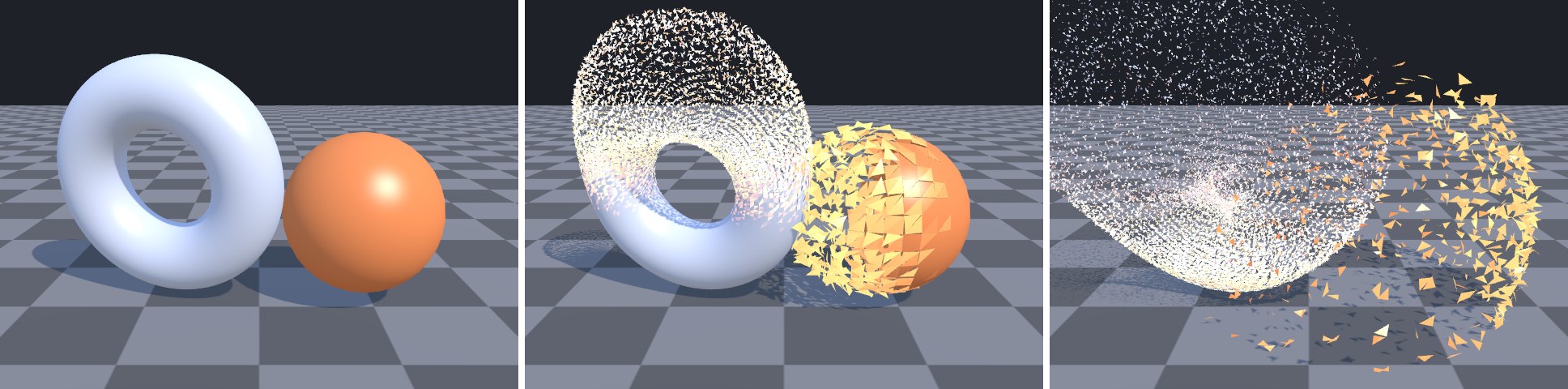
吸附重组把
_Progress 从 1 播到 0,碎片就会从四面八方飞回来,在扫描前沿依次“吸附”到原位——这正是很多游戏里“传送出现”“装备合成”的效果。配合第 18 章的溶解边缘发光,可以做出更丰富的过渡。如果希望碎片“吸附”时有一个过冲回弹,把 smoothstep 换成带回弹的缓动函数即可(例如 easeOutBack)。常见坑① 碎片大小由原网格的三角形决定:Unity 胶囊体的柱身三角形又细又长,碎出来像一根根针;想要块状碎片,用 Voronoi 预切分(在 DCC 或 C# 里把网格切成凸块,每块写同一个中心)。② 拆开共享顶点后顶点数变成三角形数 × 3,对高面数模型要注意内存。③ 包围盒要扩大(
ShatterMesh.Build 默认四周扩 3 米),否则碎片飞出原包围盒后整个物体可能被剔除。④ Cull Off:碎片翻滚时会露出背面。本案例出自《URP 渲染实战》第 17 章「顶点动画」。在章节中阅读上下文 →