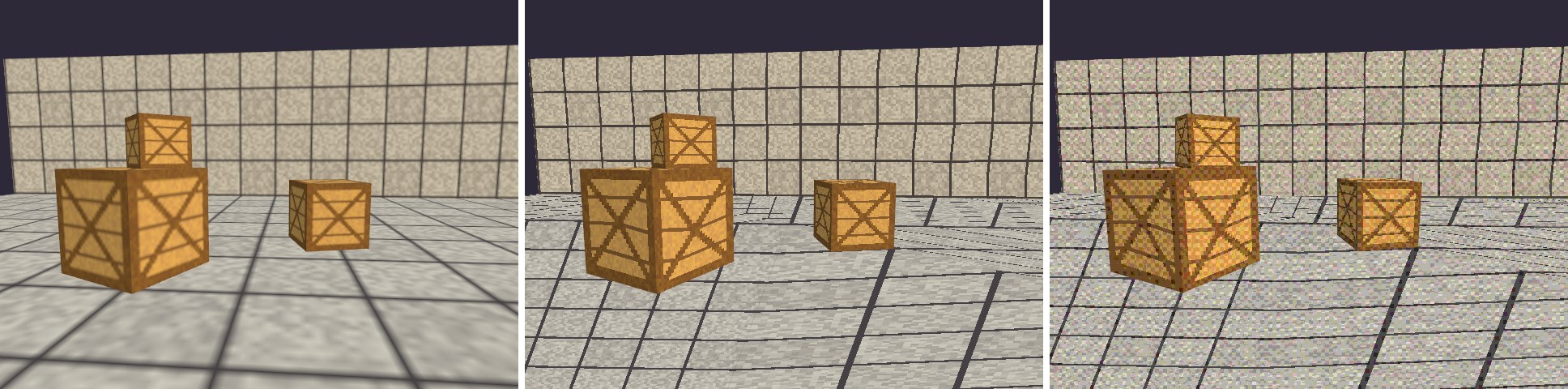
案例 15.5复古像素风:PS1 的顶点抖动与仿射贴图进阶
目标:复刻初代 PlayStation 的画面特征:顶点在屏幕上一格一格地跳、地面贴图随视角扭曲、贴图是硬边的大像素、颜色有明显的抖动网点。
原理:这些“特征”其实都是当年硬件的局限:
| 现象 | 当年的原因 | 我们的模拟方法 |
|---|---|---|
| 顶点抖动(Jitter) | 光栅化器只接受整数像素坐标,没有子像素精度;几何运算是定点数 | 把裁剪空间位置吸附到虚拟分辨率的像素格上 |
| 贴图扭曲 | 没有透视校正插值,UV 在屏幕空间线性插值(仿射映射) | 传入 uv·w 和 w,让透视校正“自我抵消” |
| 大像素贴图 | 贴图很小(常见 64×64、128×128),且多为最近点采样 | 32×32 程序贴图 + 点采样 |
| 抖动色块 | 帧缓冲常用 15 位色(每通道 5 位),用有序抖动掩盖色带 | Bayer 4×4 抖动 + 降低每通道位数 |
| 多边形明暗块 | 只在顶点上计算光照(Gouraud) | 在顶点着色器里算 Lambert |
仿射映射是怎么来的
光栅化插值顶点属性时,GPU 默认做透视校正插值(第 1 章讲过):屏幕空间里线性的不是属性 A 本身,而是 A/w 和 1/w。设三角形三个顶点的屏幕空间重心坐标为 λi,片元得到的属性是:
如果我们传入的不是 A,而是 A·w,那么插值结果是 ΣλiAi / Σ(λi/wi);同时再传一个 w,它的插值结果是 Σλi / Σ(λi/wi) = 1 / Σ(λi/wi)(因为 Σλi = 1)。两者相除,分母抵消,剩下 ΣλiAi——正是屏幕空间的线性插值,也就是 PS1 的仿射映射。HLSL 里也有 noperspective 插值修饰符可以直接关闭透视校正;上面的除法技巧则不依赖任何插值修饰符,只用到“透视校正插值”这一所有平台共同的行为,原理也更直观。
完整代码:
// 复古像素风(PS1 风格):顶点吸附到低分辨率网格、仿射纹理映射(不做透视校正)、
// 逐顶点光照、点采样,以及“抖动 + 色深量化”。每一项都能单独开关,方便对比。
Shader "Cookbook/Ch15/RetroPS1"
{
    Properties
    {
        [MainTexture] _BaseMap ("Base Map", 2D) = "white" {}
        [MainColor] _BaseColor ("Base Color", Color) = (1, 1, 1, 1)
        _VirtualRes ("Virtual Resolution (xy)", Vector) = (320, 240, 0, 0)
        [Toggle] _VertexSnap ("Vertex Snap", Float) = 1
        [Toggle] _Affine ("Affine Texture Mapping", Float) = 1
        [Toggle] _PointSample ("Point Sampling", Float) = 1
        [Toggle] _Quantize ("Dither + Quantize", Float) = 1
        _ColorBits ("Color Bits per Channel", Range(2, 8)) = 5
    }
    SubShader
    {
        Tags { "RenderType"="Opaque" "RenderPipeline"="UniversalPipeline" "Queue"="Geometry" }

        HLSLINCLUDE
        #include "Packages/com.unity.render-pipelines.universal/ShaderLibrary/Core.hlsl"
        CBUFFER_START(UnityPerMaterial)
            float4 _BaseMap_ST;
            half4  _BaseColor;
            float4 _VirtualRes;
            float  _VertexSnap, _Affine, _PointSample, _Quantize, _ColorBits;
        CBUFFER_END

        // 把顶点吸附到 _VirtualRes 分辨率的像素格上。
        // 先除 w 得到 NDC,取整后再乘回 w,保持深度与透视不变,只让 xy 跳格。
        float4 SnapToPixelGrid(float4 positionCS, float2 res)
        {
            float2 halfRes = res * 0.5;
            float2 ndc = positionCS.xy / positionCS.w;
            ndc = floor(ndc * halfRes + 0.5) / halfRes;
            positionCS.xy = ndc * positionCS.w;
            return positionCS;
        }
        ENDHLSL

        Pass
        {
            Name "ForwardLit"
            Tags { "LightMode"="UniversalForwardOnly" }
            HLSLPROGRAM
            #pragma vertex vert
            #pragma fragment frag
            #include "Packages/com.unity.render-pipelines.universal/ShaderLibrary/Lighting.hlsl"

            TEXTURE2D(_BaseMap); SAMPLER(sampler_BaseMap);

            struct Attributes { float4 positionOS : POSITION; float3 normalOS : NORMAL; float2 uv : TEXCOORD0; };
            struct Varyings
            {
                float4 positionCS : SV_POSITION;
                float2 uv         : TEXCOORD0;   // 正常的(透视校正的)UV
                float3 uvAffine   : TEXCOORD1;   // (uv * w, w),用来抵消透视校正
                half3  lighting   : TEXCOORD2;   // 逐顶点光照(Gouraud)
            };


            Varyings vert(Attributes v)
            {
                Varyings o;
                float3 positionWS = TransformObjectToWorld(v.positionOS.xyz);
                float4 positionCS = TransformWorldToHClip(positionWS);
                if (_VertexSnap > 0.5) positionCS = SnapToPixelGrid(positionCS, _VirtualRes.xy);
                o.positionCS = positionCS;

                o.uv = TRANSFORM_TEX(v.uv, _BaseMap);
                // 透视校正插值对属性 A 实际做的是:插值 A/w 和 1/w 再相除。
                // 传入 A·w 和 w,两者都被“校正”后相除,w 抵消,剩下的就是屏幕空间线性插值的 A。
                o.uvAffine = float3(o.uv * positionCS.w, positionCS.w);

                // 逐顶点 Lambert + 环境光:当年的硬件只在顶点上算光
                float3 N = TransformObjectToWorldNormal(v.normalOS);
                Light L = GetMainLight();
                o.lighting = saturate(dot(N, L.direction)) * L.color + SampleSH(N);
                return o;
            }

            static const float kBayer4[16] = {
                 0,  8,  2, 10,
                12,  4, 14,  6,
                 3, 11,  1,  9,
                15,  7, 13,  5 };

            // 先加一个有序抖动偏移,再截断到 bits 位:渐变变成规则的网点而不是色带
            half3 DitherQuantize(half3 c, float2 pixel, float bits)
            {
                uint2 p = (uint2)pixel % 4;
                float threshold = (kBayer4[p.y * 4 + p.x] + 0.5) / 16.0 - 0.5;   // -0.5..0.5
                float levels = exp2(bits) - 1.0;
                return floor(saturate(c) * levels + 0.5 + threshold) / levels;
            }

            half4 frag(Varyings i) : SV_Target
            {
                float2 uv = lerp(i.uv, i.uvAffine.xy / i.uvAffine.z, _Affine);
                half4 texLinear = SAMPLE_TEXTURE2D(_BaseMap, sampler_BaseMap, uv);
                half4 texPoint  = SAMPLE_TEXTURE2D(_BaseMap, sampler_PointRepeat, uv);
                half4 tex = lerp(texLinear, texPoint, _PointSample);

                half3 col = tex.rgb * _BaseColor.rgb * i.lighting;
                if (_Quantize > 0.5)
                {
                    // 抖动图案也按“虚拟分辨率”放大,模拟低分辨率帧缓冲上的抖动
                    float2 virtualPixel = floor(i.positionCS.xy * _VirtualRes.xy / _ScreenParams.xy);
                    // 在 sRGB(显示)空间量化,色阶才均匀
                    col = SRGBToLinear(DitherQuantize(LinearToSRGB(col), virtualPixel, _ColorBits));
                }
                return half4(col, 1);
            }
            ENDHLSL
        }

        Pass
        {
            Name "DepthOnly"
            Tags { "LightMode"="DepthOnly" }
            ZWrite On ColorMask R
            HLSLPROGRAM
            #pragma vertex vert
            #pragma fragment frag
            // 深度也要按同样方式吸附,否则深度图与颜色错位
            float4 vert(float4 positionOS : POSITION) : SV_POSITION
            {
                float4 positionCS = TransformObjectToHClip(positionOS.xyz);
                if (_VertexSnap > 0.5) positionCS = SnapToPixelGrid(positionCS, _VirtualRes.xy);
                return positionCS;
            }
            half4 frag() : SV_Target { return 0; }
            ENDHLSL
        }
    }
}
// 复古像素风(PS1 风格):顶点吸附到低分辨率网格、仿射纹理映射(不做透视校正)、(GLSL 版,对应 Ch15/RetroPS1.shader)
// 逐顶点光照、点采样,以及“抖动 + 色深量化”。每一项都能单独开关,方便对比。
Shader "Cookbook/Ch15/RetroPS1"
{
    SubShader
    {
        Tags { "RenderType"="Opaque" "RenderPipeline"="UniversalPipeline" "Queue"="Geometry" }

        GLSLINCLUDE
        uniform vec4  _BaseMap_ST;
        uniform vec4  _BaseColor;
        uniform vec4  _VirtualRes;
        uniform float _VertexSnap, _Affine, _PointSample, _Quantize, _ColorBits;

        // 把顶点吸附到 _VirtualRes 分辨率的像素格上。
        // 先除 w 得到 NDC,取整后再乘回 w,保持深度与透视不变,只让 xy 跳格。
        vec4 SnapToPixelGrid(vec4 positionCS, vec2 res)
        {
            vec2 halfRes = res * 0.5;
            vec2 ndc = positionCS.xy / positionCS.w;
            ndc = floor(ndc * halfRes + 0.5) / halfRes;
            positionCS.xy = ndc * positionCS.w;
            return positionCS;
        }
        ENDGLSL

        Pass
        {
            Name "ForwardLit"
            Tags { "LightMode"="UniversalForwardOnly" }
            GLSLPROGRAM
            uniform sampler2D _BaseMap;

            VARYING vec2 uv;          // 正常的(透视校正的)UV
            VARYING vec3 uvAffine;    // (uv * w, w),用来抵消透视校正
            VARYING vec3 lighting;    // 逐顶点光照(Gouraud)

            #ifdef VERTEX
            void main()
            {
                vec3 positionWS = TransformObjectToWorld(positionOS.xyz);
                vec4 positionCS = TransformWorldToHClip(positionWS);
                if (_VertexSnap > 0.5) positionCS = SnapToPixelGrid(positionCS, _VirtualRes.xy);
                gl_Position = positionCS;

                uv = TransformTex(texcoord0.xy, _BaseMap_ST);
                // 透视校正插值对属性 A 实际做的是:插值 A/w 和 1/w 再相除。
                // 传入 A·w 和 w,两者都被“校正”后相除,w 抵消,剩下的就是屏幕空间线性插值的 A。
                uvAffine = vec3(uv * positionCS.w, positionCS.w);

                // 逐顶点 Lambert + 环境光:当年的硬件只在顶点上算光
                vec3 N = TransformObjectToWorldNormal(normalOS);
                Light L = GetMainLight();
                lighting = saturate(dot(N, L.direction)) * L.color + SampleSH(N);
            }
            #endif

            #ifdef FRAGMENT
            const float kBayer4[16] = float[16](
                 0.0,  8.0,  2.0, 10.0,
                12.0,  4.0, 14.0,  6.0,
                 3.0, 11.0,  1.0,  9.0,
                15.0,  7.0, 13.0,  5.0);

            // 先加一个有序抖动偏移,再截断到 bits 位:渐变变成规则的网点而不是色带
            vec3 DitherQuantize(vec3 c, vec2 pixel, float bits)
            {
                ivec2 p = ivec2(mod(pixel, 4.0));
                float threshold = (kBayer4[p.y * 4 + p.x] + 0.5) / 16.0 - 0.5;   // -0.5..0.5
                float levels = exp2(bits) - 1.0;
                return floor(saturate(c) * levels + 0.5 + threshold) / levels;
            }

            // HLSL 版用内联采样器 sampler_PointRepeat;GLSL 不能按调用换采样器,
            // 这里手动做“最近邻 + 最近 mip + 重复寻址”:先由导数估算 mip 级别,再 texelFetch
            vec4 SamplePointRepeat(sampler2D tex, vec2 st)
            {
                vec2 size0 = vec2(textureSize(tex, 0));
                vec2 dx = dFdx(st * size0), dy = dFdy(st * size0);
                float lod = 0.5 * log2(max(max(dot(dx, dx), dot(dy, dy)), 1e-8));
                int maxLod = int(log2(max(size0.x, size0.y)));
                int level = clamp(int(floor(lod + 0.5)), 0, maxLod);
                ivec2 size = textureSize(tex, level);
                ivec2 p = ivec2(fract(st) * vec2(size));
                return texelFetch(tex, clamp(p, ivec2(0), size - 1), level);
            }

            vec4 frag()
            {
                vec2 st = mix(uv, uvAffine.xy / uvAffine.z, _Affine);
                vec4 texLinear = texture(_BaseMap, st);
                vec4 texPoint  = SamplePointRepeat(_BaseMap, st);
                vec4 tex = mix(texLinear, texPoint, _PointSample);

                vec3 col = tex.rgb * _BaseColor.rgb * lighting;
                if (_Quantize > 0.5)
                {
                    // 抖动图案也按“虚拟分辨率”放大,模拟低分辨率帧缓冲上的抖动
                    vec2 virtualPixel = floor(gl_FragCoord.xy * _VirtualRes.xy / _ScreenParams.xy);
                    // 在 sRGB(显示)空间量化,色阶才均匀
                    col = SRGBToLinear(DitherQuantize(LinearToSRGB(col), virtualPixel, _ColorBits));
                }
                return vec4(col, 1.0);
            }
            void main() { fragColor = frag(); }
            #endif
            ENDGLSL
        }

        Pass
        {
            Name "DepthOnly"
            Tags { "LightMode"="DepthOnly" }
            ZWrite On ColorMask R
            GLSLPROGRAM
            // 深度也要按同样方式吸附,否则深度图与颜色错位
            #ifdef VERTEX
            void main()
            {
                vec4 positionCS = TransformObjectToHClip(positionOS.xyz);
                if (_VertexSnap > 0.5) positionCS = SnapToPixelGrid(positionCS, _VirtualRes.xy);
                gl_Position = positionCS;
            }
            #endif
            #ifdef FRAGMENT
            void main() { fragColor = vec4(0.0); }
            #endif
            ENDGLSL
        }
    }
}
关键代码讲解:顶点吸附先除 w 到 NDC,按虚拟分辨率取整,再乘回 w。只动 xy,不动 z 和 w,所以深度和透视都不受影响;吸附函数写在 HLSLINCLUDE 里,DepthOnly Pass 也用同样的吸附,保证深度图和颜色对齐:
// 把顶点吸附到 _VirtualRes 分辨率的像素格上。
// 先除 w 得到 NDC,取整后再乘回 w,保持深度与透视不变,只让 xy 跳格。
float4 SnapToPixelGrid(float4 positionCS, float2 res)
{
    float2 halfRes = res * 0.5;
    float2 ndc = positionCS.xy / positionCS.w;
    ndc = floor(ndc * halfRes + 0.5) / halfRes;
    positionCS.xy = ndc * positionCS.w;
    return positionCS;
}
// 透视校正插值对属性 A 实际做的是:插值 A/w 和 1/w 再相除。
// 传入 A·w 和 w,两者都被“校正”后相除,w 抵消,剩下的就是屏幕空间线性插值的 A。
o.uvAffine = float3(o.uv * positionCS.w, positionCS.w);
量化部分用经典的 4×4 Bayer 矩阵。矩阵里 0~15 的排列保证了任意 2×2、4×4 子块内阈值都尽量分散,所以抖动出的网点均匀、没有明显的条纹:
static const float kBayer4[16] = {
     0,  8,  2, 10,
    12,  4, 14,  6,
     3, 11,  1,  9,
    15,  7, 13,  5 };

// 先加一个有序抖动偏移,再截断到 bits 位:渐变变成规则的网点而不是色带
half3 DitherQuantize(half3 c, float2 pixel, float bits)
{
    uint2 p = (uint2)pixel % 4;
    float threshold = (kBayer4[p.y * 4 + p.x] + 0.5) / 16.0 - 0.5;   // -0.5..0.5
    float levels = exp2(bits) - 1.0;
    return floor(saturate(c) * levels + 0.5 + threshold) / levels;
}
const float kBayer4[16] = float[16](
     0.0,  8.0,  2.0, 10.0,
    12.0,  4.0, 14.0,  6.0,
     3.0, 11.0,  1.0,  9.0,
    15.0,  7.0, 13.0,  5.0);

// 先加一个有序抖动偏移,再截断到 bits 位:渐变变成规则的网点而不是色带
vec3 DitherQuantize(vec3 c, vec2 pixel, float bits)
{
    ivec2 p = ivec2(mod(pixel, 4.0));
    float threshold = (kBayer4[p.y * 4 + p.x] + 0.5) / 16.0 - 0.5;   // -0.5..0.5
    float levels = exp2(bits) - 1.0;
    return floor(saturate(c) * levels + 0.5 + threshold) / levels;
}
两个细节:① 抖动坐标也按虚拟分辨率放大(floor(positionCS.xy * _VirtualRes / _ScreenParams.xy)),所以抖动网点是“大像素”的,和低分辨率帧缓冲的感觉一致;② 量化在 sRGB 空间做(先 LinearToSRGB,量化后再 SRGBToLinear),因为当年的 5 位色是对显示值的量化。如果直接在线性空间量化,暗部会只有寥寥几级、亮部却很细腻,色阶分布完全不对。